Field Service Management Software: How Work Orders Connect Dispatch, Technicians, and Customers

Summary
×A Service Request Is Not Enough
A field service team can look busy and still lose time in places that never appear on a service report. In a common equipment service scenario, technicians may lose 1.5 hours per day waiting for missing job details, confirming parts availability, calling dispatch for route changes, or asking the office for asset history. Across a team of 20 technicians, that can turn into hundreds of lost service hours every month before the company even looks at overtime, repeat visits, or customer delays.
A service manager receives three urgent repair requests before noon. One technician is already on site with another customer, another has the right certification but is across town, and the required spare part is available in only one warehouse. The customer wants an arrival time, the dispatcher needs to assign the right person, and the technician needs the asset history before walking into the job.
Without a connected work order process, this becomes a chain of phone calls, messages, spreadsheets, and repeated confirmations. The request may be recorded, but the dispatch decision still depends on memory and manual coordination. A work order is not just a task ticket. It is the operational record that connects the customer request, service priority, technician assignment, route, asset history, spare parts, field notes, customer approval, and service report.
Work Orders Turn Service Requests into Executable Work
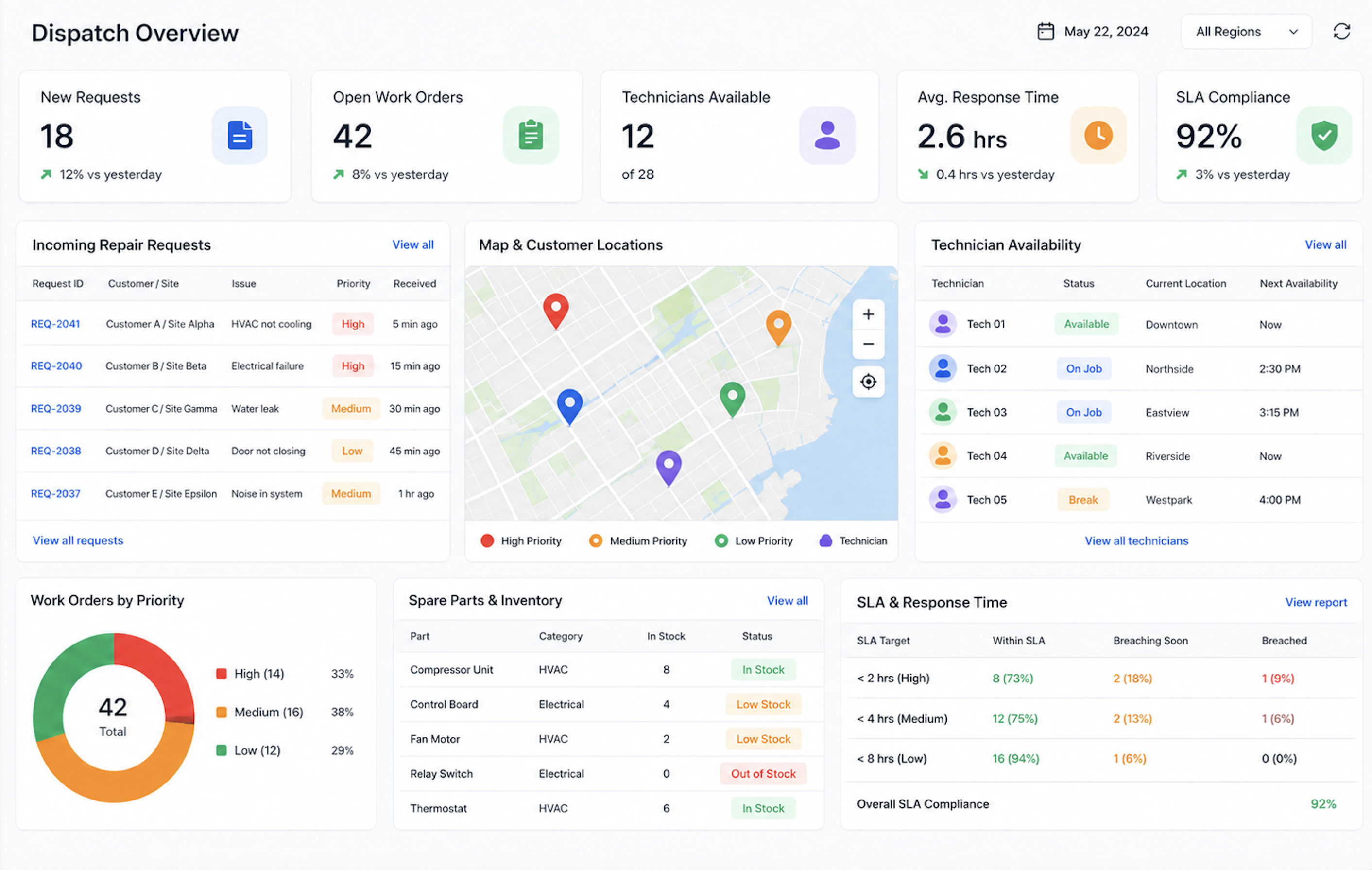
Many field service problems begin when customer requests are not converted into structured work orders. A request may arrive by phone, email, customer portal, website form, account manager, or messaging app. If it stays as a conversation, the dispatcher may not have enough detail to assign the right technician or prepare the right parts.
A useful work order should capture more than the customer name and service issue. It should include the asset or equipment involved, service history, location, required skills, priority level, SLA commitment, safety notes, required parts, and expected completion requirements. This information helps the office team make a better dispatch decision and helps the technician arrive prepared.
A strong work order record should include:
Customer, site, and contact information
Asset or equipment details
Service history and previous issues
Priority level and SLA requirements
Required technician skills or certifications
Spare parts and tools needed
Safety, access, or compliance instructions
Checklist, photos, notes, and completion requirements
Industry Software can support configurable work order templates for different service types, such as emergency repair, installation, preventive maintenance, inspection, warranty service, and scheduled field visits. This matters because not every service call needs the same information. A repair work order may focus on diagnosis and parts, while an inspection work order may require checklists, photos, compliance notes, and customer sign-off.
Dispatch Should Consider Skill, Location, Workload, and SLA
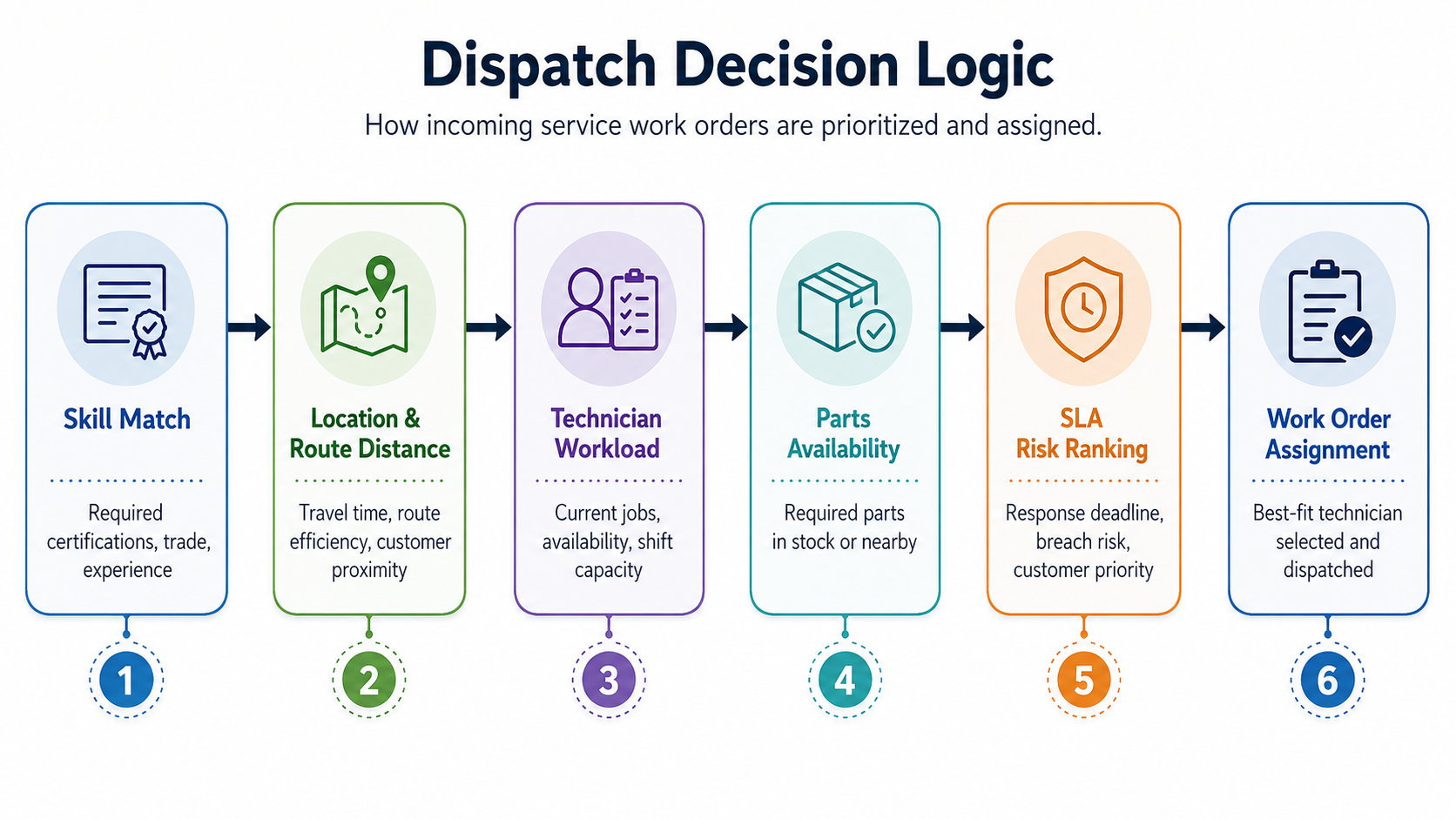
Dispatch is not just assigning the next available technician. In many field service teams, the closest technician may not have the right skill, the most experienced technician may already be overloaded, and the customer with the loudest complaint may not be the highest SLA risk. Good dispatch requires a view of technician skill, location, availability, workload, travel time, required parts, and service priority.
A better dispatch process usually follows a decision logic: first match the required skill, then check technician location and route distance, then review workload, parts availability, and SLA risk. The best assignment is not always the closest technician. It is the technician who can complete the work correctly within the promised service window.
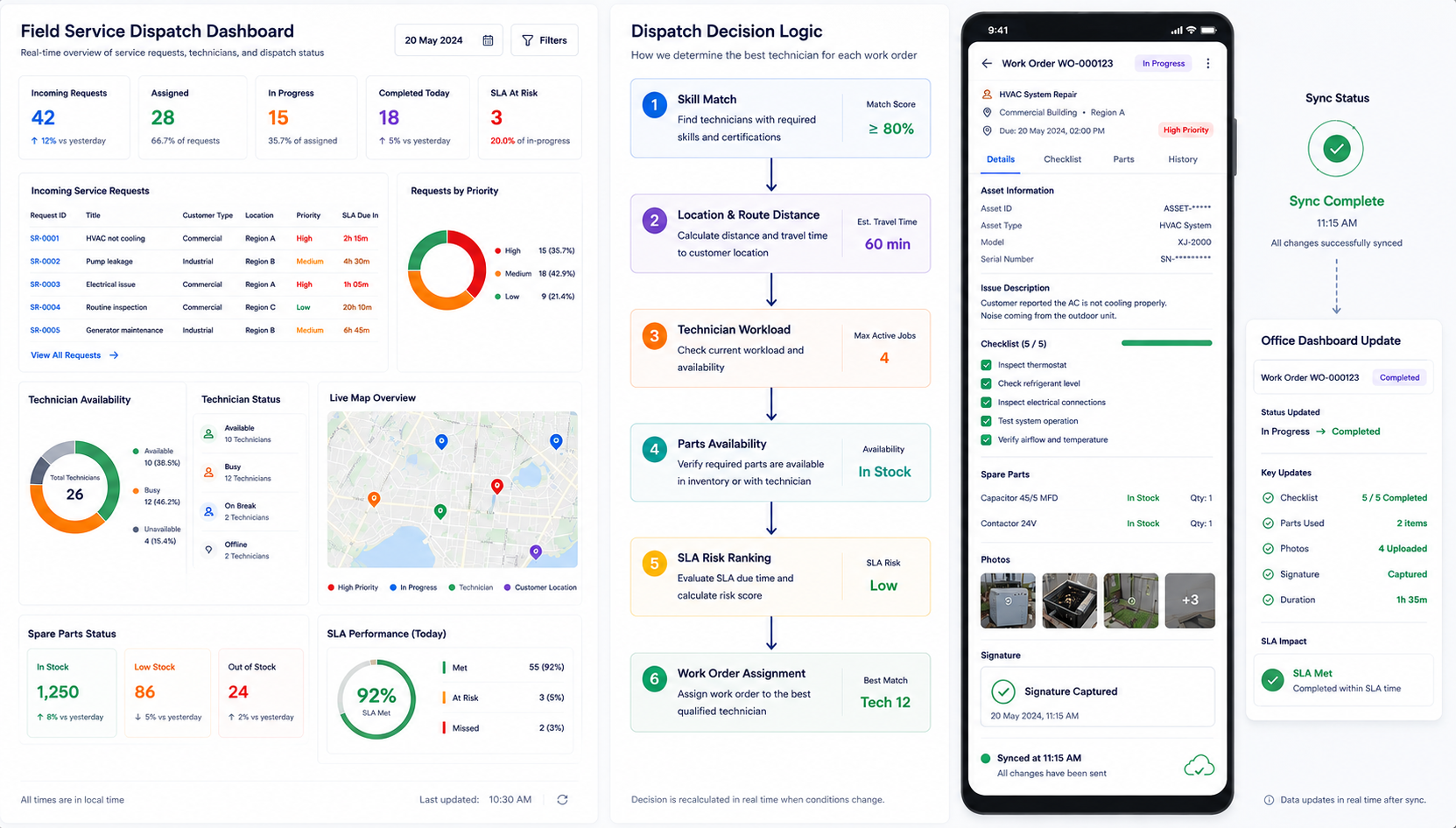
Industry Software can bring dispatch scheduling, technician availability, work order priority, route tracking, parts visibility, and SLA status into one view. Dispatchers can assign work orders based on skills, region, workload, urgency, and available parts instead of relying only on manual judgment.
Route Tracking Improves More than Arrival Time
Route tracking is often treated as a customer communication feature, but its operational value is deeper. Travel time is one of the largest hidden costs in field service. If technicians spend too much time driving, waiting, or moving between poorly grouped jobs, the company may appear fully staffed but still struggle with backlog.
A route-aware work order process helps service managers understand where technician time actually goes. It can show whether delays come from traffic, poor dispatch sequence, remote customer sites, missing parts, or last-minute schedule changes. It also helps customer service teams provide more accurate arrival updates instead of repeatedly calling technicians for status.
In Industry Software, route tracking can be connected to work order status. A dispatcher can see whether a technician is assigned, en route, arrived, working, waiting for parts, completed, or delayed. The value is not simply knowing where technicians are; it is understanding how route movement affects work order completion and customer response.
Mobile Work Orders Keep the Field and Office Aligned
The technician is often the person with the most accurate information, but that information frequently stays on site too long. A technician may know that an asset needs a different part, that the customer requested additional work, or that the job cannot be completed because of access restrictions. If that update stays in a text message or personal note, the office team cannot adjust dispatch, parts, billing, or customer communication quickly enough.
Mobile work orders solve this gap by allowing technicians to update job status directly from the field. They can view the task, asset history, service checklist, customer notes, route instructions, and parts requirements before arrival. During the job, they can upload photos, record labor time, add parts usage, complete checklists, capture customer signatures, and submit completion notes.
For many field teams, offline access is also important. Technicians may work in basements, industrial sites, remote facilities, equipment rooms, or customer locations with weak signal. Industry Software can support mobile work order access where technicians view job details, checklists, asset history, and parts information offline, then cache updates such as photos, notes, labor time, and signatures until the device reconnects. This helps field teams continue working even when the network is unreliable.
Parts Visibility Prevents Avoidable Second Visits
Many field service delays happen because the technician arrives without the right part. The job may be correctly assigned, the technician may arrive on time, and the customer may be ready, but the repair still cannot be completed. When parts planning is disconnected from work orders, first-time fix rate becomes difficult to improve. A simple metric shows why parts visibility matters: First-Time Fix Rate = (Work Orders Completed in One Visit / Total Work Orders) × 100%.
If technicians arrive without the correct part, the work order may stay open even when the technician reaches the customer on time. When work orders are connected to asset history, likely failure types, required parts, and inventory availability, dispatchers can prepare the technician before the visit. That improves the chance of completing the job once, instead of creating a second trip, another customer appointment, and another route slot. Industry Software can connect work orders with spare parts, inventory status, parts consumption, and follow-up actions. This helps teams reduce avoidable repeat visits and gives managers better visibility into which assets, parts, or service types create the most field delays.
Service Reports Should Be Created from Field Data
Many service organizations complete the field work before the service record is truly complete. The technician finishes the job, but the report is written later. Photos stay on a phone, parts usage is recorded separately, customer approval is stored in an email, and billing waits for someone to collect missing information. The service was performed, but the work order was not fully closed. A better process generates service reports from the data already captured in the work order. Labor time, parts used, checklist results, photos, notes, customer signature, and recommendations should all flow into the final service record. This reduces manual rewriting and improves consistency across technicians and service teams.
Industry Software can help generate service reports from completed work orders and keep them connected to the customer, asset, technician, and service history. Managers can review closed work orders, analyze recurring issues, and identify where delays or repeat visits happen. The work order then becomes more than a job record; it becomes a source of service intelligence.
Quick Self-Check: Is Your Work Order Complete Enough to Guide Service Execution?
A work order should help the dispatcher, technician, customer service team, inventory team, and manager make better decisions. If it only records a task title and a customer name, it will not support consistent field execution. By tying critical resource requirements and technical context directly to the job assignment, the platform provides clear cross-functional transparency, guiding front-line teams toward predictable resolution paths before operational field surprises disrupt parts availability and customer trust.
A strong work order process should be able to answer:
Does each work order include customer, asset, location, and service history?
Does the work order show SLA, priority, and required response time?
Are technician skills and availability visible before dispatch?
Are required spare parts linked to the work order?
Can technicians update status, photos, notes, labor time, and completion results from mobile devices?
Can technicians continue working offline and sync updates later?
Can customers receive updates or confirm service completion?
Can managers see open, assigned, in-progress, waiting-for-parts, completed, and closed work orders in one view?
How Industry Software Supports Connected Field Service
Industry Software helps field service teams bring work orders, dispatch scheduling, technician routes, mobile execution, spare parts, customer confirmation, service reports, and management dashboards into one configurable system. The platform can be tailored around different service models, including repair, installation, inspection, preventive maintenance, warranty support, and equipment service.
Cloud-based access is especially important for field service teams. Office staff can create and dispatch work orders, while technicians can update job status, labor time, photos, parts usage, and customer confirmation from the field. Managers can see service progress without waiting for end-of-day reports or manual status calls.
Industry Software also supports modular deployment. Companies can start with work order management, dispatch scheduling, mobile technician workflows, route tracking, service reports, or customer confirmation, then expand as their operations mature. The goal is not to force every service team into one fixed process. It is to create a connected field service workflow that fits the way the business actually works.