Construction Project Management Phases: How to Keep Cost Estimates Accurate

Summary
×A Good Estimate Can Still Become Wrong
A construction project does not always go over budget because the first estimate was careless. Sometimes the first estimate was reasonable for the information available at the time. The real problem starts later, when drawings change, procurement prices come in, schedules move, and site conditions shift, but the estimate remains exactly where it was.
Consider a common project scenario. A mid-size building project begins with a planning estimate based on early drawings and standard unit costs. Four months later, the design team revises the MEP scope, procurement receives updated equipment quotes, and the Gantt chart shifts because one long-lead package will arrive later than expected. Each team understands its own update, but no one updates the estimate as a formal project baseline.
By the next project review, several procurement commitments are no longer aligned with the original allowance. The forecast has moved about 8% above the approved budget, and nearly $200,000 of contingency has already been consumed before leadership has a clear view of why. The budget still looks organized in the report, but it is tied to an older version of the project.
That is why construction estimating should not be treated as a one-time calculation. A better process keeps the estimate aligned with each project phase: planning, design, procurement, construction, change management, and handover. Each phase creates new information, and that information should either confirm the estimate or trigger a new estimate version with a clear ID, status, and approval record.
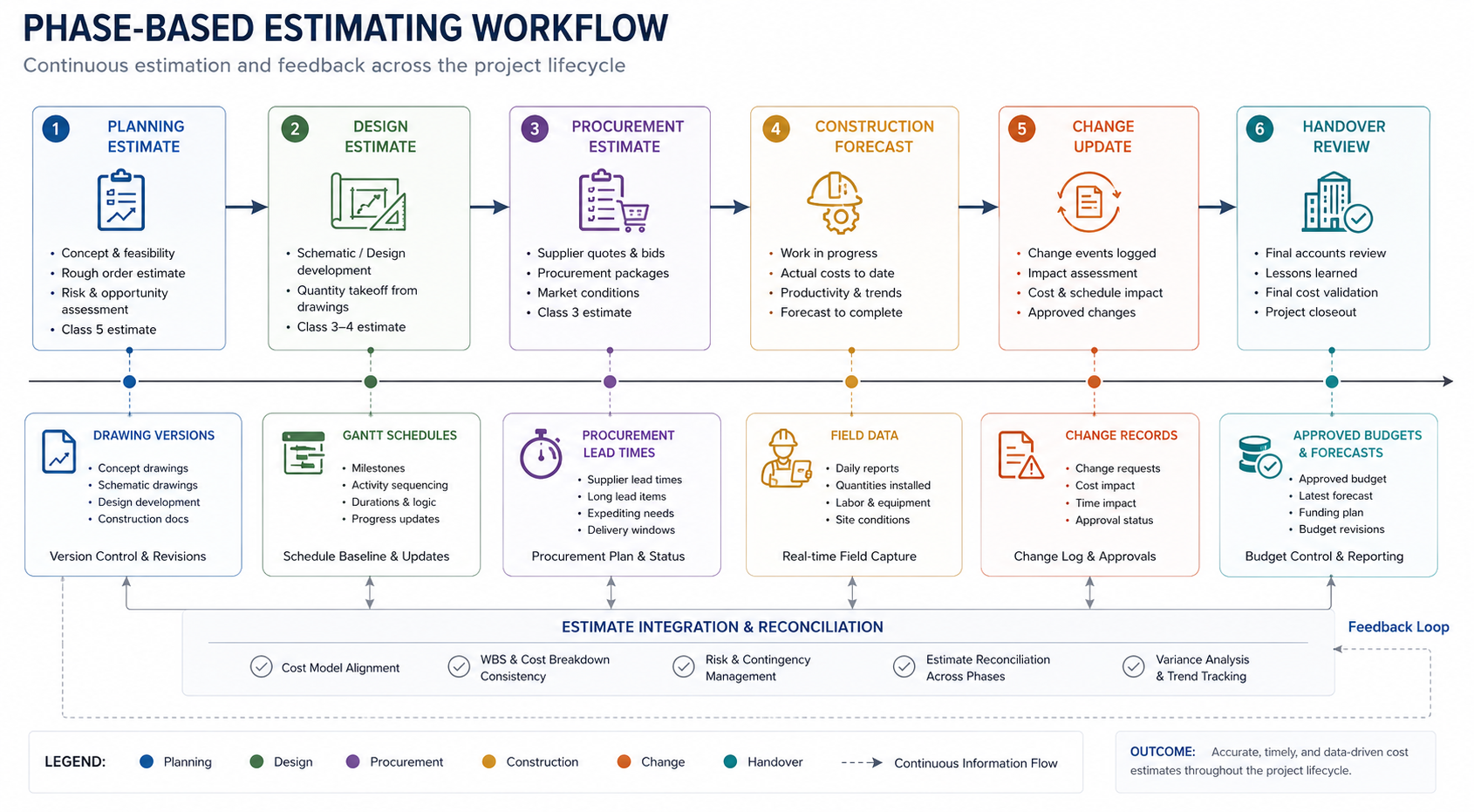
A Short Failure Story: When Versions Stop Matching
On One Commercial Construction Project, the Cost Team Continued Using an Estimate Based on an Earlier Drawing Set While the Design Team Had Already Issued an Updated Version. Procurement Requested Quotes Using the New Specifications, and the Site Team Prepared Work Based on the Revised Sequence. No Single Decision Looked Dramatic on Its Own, but the Estimate, Drawing Version, Procurement Scope, and Gantt Baseline Were No Longer Aligned.
The issue only became clear after several commitments had already been made. Some equipment pricing was higher than the original allowance, a material change affected delivery timing, and field preparation had started before the cost impact was fully reflected. The lesson is simple: an estimate can look complete and still be outdated if it is not tied to the current project phase. This kind of problem is not always caused by poor estimating skill. It often comes from weak phase alignment. Drawings, schedules, procurement records, field data, and change orders all keep moving, while the estimate remains locked to a previous version of the project.
Planning: Make Assumptions Traceable
In the planning phase, estimates are usually based on concept design, historical projects, unit costs, and preliminary scope. The main risk is not that the estimate is imperfect. The main risk is that assumptions are not recorded clearly. Leadership may see one budget number without knowing which scope items are confirmed, which materials are provisional, and which site conditions still need validation.
A stronger planning estimate makes uncertainty visible. Site access constraints, delivery routes, long-lead equipment, subcontractor boundaries, and schedule pressure should all be captured as part of the estimating record. If these details stay only in the estimator’s or project manager’s memory, later budget changes become harder to explain.
Planning-stage estimating should include:
Project-type estimating templates
Cost code configuration
Labor, material, equipment, subcontracting, and overhead assumptions
Scope items with validation status: confirmed, provisional, or pending validation
Contingency rules linked to project risk
Historical similar project references
Estimate version ID, owner, status, and validation notes
In Industry Software, these planning details can be captured through configurable estimating templates and assumption records. Companies can create different templates for commercial buildings, industrial facilities, infrastructure projects, renovation work, or multi-site construction. Each planning estimate can also be saved as a formal estimate version with a version ID, status, owner, and validation notes. The goal is not to make the early estimate look final. The goal is to make it traceable, reviewable, and ready for the next phase.
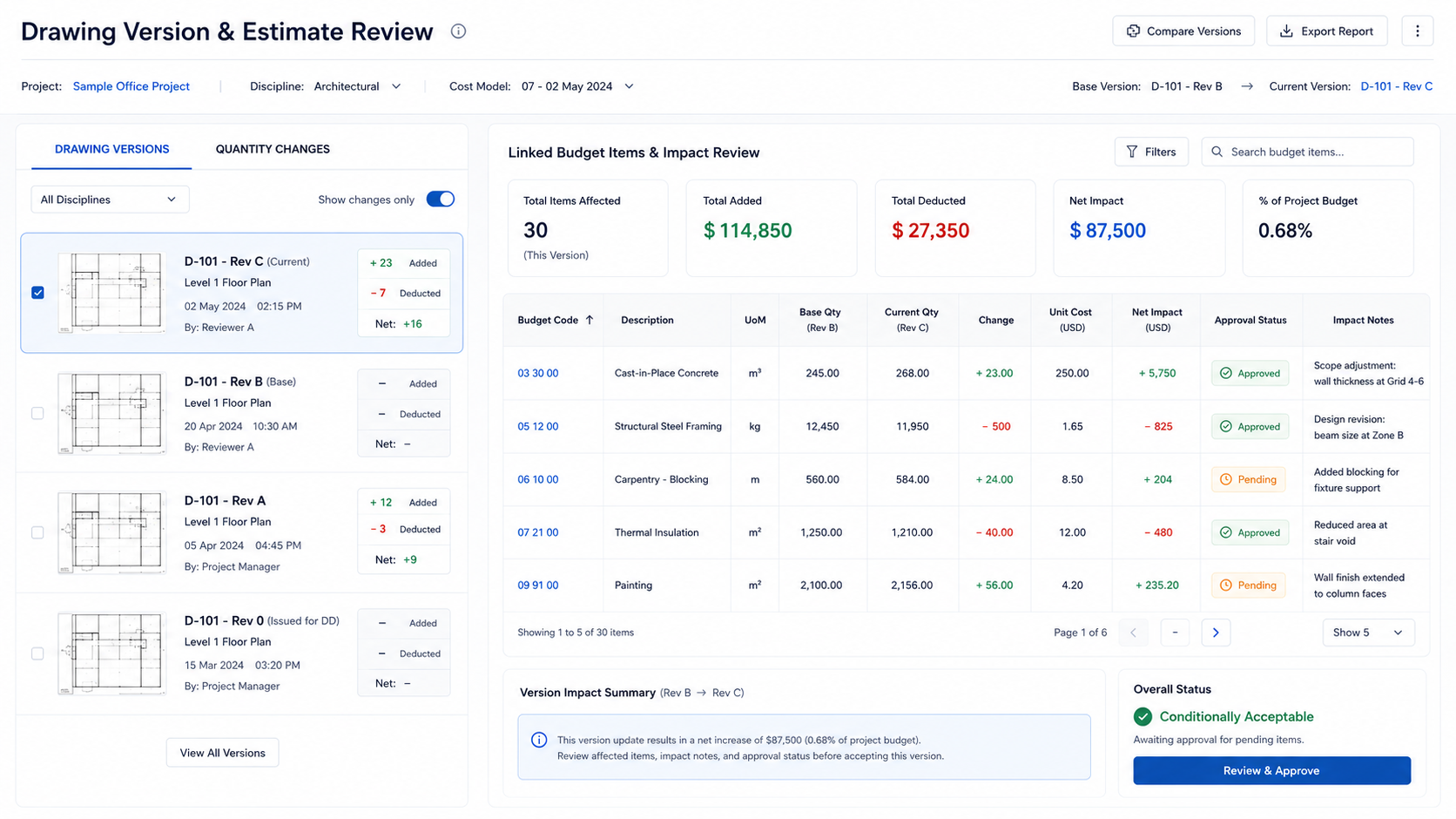
Design: Connect Drawing Versions with Estimate Review
Design is one of the most important phases for estimate accuracy. As drawings develop, quantities change, specifications become clearer, equipment selections are confirmed, and construction methods become more specific. Structural revisions may affect concrete and steel quantities, MEP changes may affect procurement and installation hours, and façade material changes may affect both lead time and installation complexity.
The common problem is that drawings update faster than estimates. The cost team may review an old drawing version, procurement may quote against a new specification, and project managers may discuss another version in meetings. Once version control becomes unclear, estimate accuracy quickly declines.
Design-stage management should include:
Drawing version control
Links between drawing changes and estimate items
Quantity change alerts
Review points for high-value materials and equipment
Linked design and cost approvals
Records of design impact on schedule and procurement
Gantt Chart Integration: Show Cost and Schedule Impact Together
Construction estimates should not only track price. They also need to track time. A material specification change may increase cost and extend procurement lead time. An equipment selection change may affect both budget and installation milestones. A design revision on the critical path may change not only one cost item, but the sequence of work across the project.
This is where Gantt chart integration becomes important. Project managers need to know whether an estimate change affects a specific task, a project phase, or the critical path. When cost and schedule are managed separately, teams may underestimate the impact of design decisions, procurement delays, or change execution.
In a connected workflow, estimates can be linked with Gantt charts, task milestones, and critical path logic. Design changes, procurement lead times, field progress, and change orders can be reflected in the project schedule. Estimate review then becomes more than a cost team activity. It becomes part of project phase control and resource planning.
Approved Budget and Latest Forecast Should Not Be Treated as the Same Number
A construction estimate becomes more useful when teams separate the approved budget from the latest forecast. The approved budget is the cost baseline that leadership, finance, and project controls use to understand what the project was authorized to spend. The latest forecast is the current projection after design updates, procurement commitments, field performance, pending changes, and cost to complete have been considered.
These two numbers should work together, but they should not replace each other. If the latest forecast quietly overwrites the approved budget, the team loses the original baseline and cannot explain where cost movement began. If the team only looks at the approved budget and ignores the latest forecast, project managers may miss early warning signs from procurement, field execution, or change orders.
A stronger project cost view should show both the approved baseline and the current forecast position:
Approved Budget: the authorized project cost baseline
Current Estimate Version: the phase-based estimate currently under review or approved
Committed Cost: procurement and contract values already locked in
Pending Change Exposure: changes that may affect cost but are not yet fully approved
Cost to Complete: the expected cost required to finish remaining work
Latest Forecast: the current projected final cost
Variance Reason: whether movement comes from design, procurement, field execution, schedule, or change activity
Industry Software can keep the approved budget and latest forecast visible in the same project dashboard without blending them into one unclear number. Project managers can see whether the project is still within the approved baseline, whether the latest forecast is moving, and which phase is driving the difference.
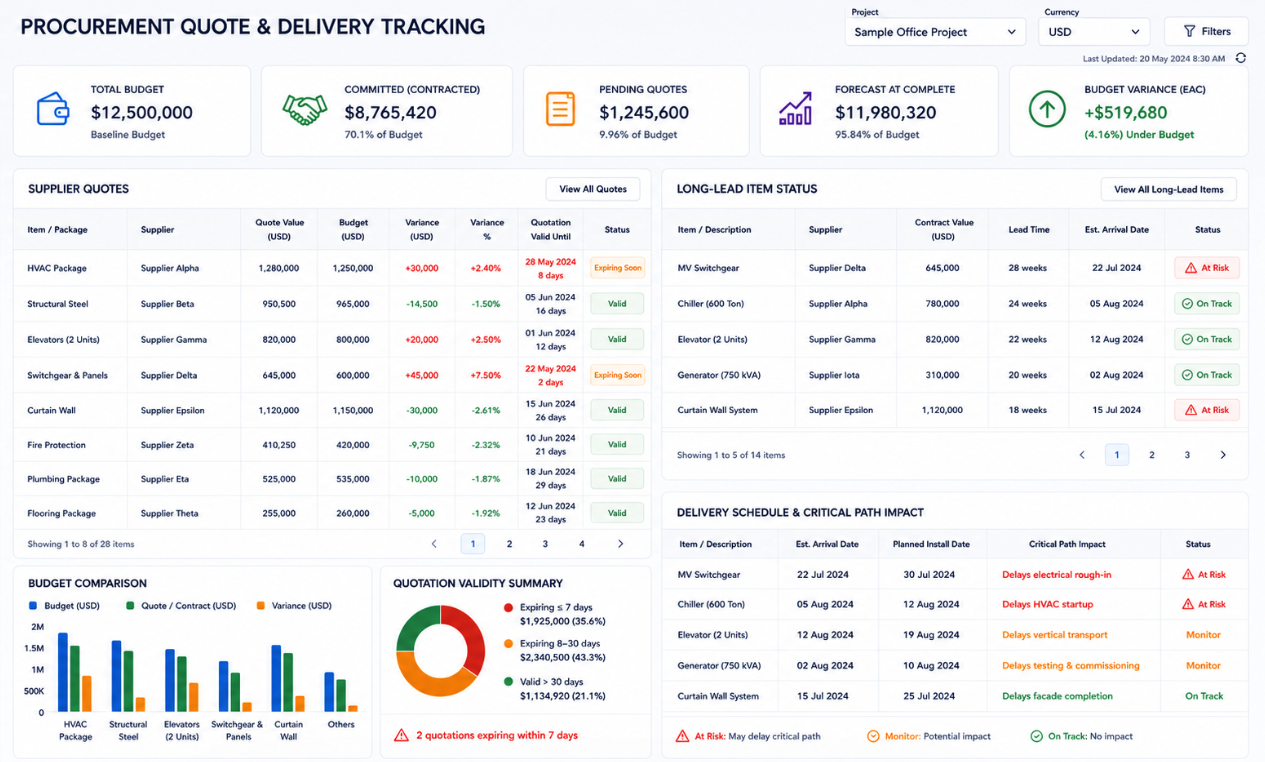
Procurement: Update Estimates with Quotes, Lead Times, and Delivery Risk
Procurement is where early estimates meet real market conditions. Supplier quotes, subcontractor pricing, contract terms, quotation validity, delivery lead times, and transportation planning all affect whether the estimate remains reliable. Many estimate variances occur not because the original estimate was entirely wrong, but because real procurement information was not fed back into the current estimate.
Construction procurement should not only compare prices. One equipment quote may be higher than estimated but include installation, commissioning, and warranty responsibility. Another quote may appear cheaper but exclude freight, lifting, supporting materials, or site coordination. For long-lead items, delivery timing and site arrival planning may affect the project phase plan as much as price does.
Procurement-stage tracking should include:
Supplier quote compared with estimated cost
Included and excluded scope, such as freight, installation, testing, tax, and supporting materials
Quotation validity and approval timing
Long-lead item delivery and site arrival plans
Subcontractor interface responsibility
Contract value entering committed cost
Procurement milestones affecting the Gantt chart critical path
In Industry Software, these functions can be supported through quotation-to-budget comparison, quotation expiry alerts, long-lead item tracking, and procurement approvals. For key materials, equipment, or prefabricated components, the system can record transportation status, site arrival timing, and receiving plans, then connect them with Gantt chart milestones. If delivery timing affects a key construction activity, the project team can adjust procurement actions, work sequence, or site resources earlier.
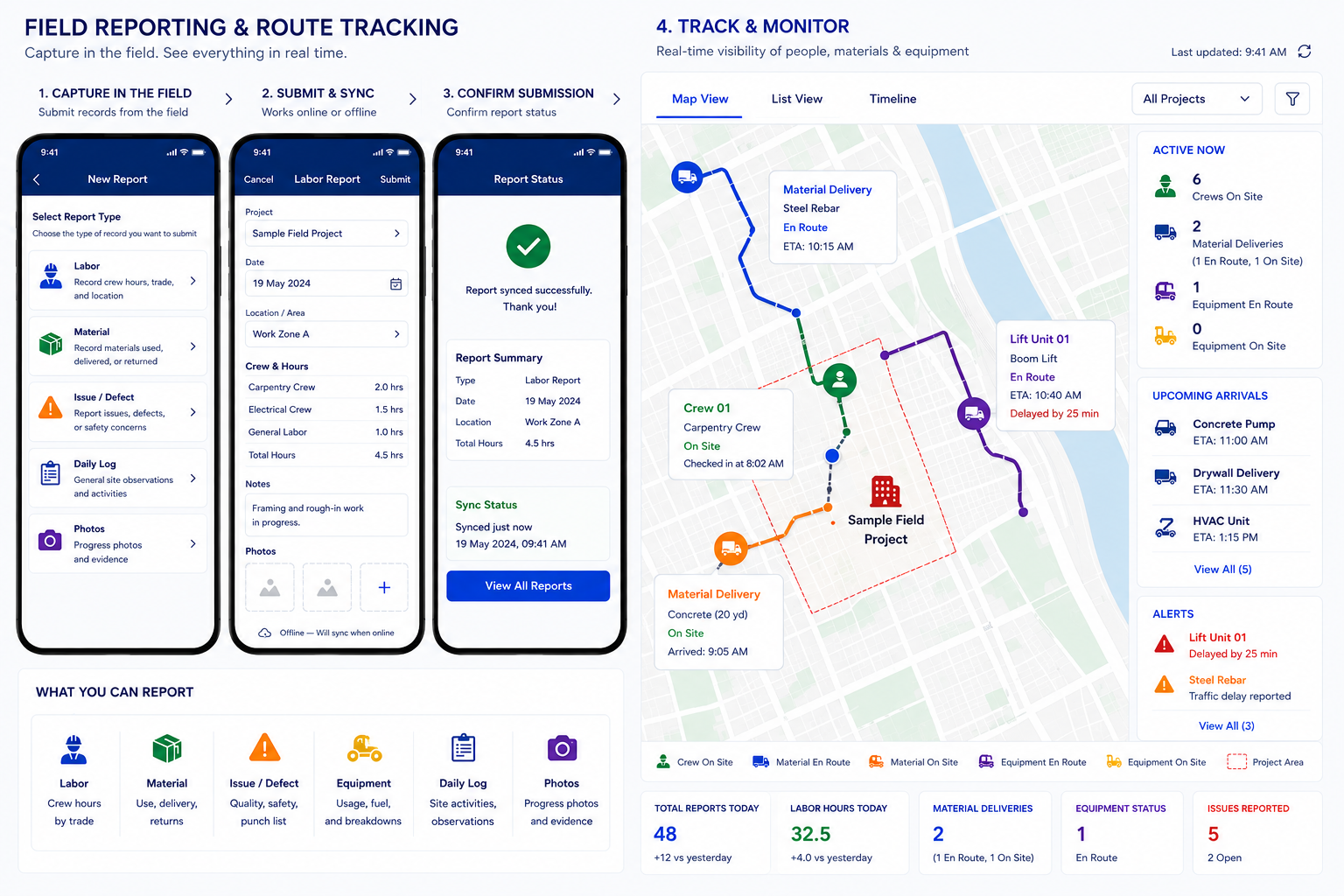
Construction: Let Mobile Field Data Update the Estimate
The construction phase creates new cost signals every day. Labor hours may exceed the estimate, material issue quantities may look abnormal, equipment usage may run longer than planned, subcontractor progress may fall behind, and site waiting, rework, or coordination issues may increase cost to complete. These signals often remain in paper reports, chat records, or crew logs instead of flowing into the estimating workflow.
Project managers should not only ask how much work is complete. They should ask how many resources were used to complete it. Two projects may both report 40 percent completion, but one may have used planned resources while the other already exceeded estimating standards. The second project may not show the full impact in actual cost yet, but cost to complete should already be reviewed.
Field-stage tracking should include:
Actual labor hours compared with estimated labor hours
Issued, installed, and wasted material quantities
Equipment usage time, waiting time, and rental cost
Subcontractor progress and payment milestones
Site issues, rework, and stoppage records
Location check-ins, arrival records, and route tracking
Cost to complete review triggers
Industry Software’s cloud and mobile capabilities bring field data directly back into the project estimate view. Site teams can submit labor, material, equipment, issue photos, and progress updates from the jobsite, while office teams can see the impact on estimate variance and cost to complete. or multi-site projects, distributed crews, or moving equipment and materials, location check-ins and route tracking help project managers understand whether delays come from crew dispatch, material arrival, equipment waiting, or field productivity.
Change Management: Connect Change Orders with Both Cost and Schedule
Construction projects rarely proceed without change. Client requests, design revisions, site condition differences, material substitutions, and construction method changes can all affect the estimate. The real issue is not whether change happens, but whether change enters both cost forecasting and phase planning at the right time.
If change is handled only during contract review or billing, the project manager’s estimate can become too optimistic. Extra work may already be performed on site while approval is still pending. Procurement may already be ordering for the added scope while the budget has not been updated. The Gantt chart may still show the original plan even though the work sequence has changed.
Change management should include:
Potential change under impact review
Submitted change awaiting approval
Approved change ready to update estimate and schedule
Executed change linked to labor, materials, and equipment
Rejected change with possible internal cost
Billed change moved into collection or settlement
Industry Software supports change order workflows that connect budget items, Gantt chart milestones, procurement needs, and field records. When executed but unapproved changes exceed a threshold, or pending changes affect margin buffer, the system can alert project managers and leadership before the issue becomes a closeout dispute.
Handover: Turn Project History into Better Future Estimates
Handover should not only close billing and delivery. It should improve the next estimate. Final actual cost, procurement pricing, long-lead delivery performance, field labor hours, material waste, route delays, subcontractor progress, and change approval duration should all become reference data for future projects.
In many companies, experience stays in project managers’ memory and data stays in separate files. When the next project starts, estimators may struggle to find real cost, real labor consumption, and real variance reasons from similar projects. Over time, the company continues to depend on individual experience instead of reusable organizational knowledge.
Handover review should capture:
Initial estimate compared with final actual cost
Estimate variance by project phase
Supplier pricing and delivery performance
Long-lead item actual delivery time
Subcontractor productivity and payment milestones
Labor standards compared with actual labor hours
Material waste rates
Planned Gantt chart compared with actual progress
Change approval duration and billing results
Similar project cost references
A historical cost library gives future estimates a stronger foundation. In Industry Software, estimate versions, procurement records, field data, change records, and final cost results can be stored in a structured way after closeout. When the next project starts, teams can use real historical data to make planning estimates, design estimates, and procurement estimates more reliable.
Quick Self-Check: Is Your Estimate Keeping Up with the Project?
Before the next project review, project managers can ask a few practical questions. If several answers are unclear, the project may not have an estimating problem only. It may have a phase alignment problem. By evaluating operational readiness before advancing the timeline, the platform highlights gaps between planning assumptions and actual field execution, guiding delivery teams toward structured baseline reviews before subtle task delays mature into major budget overruns.
A phase-based estimating process should be able to answer:
Does the current estimate have a version ID, owner, and approval status?
Does the team know which estimate version is tied to the current project phase?
Have major drawing revisions triggered estimate review?
Is the Gantt baseline connected to the current estimate assumptions?
Are procurement quotes, contract values, and committed cost reflected in the estimate?
Are long-lead items and delivery risks visible in the schedule and cost view?
Are field labor, material, equipment, and issue records updating cost to complete?
Are pending change orders visible before they become closeout disputes?
Can leadership see both approved budget and latest forecast?
Are actual cost results captured after handover for future estimating?
If the answer to several of these questions is “no,” the estimate may still exist, but it may no longer describe the current project. That is where phase-based estimating becomes critical. The estimate needs to move with drawings, procurement, schedule, field execution, and change activity.
How Industry Software Keeps Estimates Aligned with Project Phases
Industry Software is not only a budgeting tool. It places estimates inside a complete project phase workflow by connecting estimating templates, estimate version IDs, drawing versions, Gantt charts, procurement quotes, route tracking, mobile field data, change order workflows, cost alerts, approved budgets, latest forecasts, and historical cost libraries. Each phase creates new information that can update the estimate.
For construction companies, this connection is practical. Project managers can review phase schedules in Gantt charts, quotes and lead times in procurement, labor and material updates in field reporting, pending change exposure in change management, and current forecast cost in project dashboards. Teams no longer need to reconcile spreadsheets, emails, drawing files, and site reports manually. They work from the same operational data.
Industry Software also supports customization and modular deployment. Companies can start with estimating templates, Gantt planning, quotation comparison, mobile field reporting, change approvals, forecast dashboards, or project dashboards, then expand toward a complete construction project management system. The system can be configured around project types, cost codes, approval rules, procurement workflows, and field management practices, so it fits real operations instead of forcing teams into a fixed template.
Construction estimating should not happen only once before work begins. A useful estimate should update through planning, design, procurement, construction, change management, and handover. Through industry-specific customization, cloud collaboration, modular deployment, and cross-phase data integration, Industry Software helps construction companies turn estimating from a one-time calculation into a lifecycle project management capability.