Construction Cost Control: What Project Managers Should Track Before Costs Overrun

Summary
×Cost Risk Appears Before Invoices
Many construction projects do not start going over budget when the invoice arrives. More often, purchase contracts have already been signed, subcontractor pricing has already been locked, extra field work has already started, and client changes are still waiting for approval, while actual cost still looks normal in the project report. This is where project managers can easily misread the situation, because the project appears to be within budget while cost risk is already forming.
Consider a common project scenario. A project team signs a major equipment purchase order, approves field work for a client-requested change, and keeps crews on site for additional coordination time. The financial report still shows the project within budget because the invoice has not arrived and the change order has not been billed. Two months later, the team discovers that the final forecast has moved 20% above the original cost plan. The overrun did not begin in the accounting report; it began when procurement, change activity, and field execution moved ahead of the forecast.
This is the real issue behind searches such as construction cost control, construction budget tracking, cost overrun prevention, and change order tracking. Construction companies are not only trying to understand why projects overrun. They want to know how to identify risk before it appears in financial reports.
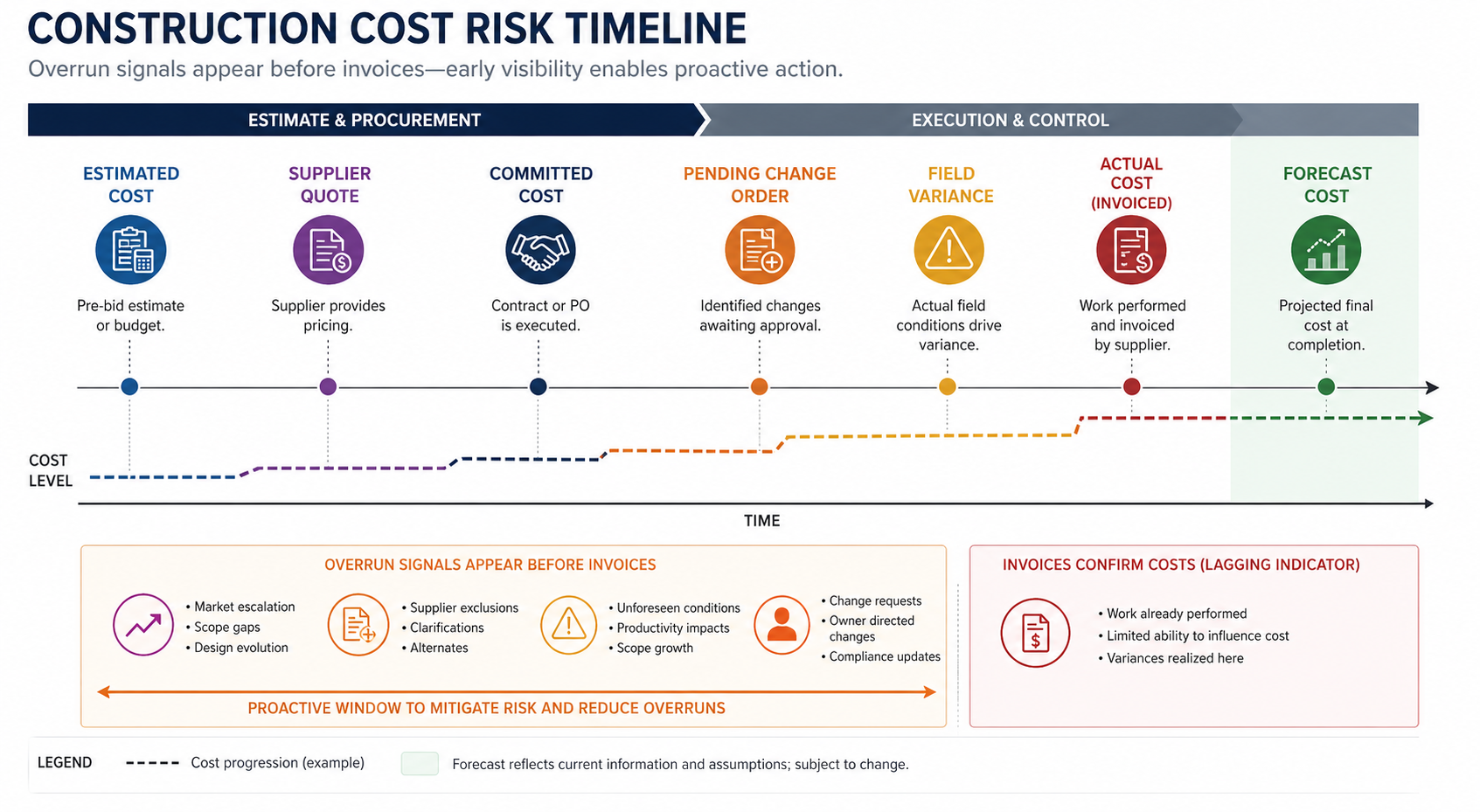
Separate Cost Numbers by Status
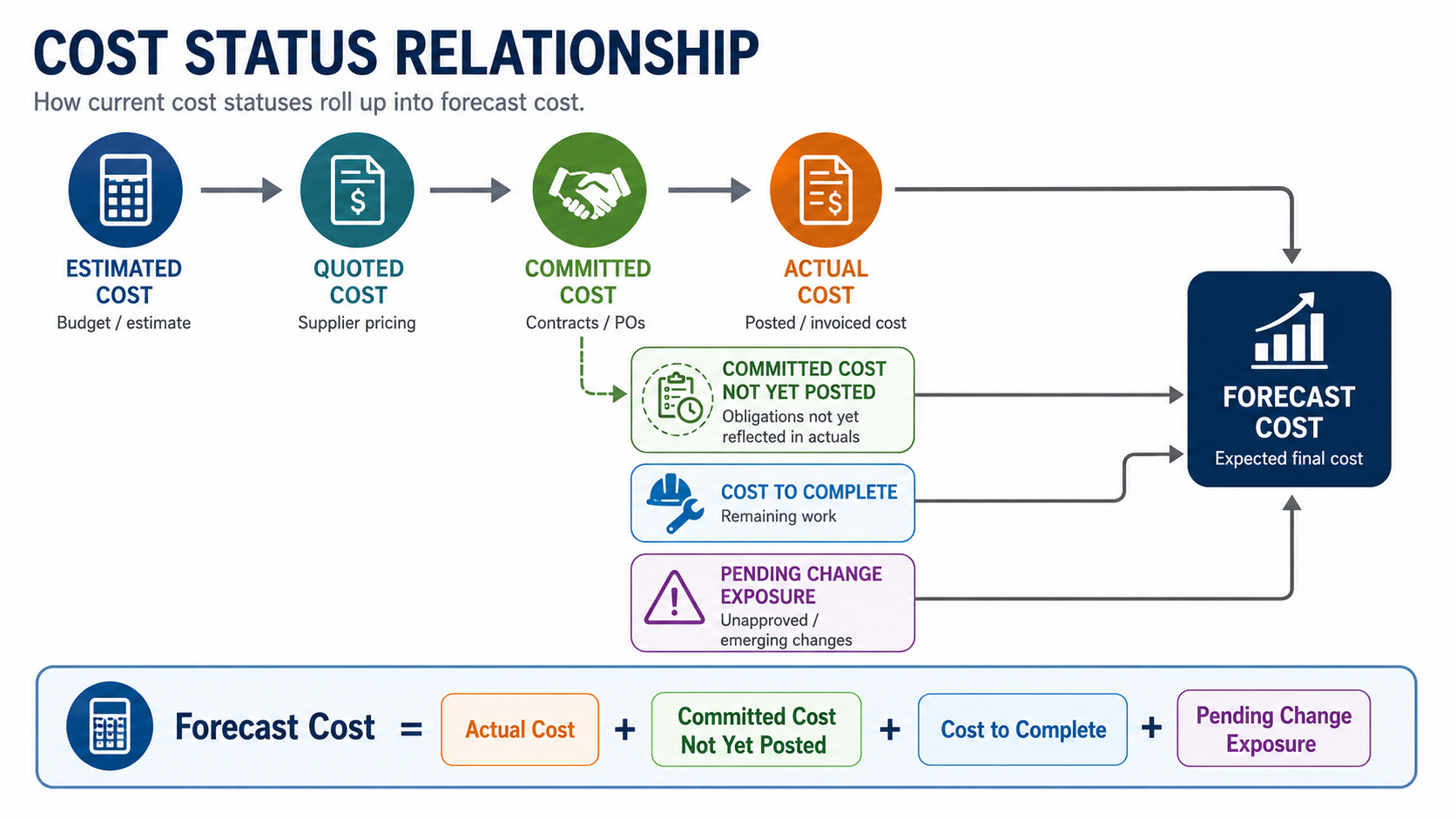
Project managers cannot rely on one total budget number. Construction cost data carries different meanings at different stages, and when estimated cost, quoted cost, committed cost, actual cost, and forecast cost are discussed together without clear separation, teams can misread project status. Remaining budget does not automatically mean the project is safe, and no invoice does not mean no cost responsibility has been created.
A more professional approach is to manage cost numbers by status. Project managers need to see the full path from estimate to quotation, commitment, execution, and final forecast. Committed cost is especially important because it shows procurement, contract, and subcontract responsibility earlier than actual cost.
Project managers should continuously track:
Estimated Cost: the original estimated cost used as the project baseline
Quoted Cost: supplier or subcontractor quotation values
Committed Cost: cost locked through purchase orders, contracts, or subcontract agreements
Actual Cost: cost already incurred, posted, or paid
Cost to Complete: expected cost required to finish the remaining work
Forecast Cost: final projected cost based on actual cost, commitments, remaining work, and changes
A useful way to explain the relationship is: Forecast Cost = Actual Cost + Committed Cost Not Yet Posted + Cost to Complete + Pending Change Exposure. This is not a perfect accounting formula for every company, but it gives project managers a practical operating view. Actual cost may not have changed yet, but committed cost may already exceed a budget item. Remaining budget may look sufficient, but if cost to complete is higher than that remaining budget, the project manager needs to act before the risk reaches the financial report.
Remaining Budget Is Not Safety
Many project meetings ask one familiar question: how much budget is left. That question is useful, but it is not enough. In construction projects, the more important question is whether the remaining budget can cover unpurchased scope, pending changes, and the remaining field work. A project may still show remaining material budget, but a critical equipment package has not been purchased and the latest supplier quote is already above the estimate. Another project may show labor cost within budget, but field progress is behind plan, which means more crews, overtime, or extended equipment rental may be needed. Some projects appear safe only because client changes have not yet been approved, even though extra work has already started on site.
To judge whether a project is truly safe, project managers should ask:
Is the remaining budget enough to cover unpurchased scope?
Do unpurchased items carry price increase or lead time risk?
Does current progress match the cost already consumed?
Does completed quantity justify current resource usage?
Is cost to complete higher than the remaining budget?
Will pending change orders consume margin buffer?
Has the site already performed unapproved extra work?
Real cost risk is often hidden in remaining work, not completed work. If project managers only look at budget balance, they can miss the cost trend. Better control requires comparing remaining budget with future cost responsibility. This proactive comparison reveals whether the remaining funds are truly sufficient to cover the upcoming obligations. Only by identifying this variance early can managers accurately anticipate final cost outcomes and keep the project on track.
Manage Procurement Commitments Before Payment
Procurement is one of the most underestimated areas in construction cost control. Many companies treat procurement as a process of requesting quotations, comparing prices, issuing purchase orders, and paying invoices. From a project manager’s perspective, procurement is the stage where cost becomes formally committed.
If procurement commitments do not update forecast cost quickly, project managers continue judging the project against an old budget view. A critical equipment package may already be priced above the estimate, but because payment has not been made, actual cost does not show the impact yet. By the time the invoice arrives, the project may have lost the opportunity to renegotiate, revise scope, or request a change approval.
Procurement-stage tracking should cover more than price:
Whether the quotation is higher than the original estimated cost
Whether freight, installation, testing, tax, or supporting materials are included
Whether quotation validity is about to expire
Whether long-lead items affect key construction milestones
Whether subcontractor pricing covers complete interface responsibility
Whether contract value has exceeded the related budget item
Whether over-budget procurement requires project manager or leadership approval
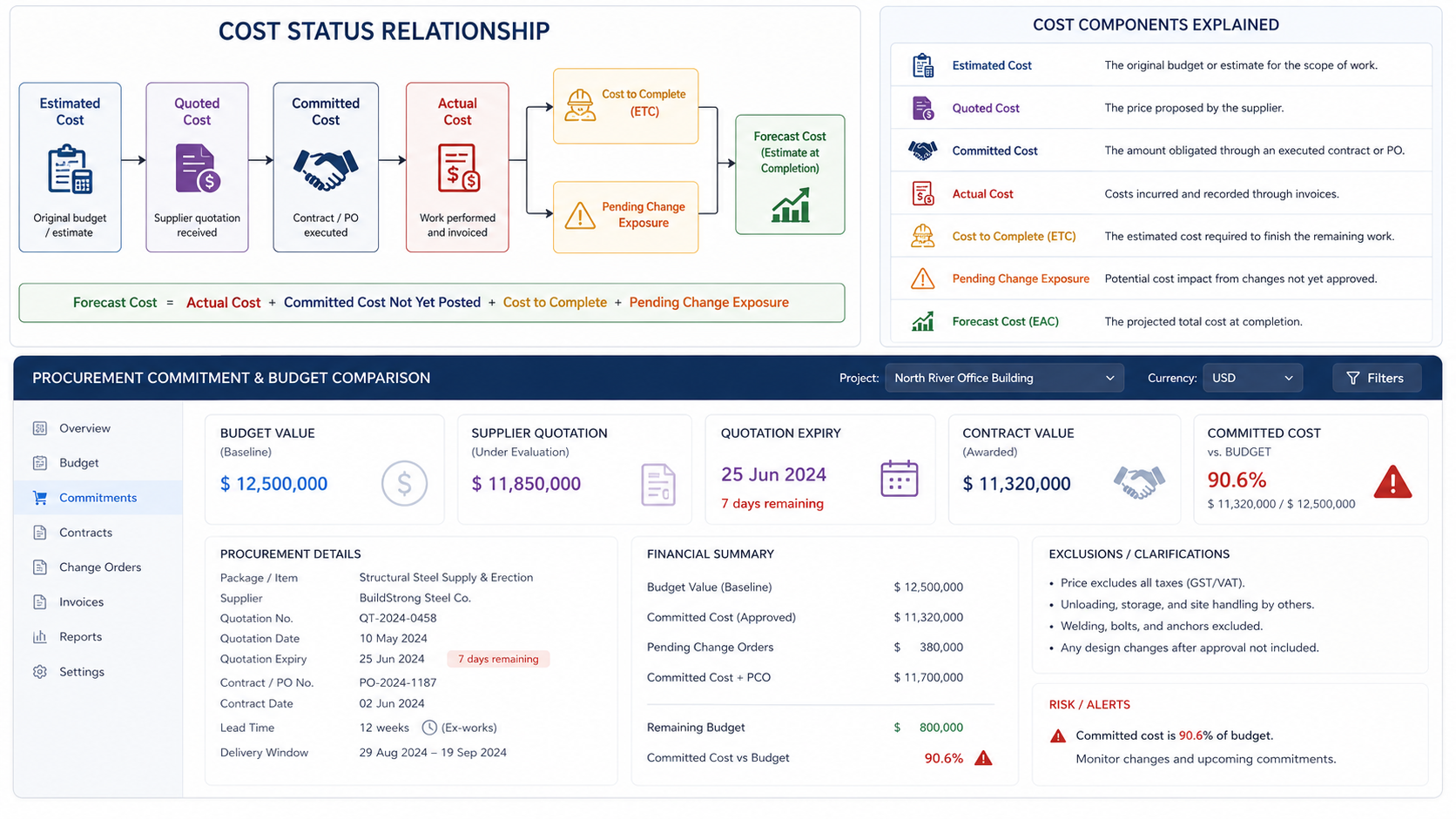
In a systemized workflow, supplier quotations can be compared with budget items, quotation expiry can be monitored, long-lead items can be linked to schedule risk, and committed cost thresholds can trigger alerts. Industry Software supports this type of procurement commitment tracking, allowing project managers to see cost risk before payment. Procurement data no longer stays buried in emails and quote files; it enters the project forecast directly.
Track Change Order Status
Change orders in construction rarely move through the project in one step. A client requests additional scope, the project manager reviews the impact, the cost team calculates the value, the field team may start the work, and billing happens later. The riskiest changes are not always the approved ones, but the changes already executed on site while approval and budget updates are still pending.
Project managers should manage change as a cost chain, not only as a final approval document. Every change should have a source, status, estimated value, scope impact, owner, approval path, and execution record. If only approved change orders are recorded, pending change exposure remains hidden, and those unapproved risks can quietly consume margin.
Change management can use these statuses:
Potential Change: record the source and initial impact of a possible change
Submitted Change: track approval duration after internal or client submission
Approved Change: update budget and forecast cost
Rejected Change: record whether internal cost has already been created
Executed Change: link field execution with labor, materials, equipment, and site records
Billed Change: track invoicing, settlement, or collection status
Industry Software supports change order tracking by status, so project managers can see which changes have already been executed but not approved, which pending change orders are affecting the margin buffer, and which approved changes need to update budget and billing records. Change management becomes part of cost control, not a documentation task at the end of the project. Change value matters, but status and execution timing matter just as much.
Make Field Data Affect Remaining Cost
The jobsite creates cost signals every day. Labor hours run above plan, material waste increases, equipment rental time extends, subcontractors wait, rework occurs, and coordination issues slow progress. These signals often stay in site reports, crew records, or chat messages and do not update the project cost forecast quickly enough.
Project managers should not only ask how much work has been completed. They should also ask how many resources were consumed to complete it. Two projects may both report 40 percent completion, but one may have used planned labor and materials while the other has already exceeded standard consumption. The second project may not show the full impact in actual cost yet, but cost to complete should already be reviewed.
Field-stage tracking should include:
Actual labor hours compared with planned labor hours
Material issued, installed, and wasted quantities
Equipment usage time, waiting time, and rental cost
Subcontractor completed quantity, payment milestones, and coordination issues
Additional cost caused by rework, stoppage, or site issues
Whether current productivity will increase remaining work cost
A simple calculation can make field variance easier to understand. If a work package was planned for 400 labor hours but has already used 520 hours, and the average labor rate is $65 per hour, the labor variance is: Labor Cost Variance = (Actual Hours - Planned Hours) × Hourly Rate . Labor Cost Variance = (520 - 400) × $65 = $7,800. That $7,800 may not look large on its own, but if the same pattern appears across multiple work packages, the remaining cost can rise quickly. The same logic applies to material waste and equipment usage. Material cost variance can be estimated by comparing issued quantity with installed quantity, while equipment variance can be tracked by comparing actual rental days with planned rental days.
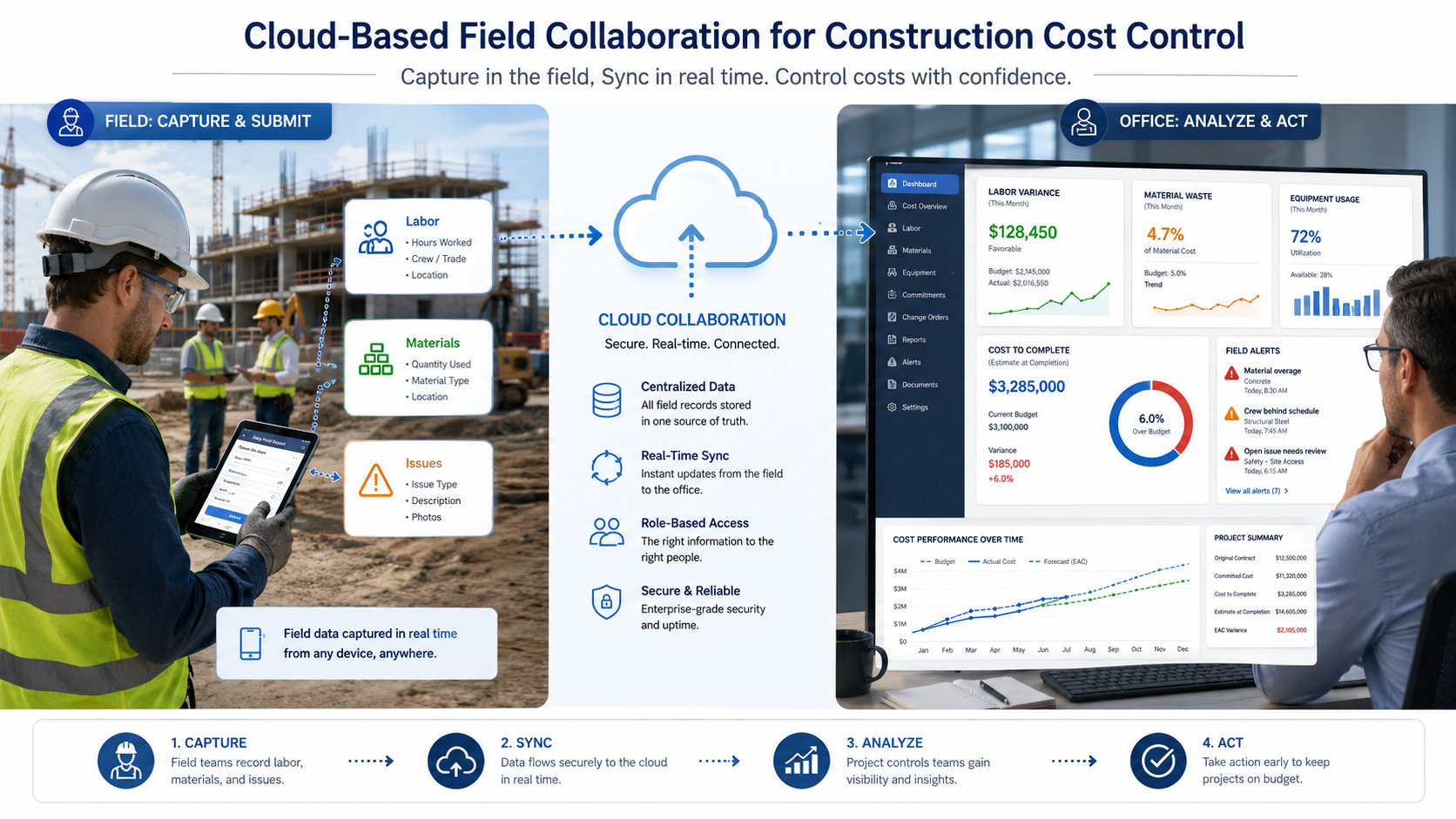
The cloud-based capability of Industry Software is especially valuable here. Site teams can submit labor hours, material usage, equipment records, and site issues from mobile devices, while office teams can see how those updates affect cost to complete. When actual labor hours remain above plan, material waste exceeds the standard rate, or equipment usage becomes abnormal, the system can alert project managers before month-end reporting.
Connect Alerts to Action
More alerts do not automatically create better control. Too many alerts become noise, while too few alerts weaken management visibility. Effective warnings should connect to clear actions: who needs to approve, who needs to review, who needs to adjust procurement, who needs to revise the schedule, and who needs to confirm a change with the client.
Industry Software supports configurable cost alert rules, allowing companies to set trigger conditions based on budget structure, approval levels, project type, and management requirements. When procurement, change activity, field execution, or remaining cost forecasts move outside expected limits, the system can alert the right owner before the issue becomes harder to correct.
Industry Software can support practical cost alerts in four areas:
Procurement alerts
Committed cost threshold alerts: when purchase orders, contracts, or subcontract agreements reach 80% or 90% of a budget item, the system alerts the project manager for review.
Supplier quotation approval triggers: when a supplier quote exceeds the original estimated cost by a configured percentage, the system can trigger an approval workflow.
Quotation expiry reminders: when a quotation is close to expiry and procurement is not complete, the system reminds the purchasing team to follow up.
Change alerts
Pending change order margin alerts: when pending change orders exceed the project margin buffer or a defined risk threshold, the system alerts leadership.
Executed but unapproved change alerts: when field work has been executed but approval is still pending above a set value, the system requires explanation and follow-up.
Field execution alerts
Labor hour variance alerts: when actual labor hours exceed planned hours for several consecutive days, the system alerts the project manager and field lead.
Material waste alerts: when issued, installed, and wasted material quantities show abnormal variance, the system alerts field and cost teams.
Cost to complete risk flags: when cost to complete exceeds the remaining budget, the project dashboard automatically marks the risk.
Schedule and delivery alerts
Long-lead item critical path alerts: when delivery movement for long-lead materials affects key project milestones, the system alerts planning and project teams.
These alerts are not meant to create more noise. Each alert should point to a clear action, such as reviewing procurement scope, renegotiating price, pausing unconfirmed changes, reviewing field productivity, updating cost to complete, or escalating project risk. For construction companies, the most valuable system is not one that only reports an overrun after it happens; it is one that shows where the overrun is starting to form.
Show Where Risk Comes From
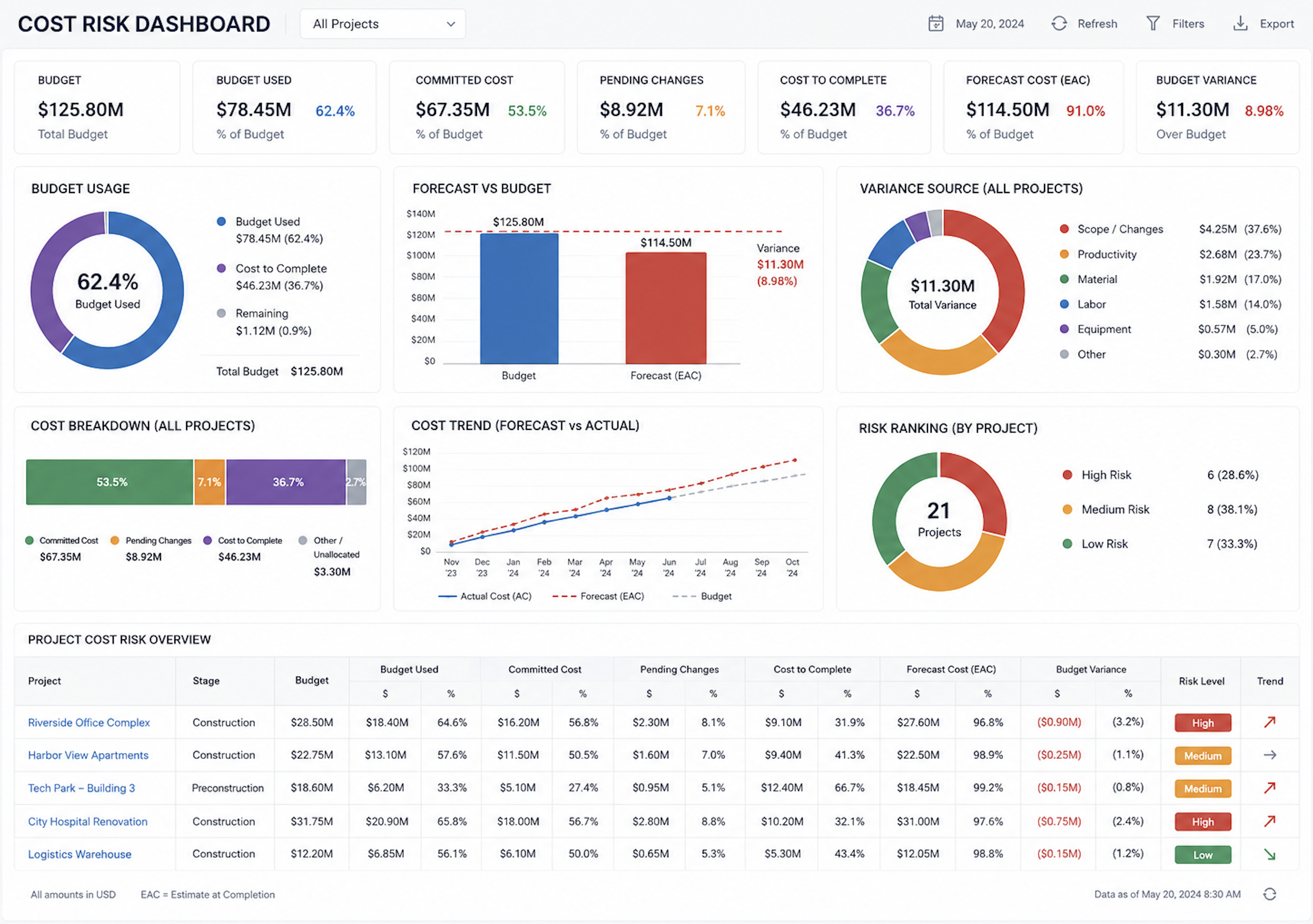
Many project dashboards show budget used, progress completed, and cost incurred. These are useful, but not enough. Project managers and leadership need to know whether risk comes from procurement price increases, unapproved changes, field productivity loss, abnormal material waste, or rising remaining cost.
A stronger cost dashboard should place estimated cost, committed cost, actual cost, pending changes, cost to complete, and forecast cost in one view. It should also break cost variance down by cause, so the team knows whether procurement, field execution, cost control, contract management, or leadership action is needed.
A dashboard can show:
Budget usage and committed cost ratio
Whether actual cost matches field progress
Cost to complete compared with remaining budget
Total pending change value and approval status
Over-budget procurement items and expiring quotations
Labor, material, and equipment usage exceptions
Forecast cost compared with target margin
Cost risk ranking across multiple projects
Industry Software project dashboards help project managers and leadership bring these risks into one shared view. For a single project, the dashboard helps teams understand whether cost movement is coming from procurement, change activity, or field execution. For companies managing multiple projects, it also helps leadership rank cost risk across the portfolio and focus resources where intervention is most urgent.
A Quick Self-Check for Project Managers
Before the next cost review, project managers can ask a few practical questions. If the answer to several of these is unclear, the project may not have a reporting problem only. It may have a cost visibility problem. This lack of clarity means that critical blind spots are likely being overlooked until they become actual overruns. Consequently, fixing the way data is seen and tracked becomes the essential first step to regaining control over the project's true financial health.
A mature cost control process should be able to answer:
Can the team see committed cost before invoices arrive?
Does the forecast include pending change exposure?
Is cost to complete updated with field labor, material, and equipment data?
Are procurement commitments connected to budget items?
Are actual hours compared with planned hours at the work package level?
Are material waste and equipment waiting time visible before month-end?
Are cost alerts grouped by procurement, change, field execution, and schedule risk?
Can leadership see why the forecast is moving, not only how much it moved?
Can project managers rank cost risk across multiple active projects?
How Industry Software Supports Active Cost Control
Industry Software helps construction companies bring budgets, procurement, change management, field execution, and cost forecasting into one configurable system. The system can be tailored around project types, cost codes, approval rules, procurement processes, and field management practices, so the software fits real operating workflows instead of forcing teams into rigid templates.
In construction cost control, Industry Software can combine several key modules. Companies can start with budget tracking, procurement commitment management, change order workflows, field data capture, or project dashboards, then expand gradually as their management process matures. Modular deployment reduces implementation pressure and helps teams see value from specific business scenarios earlier.
Cloud-based access is particularly valuable for construction companies. Site users can submit labor, material, equipment, and issue records from the jobsite, while office teams can see the cost impact in the same system. Procurement quotations, contract values, lead times, change approval status, cost to complete, and forecast cost can be centralized into one shared project view.
With long-term experience in industry software scenarios, Industry Software helps companies turn complex workflows into configurable, deployable, and scalable modules. It does not replace the judgment of project managers, cost teams, or procurement professionals. It helps those teams make earlier, better-informed, and more traceable decisions from the same operational data.