Construction Estimate Version Control: Stop Teams from Working from the Wrong Budget

Summary
×An Outdated Estimate Can Cost More Than a Rough Estimate
An early construction estimate with limited accuracy is not always the biggest risk. Most project teams understand that early numbers will change as drawings, supplier quotes, site conditions, and change orders become clearer. The bigger risk is when an outdated estimate continues to be used as if it were still current.
A project manager may update the estimate after a design revision, but procurement may still use the old approved version to place an order. Three weeks later, the team discovers that the purchase commitment is $150,000 above the current working estimate because the revised specification was never tied back to the procurement baseline. No one intended to create a budget problem, but the wrong version became the basis for a real financial commitment.
That is why construction estimate version control matters. It is not only about saving old budget files. It is about making sure every team knows which version is valid, which version is under review, which version is locked, and which version can be used for procurement, reporting, forecasting, and approval.
How Budget Version Chaos Actually Happens
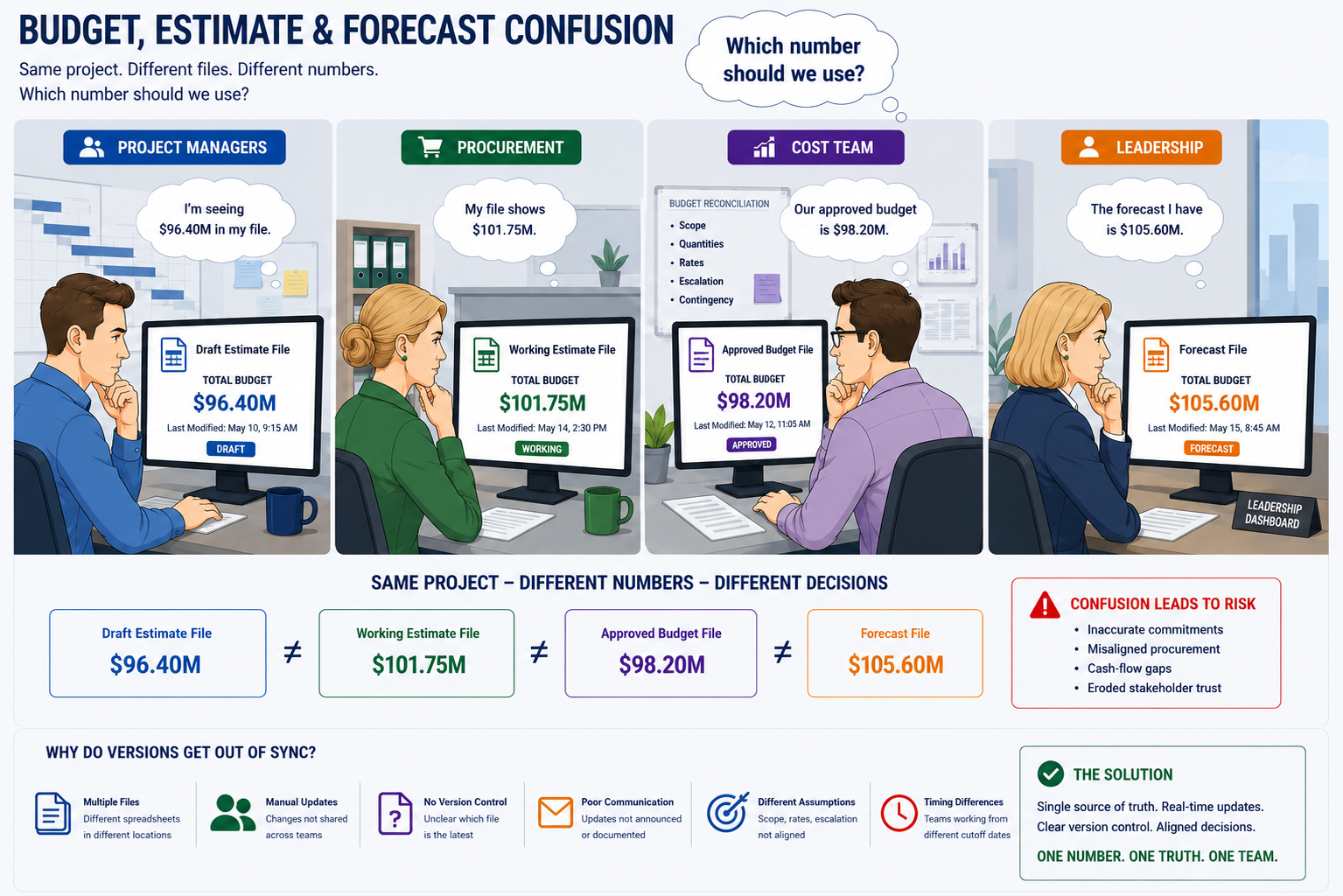
Budget version chaos rarely happens because a company has no process. More often, each team has its own process, but the processes are not aligned around one version baseline. Cost teams manage estimate details, procurement teams manage supplier quotes and contract values, project managers manage forecasts, finance watches approved budgets, and leadership reads summarized reports.
One common case starts after a design change. The project manager asks the cost team to prepare a revised working estimate, but the approved budget in the leadership report stays unchanged. Procurement then receives updated supplier quotes and records them in a purchasing file, while the field team begins planning around the revised scope. By the next review, everyone is talking about “the budget,” but one team means approved budget, another means working estimate, and another means latest forecast.
Another case begins during procurement. A supplier quote comes in lower than expected, so the team feels comfortable moving forward. Later, the project team realizes that the quote excluded freight, lifting, commissioning, or site coordination, and the missing scope was never reflected in the estimate version used for approval. The project did not fail because nobody checked the price; it failed because price, scope, and version status were not controlled together.
Every Estimate Version Needs a Clear Purpose
Not every estimate should do the same job. An internal draft should not be used for purchasing. A working estimate should not be treated as the approved budget. A latest forecast should not overwrite the original baseline without review, because the company still needs to know what was originally approved and why the forecast moved.
A clearer version structure helps teams avoid mixing different numbers:
Draft Estimate: early internal calculation for scenario review
Working Estimate: project team review version, not yet approved
Approved Budget: formal cost baseline for leadership reporting and control
Procurement Baseline: version used for quote comparison and committed cost review
Latest Forecast: current cost projection based on procurement, field data, and changes
Archived Estimate: historical version that can be viewed but not used for decisions
A good practice is to make each version status visible in the system, not buried in file names. Industry Software supports estimate version status such as Draft, Under Review, Approved, Locked, and Archived. This helps prevent a working estimate from being used for procurement, or an archived version from appearing in current project reports.
Who Can Change the Budget Matters as Much as the Budget Itself
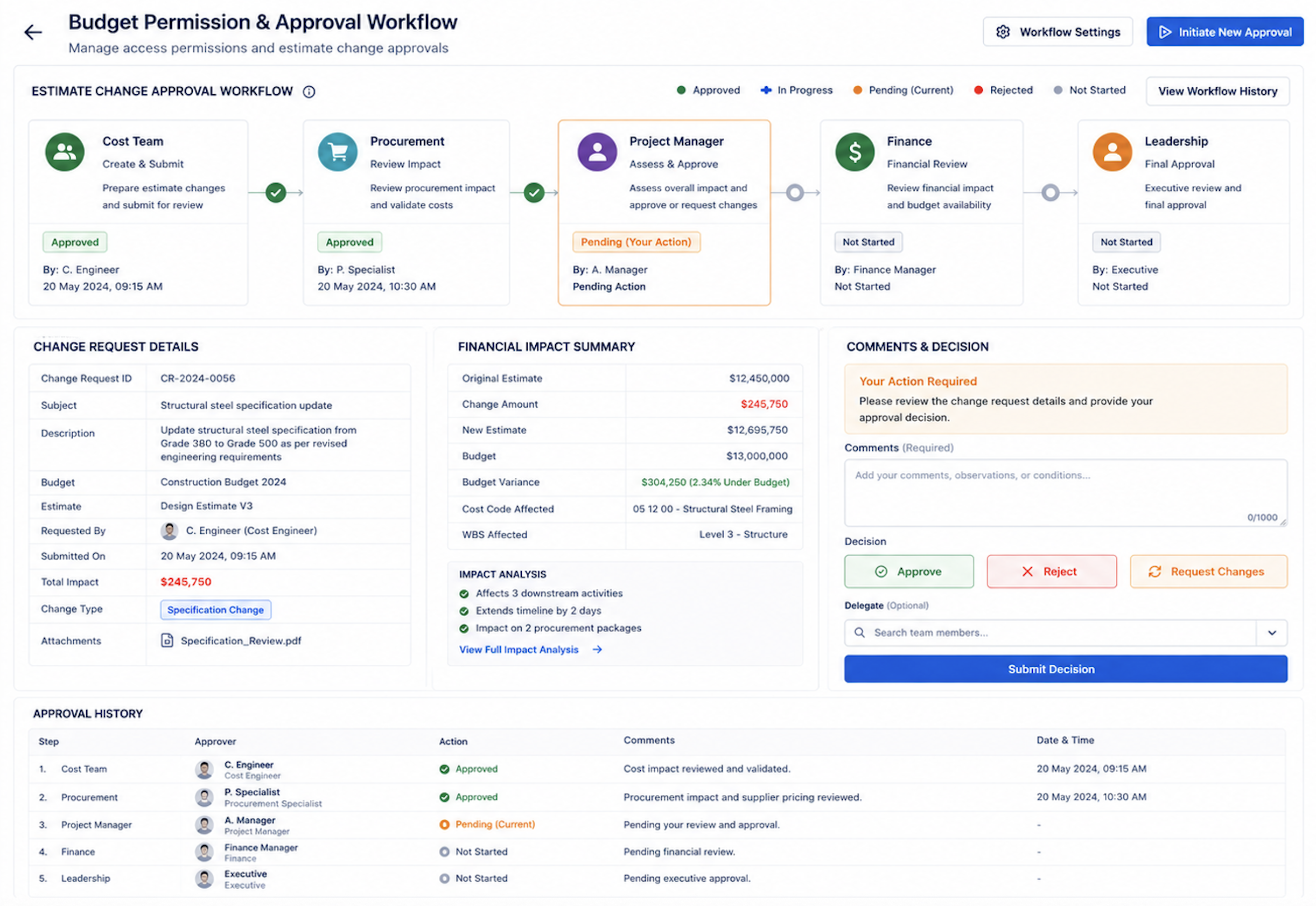
Version control is not only about saving copies. It is also about controlling who can change what. In a construction project, the cost team may own cost codes, procurement may update quotes and committed cost, the project manager may submit a revised version for review, and finance or leadership may approve the official budget baseline.
When everyone can freely change the estimate, version control becomes a file naming exercise. The team may not know who changed a number, when it changed, why it changed, or whether the change was approved. When cost variance appears later, the project team has little evidence to explain whether the issue came from scope change, procurement movement, field execution, or unauthorized edits.
A stronger permission model should define:
Cost teams editing cost items and cost codes
Procurement updating quotes, contract values, and committed cost
Project managers submitting estimate versions for review
Finance or leadership approving the official budget
General team members viewing approved versions or assigned module data
Over-budget, cross-phase, or margin-impacting changes triggering approval
All edits captured through change logs and approval history
In Industry Software, role-based permissions and approval workflows can be configured around how the company actually works. Editing rights, approval levels, and version locking rules can be tailored by role, project type, cost code, or approval threshold. The system keeps change records and approval history, so teams can see not only that the estimate changed, but who changed it, why it changed, and when the new version became effective.
Old Versions Should Stay Visible, but Not Usable
Historical estimates should not disappear. They are valuable for audits, claims, internal reviews, and lessons learned. The problem is not that old versions exist; the problem is when old versions can still be used for procurement, reporting, or field decisions. A practical version control process keeps old versions visible but read-only. Project members can review them, compare them, and use them for reference, but they should not be able to treat them as active baselines. Procurement and reporting should be tied to approved versions or designated forecast versions, not whatever spreadsheet someone copied last month.
Wrong-version prevention can include:
Historical estimates automatically marked as Archived
Archived versions available for viewing but not editing or approval
Purchase requests restricted to the current approved budget or procurement baseline
Reports displaying estimate version ID and generation time
Alerts when a user attempts to reference an old version
Side-by-side comparison between current and historical versions
Version replacement requiring approval instead of direct overwrite
A systemized workflow makes this easier. Industry Software can keep archived versions traceable while preventing them from being reused in the wrong process. Project managers can still review old assumptions, and leadership can compare version movement, but purchase orders, budget approvals, and official reports remain connected to valid versions.
Approved Budget and Latest Forecast Must Stay Separate
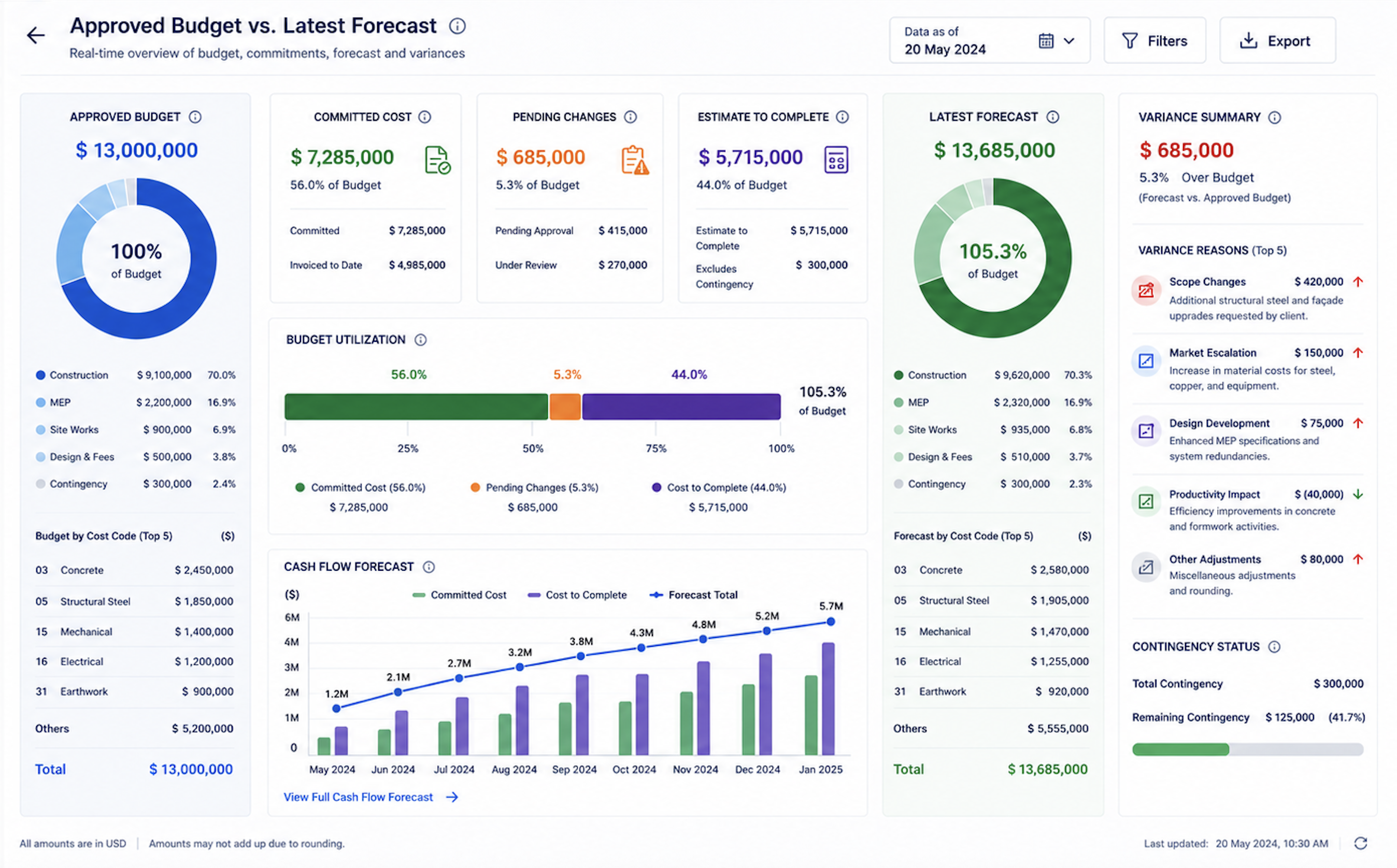
Many project cost discussions become confusing because teams mix approved budget with latest forecast. Approved Budget is the official cost baseline. It supports contract control, leadership targets, and accountability. Latest Forecast is the current projection after procurement, field execution, pending changes, and cost to complete are considered.
Both numbers matter, but they should not be merged. Approved Budget tells the team what the project was authorized to spend. Latest Forecast tells the team what the project is now expected to spend. If the forecast overwrites the approved budget, leadership loses the baseline; if the team only looks at approved budget, project managers may miss the real risk.
Project managers should see:
Approved Budget
Working Estimate
Pending Change Exposure
Committed Cost
Cost to Complete
Latest Forecast
Variance Reason
Industry Software can separate approved budget from latest forecast while showing the variance between them. This gives project managers a clearer explanation of cost movement and gives leadership a better view of whether the project needs budget adjustment, change approval, procurement review, or risk intervention.
Version IDs and Audit Trails Make Reviews Easier
When a project has cost variance, teams often ask the same questions. Which estimate was used at approval? When did this number change? Who approved the change? Did the updated scope enter the forecast? Was procurement based on the official version or a working version? Without version IDs and audit trails, these questions become difficult to answer. Team members search through old emails, downloaded files, meeting notes, and renamed spreadsheets. By the time they reconstruct the history, the project has already spent too much time explaining what happened instead of deciding what to do next.
A useful audit trail should show:
Which estimate version was used for project approval
Which version was used as the procurement baseline
Which cost items changed after design revisions
Which supplier quotes entered committed cost
Which pending changes affected the forecast
Which versions were locked, archived, or replaced
Which approval steps took the longest
Industry Software can retain estimate version ID, change logs, approval history, and linked records. After closeout, teams can compare Initial Estimate, Approved Budget, Working Estimate, Latest Forecast, and Final Actual Cost. Over time, this data becomes part of the historical cost library and improves future estimating quality.
A Quick Self-Check for Estimate Version Control
Before the next project review, project managers can ask a few practical questions regarding how data is shared and updated between departments. These questions are simple, but they often reveal a critical systemic vulnerability: whether the team is operating under a single, unified project baseline or struggling to reconcile several disconnected, outdated versions of the same budget across separate spreadsheets and siloed software tools. When different teams rely on isolated data, minor discrepancies in change orders or procurement timelines compound silently, meaning that what looks like a minor reporting delay is actually a fundamental lack of cost visibility that leaves the project highly exposed to unexpected financial risk.
A strong estimate version process should be able to answer “yes” to most of the following:
Does every estimate have a version ID and status?
Does the team know which version is approved, under review, locked, or archived?
Can procurement only create commitments against an approved baseline?
Are working estimates clearly separated from approved budgets?
Is latest forecast shown separately from the approved budget?
Are pending changes visible before they are approved?
Can the team see who changed a cost item and why?
Are archived versions read-only?
Do reports show which estimate version they were generated from?
Can leadership see variance reasons, not just variance amounts?
Is historical estimate data saved for future projects?
If the answer to several of these questions is “no,” the project may not have an estimating problem. It may have a version governance problem. The estimate may exist, but the team may not have enough control over how that estimate is updated, approved, locked, referenced, and reused.
How Industry Software Controls Estimate Versions
Industry Software does not simply create more budget files. It helps construction companies build a controlled estimate version system where budgets, permissions, approvals, procurement references, forecasts, change exposure, and audit records are managed in one workflow. This reduces the risk of teams using different budget versions without realizing it.
In practice, Industry Software can support:
Estimate version ID and status management
Draft, Working, Approved, Locked, and Archived status configuration
Role-based permissions
Estimate approval workflows
Version locking
Audit trails and change logs
Separation of approved budget and latest forecast
Procurement baseline linking
Alerts for archived version misuse
Dashboards showing version variance and risk sources
Historical versions feeding into the cost library
Companies can also deploy modules gradually. They may start with estimate version control, approval workflows, procurement baselines, or forecast dashboards, then connect drawings, Gantt schedules, field data, and change management later. The system can be configured around each company’s cost codes, approval rules, project types, and management habits.
Ultimately, a construction estimate should not be only a budget sheet. It should be a governed project baseline with version status, permissions, approvals, and audit history. Through customization, modular deployment, cloud collaboration, and unified data views, Industry Software helps project managers, cost teams, procurement teams, field teams, and leadership make decisions from the same budget version.