Results Snapshot
Enabled core asset registry, maintenance planning, repair work orders, spare parts usage, and field feedback workflows to go live within 6–8 weeks
Reduced critical asset status confirmation time by 30%, helping maintenance, production, and management teams identify asset location, condition, and ownership faster
Improved preventive maintenance completion by 26%,while emergency repair work order share decreased by 25% within 8–12 weeks after go-live
Connected spare parts lookup, issue, and repair history in one system, reducing duplicate purchasing, manual recording, and post-repair traceability effort
Customer Operating Environment
The customer is a mid-sized industrial manufacturer operating across two production sites, one maintenance warehouse, and multiple shop floor areas. Its asset base includes production equipment, forklifts, compressors, pumps, electrical cabinets, inspection devices, molds, tools, and critical spare parts. The first rollout involved maintenance, production, asset management, warehouse, purchasing, and leadership teams, with approximately 60–90 core users participating in daily asset and maintenance workflows.
As the number of assets increased, the customer realized that asset management was not only about knowing where equipment was located. Whether an asset was running, under repair, overdue for maintenance, waiting for spare parts, or experiencing repeated failures could directly affect production rhythm and maintenance cost. Spreadsheets, paper inspection sheets, and technician experience supported basic operations, but information gaps became more visible across multiple shifts, asset types, and shop floor areas.
Industry Software began the project by reviewing how equipment was used, inspected, maintained, repaired, supplied with spare parts, and reported back after downtime. The project team brought asset coding, location hierarchy, equipment status, maintenance cycles, failure categories, work order priority, spare parts issue, and repair results into one process design. The Asset Management Platform therefore became more than a place to store equipment records; it became an operating system connecting production, maintenance, and management decisions.

Why Maintenance Stayed Reactive
The customer’s most visible problem was not a lack of technicians. The problem was that asset status did not exist in one shared view. Production teams knew which equipment affected scheduling, maintenance teams knew which assets had recently been repaired, warehouse teams knew spare parts availability, and leadership wanted visibility into availability and maintenance cost.
Preventive maintenance was also difficult to execute consistently. Some equipment required calendar-based service, some required inspection based on operating hours, and some critical assets needed additional checks based on usage intensity. Without system-based planning, maintenance tasks were often pushed aside by production pressure until a failure brought the asset back into focus.
Spare parts management also affected maintenance execution. A technician might know which part was needed, but inventory availability, approved substitutes, supplier lead time, and issue history were not always easy to confirm. Without a connection between work orders, spare parts, and asset history, maintenance could not form a complete execution loop.
System Design for the Asset Lifecycle
The customer needed more than a better equipment list. It needed a management foundation that covered the asset lifecycle. Industry Software worked with the customer to focus implementation on five priorities: unifying the asset registry, creating location and status visibility, configuring maintenance plans, standardizing repair work order execution, and connecting spare parts consumption with maintenance records.
During workflow review, the project team found that several asset rules had not been fully standardized. These included which equipment counted as critical assets, which assets required mandatory inspections, which failures needed escalation, which repairs required downtime records, and which spare parts should be charged back to asset maintenance cost. Industry Software translated these rules into system configuration, moving maintenance execution from personal memory toward traceable workflows.
The system design also focused on field usability. Maintenance users are not always in an office; many work orders must be completed beside machines, inside workshops, or between the warehouse and the production floor. The Asset Management Platform therefore needed to support mobile access to asset history, QR code identification, work order assignment, photo upload, failure cause entry, and repair completion confirmation.
Key Solution Areas
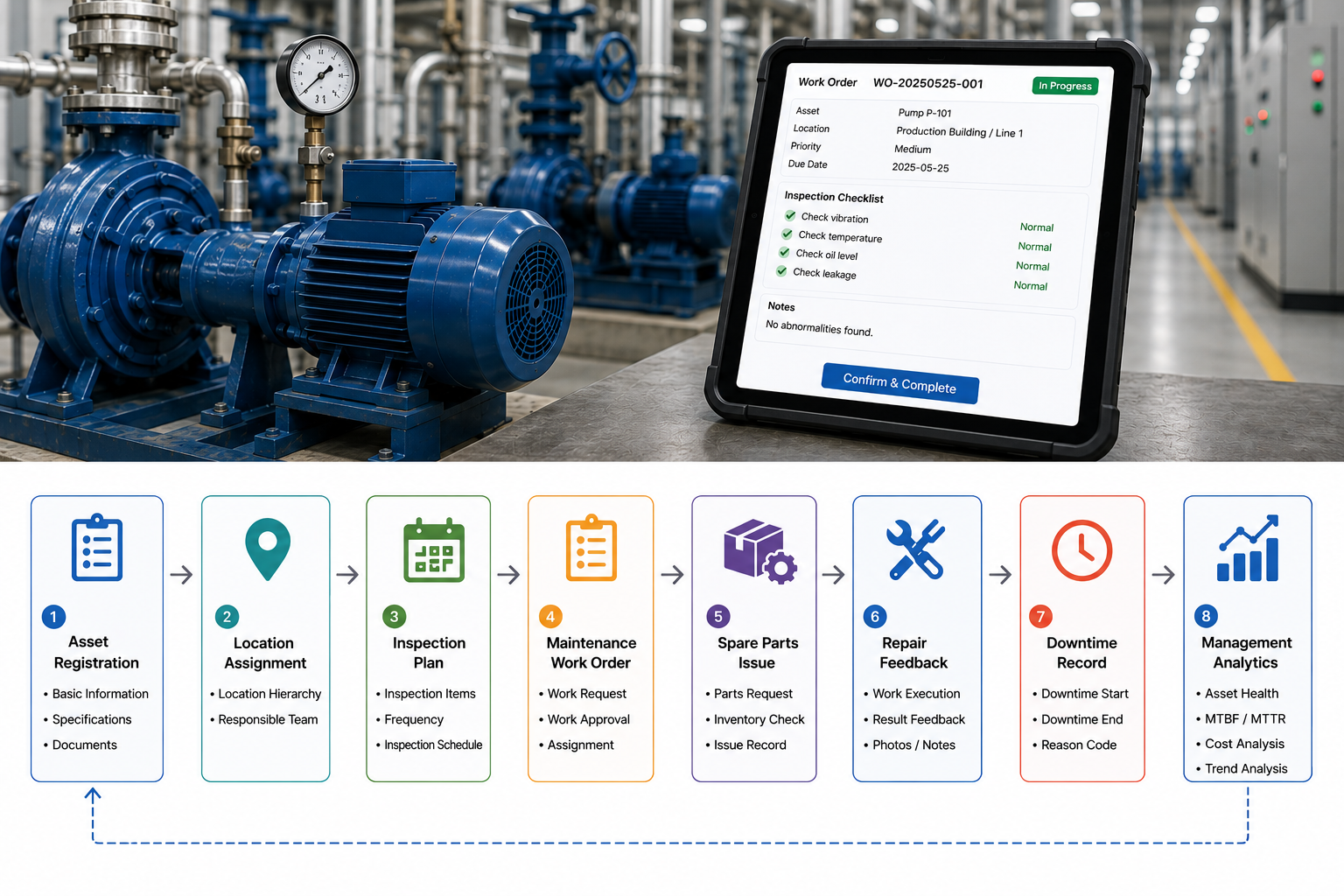
Industry Software configured and deployed a cloud-based Asset Management Platform that centralized asset records, equipment hierarchy, location status, inspection plans, maintenance work orders, spare parts issue, repair records, and management reporting in one system. The system followed a modular rollout approach, with the first phase focused on critical equipment, repair work orders, preventive maintenance, and spare parts linkage. Later phases can extend into asset performance analysis, failure trends, mobile inspections, and more detailed maintenance cost management.
Unified asset registry: The system brought equipment codes, asset categories, locations, responsible teams, status, supplier information, activation dates, warranty periods, and key technical parameters into one data standard.
Maintenance planning and work order execution: The system supports inspection and maintenance plans based on calendar cycles, operating hours, asset criticality, and risk level, with related work orders or reminders generated from the configured rules.
Failure and spare parts loop: Repair work orders can connect failure categories, downtime, repair actions, spare parts issue, photos, and completion results, helping teams identify repeated failures and spare parts consumption patterns.
Mobile field feedback: Maintenance users can view asset history, receive work orders, scan equipment codes, upload photos, and record repair results in the field, keeping data closer to the actual work.
Management visibility: The system summarizes asset status, work order backlog, preventive maintenance completion, downtime causes, spare parts consumption, and maintenance cost into management views.
Asset Registry Beyond Recordkeeping
The asset registry was the starting point, but it was not the end goal. The customer already had equipment lists, but equipment names, codes, locations, owners, and status were not fully consistent. Some assets had moved to new areas, some were still using old codes, some critical equipment had missing maintenance cycles, and some repair history existed only in paper forms or technician notes.
Industry Software helped the customer establish asset hierarchy and coding rules. The system organized relationships across production lines, areas, equipment groups, individual assets, subcomponents, and critical spare parts. This allowed teams to view asset information by plant, workshop, equipment group, or individual asset.
The asset registry therefore became more than a fixed asset list for administrative or finance purposes. It became the data foundation for maintenance plans, repair work orders, spare parts issue, and equipment analysis. Production teams could confirm equipment status faster, maintenance teams could view historical problems, and leadership could understand which assets had the largest impact on capacity and cost.
Maintenance Plans and Work Order Execution
The customer’s maintenance work had historically depended heavily on team experience and periodic reminders. Some equipment could follow monthly service cycles, but critical assets required more precise planning based on running hours, usage intensity, or risk level. Without a unified platform, planned work could be interrupted by production pressure, and maintenance teams struggled to determine which tasks had to be completed first.
Industry Software configured layered maintenance plans for the customer. Critical equipment could follow stricter inspection and preventive maintenance cycles, standard equipment followed regular service schedules, and low-risk assets could use lighter inspection rules. The system generated work orders or reminders based on these maintenance rules and assigned tasks to responsible teams.
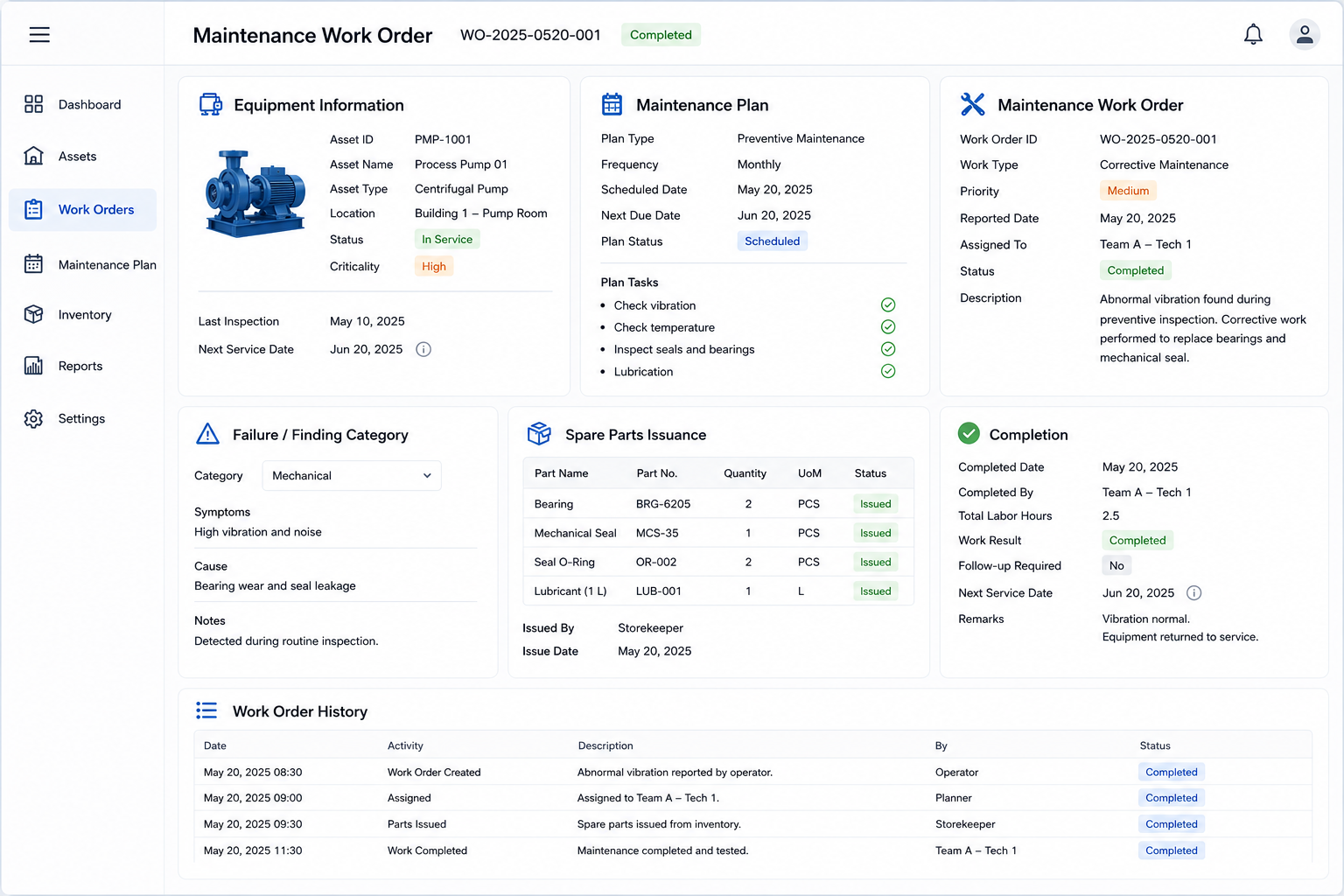
Repair work orders were also designed as full execution records, not simple “completed” statuses. Each work order could capture symptoms, failure codes, downtime, repair actions, spare parts usage, photo attachments, completion time, and review results. Over time, this allowed the customer to identify repeated failures, weak assets, and maintenance strategies that needed adjustment.
Spare Parts and Maintenance Cost Loop
Spare parts availability is often underestimated in maintenance execution. Knowing what is wrong with an asset does not mean the repair can begin immediately. If spare parts availability is unclear, substitutes are not governed, and issue records are not connected to work orders, maintenance can be delayed while cost analysis remains incomplete.
Industry Software connected spare parts issue with maintenance work orders. Technicians could select the asset, failure cause, and required spare parts inside the work order, while warehouse users could check availability and issue records. After parts were issued, the system wrote consumption back to the related work order and asset record.
This loop helped the customer identify which assets consumed too many parts, which parts required higher safety stock, and which low-frequency, high-value parts could be managed with less duplicate purchasing. As data accumulated, purchasing and maintenance teams could adjust spare parts strategy based on actual consumption rather than experience alone. Maintenance cost also became easier to analyze by asset, area, failure type, and time period.
Implementation Challenges
The largest early challenge was asset data cleanup. The customer’s existing lists contained duplicate asset codes, inconsistent equipment names, outdated location records, and unclear responsible teams. Some assets had been retired but still appeared in records, while some critical equipment was actively used without complete maintenance history.
Industry Software worked with asset, production, and warehouse users to prioritize data preparation. The first pass did not try to clean every asset at once. Instead, the project focused on critical production equipment, assets with high failure frequency, and high-value spare parts, allowing the customer to bring the most important assets under control first and expand gradually.
User adoption also required careful handling. Some technicians were used to recording failures on paper forms, and some supervisors preferred assigning work directly through messages. QR code scanning, mobile feedback, and failure classification were new habits for part of the team. Industry Software used real repair scenarios during training and adjusted field names, work order steps, and photo upload requirements based on feedback from maintenance users.
Implementation Process
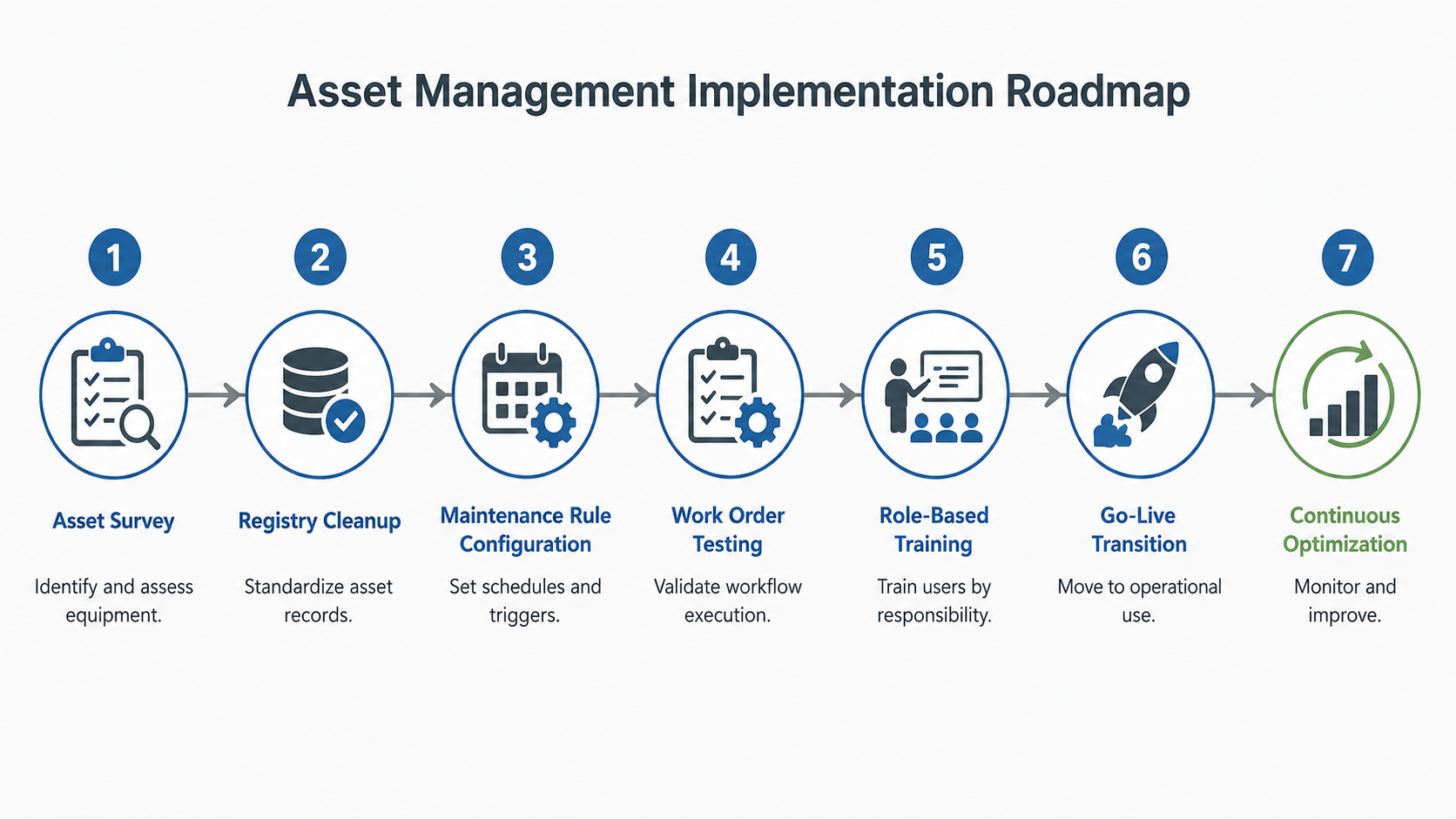
The project followed a phased implementation model, starting with critical production equipment, the maintenance warehouse, and high-frequency maintenance scenarios. Industry Software worked with asset managers, maintenance teams, production supervisors, warehouse users, purchasing users, and leadership to review actual asset management workflows. The review covered asset registration, location confirmation, inspection planning, failure reporting, work order dispatch, spare parts issue, repair feedback, downtime records, and management reporting.
After workflow confirmation, the project team helped the customer prepare asset codes, location hierarchy, equipment categories, maintenance cycles, failure codes, spare parts lists, user permissions, and work order statuses. Several areas that had not been standardized before, such as failure priority, repeated failure definition, substitute spare parts rules, downtime recording, and repair review responsibility, were defined during implementation. As a result, the system could record not only repair results, but also task priority, ownership, and review logic.
Testing focused on field execution. The project team selected planned maintenance, unexpected failure, spare parts shortage, parts issue, repair review, and repeated failure analysis scenarios for testing. This helped the customer identify inaccurate asset locations, inconsistent spare parts codes, and unclear work order permissions before go-live.
The go-live plan used a focused rollout approach. The first phase stabilized asset records, repair work orders, preventive maintenance, and spare parts issue workflows, while the second phase extended mobile inspection, failure trends, maintenance cost, and management dashboards. Core workflows went live within 6–8 weeks, followed by adjustments to fields, work order statuses, mobile operation sequence, and reporting views based on field feedback.
Training and Adoption
Training was designed around field roles rather than system features alone. Maintenance users focused on scanning equipment codes, receiving work orders, recording failures, uploading photos, and confirming repair results, while production teams learned how to report issues, check repair status, and confirm equipment recovery. Warehouse users focused on spare parts lookup, issue registration, and work order linkage, while managers focused on backlog, downtime causes, maintenance completion, and spare parts consumption trends.
After go-live, the Industry Software implementation team continued to track user feedback. Some technicians felt that the mobile form had too many fields, so required fields and operating sequences were adjusted. Some managers wanted faster access to critical asset status, so reporting views were refined as well. This ongoing support helped the customer move from “system live” to “field users adopt it, managers can see it, and data can support review.”
The customer also began to establish new maintenance responsibilities. Maintenance teams no longer handled only urgent breakdowns; they began completing inspections and preventive maintenance according to plan. Production teams no longer relied only on phone calls to follow repair progress; they could check work order status in the system. Warehouse teams could connect spare parts issue with specific assets and work orders.
Operational Results
An operational review conducted 8–12 weeks after go-live showed that critical asset status confirmation time decreased by 30%. Production and maintenance teams could check asset location, status, failure history, and current work orders faster, without stitching information together from spreadsheets and verbal updates. For equipment that affected production rhythm, this visibility helped teams judge severity and priority more quickly.
Preventive maintenance completion improved by 26%. The system generated tasks and reminders based on maintenance rules, reducing dependence on memory or paper schedules. Maintenance supervisors could see which tasks were upcoming, overdue, or tied to critical equipment, helping prevent planned work from being repeatedly pushed aside by production pressure.
Emergency repair work order share decreased by 25%. As preventive maintenance became more consistent, some repeated failures and early warning issues were handled sooner. Breakdowns could not be eliminated entirely, but teams could better distinguish planned maintenance, emergency repairs, and repeated problems, then adjust maintenance strategy based on evidence.
Spare parts lookup and issue efficiency also improved. Once work orders, spare parts consumption, and asset records were connected, warehouse users could confirm availability faster, and maintenance users could view which parts had been used in previous repairs. For high-value parts, management gained a clearer view of inventory strategy and purchasing rhythm, reducing duplicate purchasing and repair delays caused by missing parts.
Long-Term Business Value
The implementation helped the customer build a more mature asset management foundation. Asset management moved beyond equipment lists and repair records into an operating system connecting production availability, maintenance execution, spare parts inventory, and management analysis. As platform usage increases, the customer can further analyze downtime causes, repeated failures, maintenance cost, spare parts consumption, and asset utilization.
From a long-term ROI perspective, the platform’s value extends beyond faster repair response. More consistent preventive maintenance can reduce unplanned downtime risk, more complete repair records can help teams identify high-failure assets, and clearer spare parts consumption can optimize inventory investment. For an industrial manufacturer, these improvements gradually influence equipment availability, maintenance cost, and production planning stability.
These returns do not appear fully on the first day of go-live, but they become more visible as asset, work order, spare parts, and failure data accumulates. Industry Software helped the customer build not just a one-time asset registry, but an operating foundation that can continue supporting maintenance improvement, cost control, and asset decision-making. Future expansion can extend into mobile inspections, failure trend analysis, and more detailed asset performance management.
Client Quote
“Before the platform, when a machine stopped, technicians first had to find the asset number, check history, ask about spare parts, and then decide who should handle it. Now the work order shows asset status, failure history, and spare parts usage, while supervisors can see which maintenance tasks are coming due. Maintenance work is not simple, but the information is no longer scattered, and field response is much more stable.”