Results Snapshot
Enabled core inventory records, sales reservations, open purchase orders, substitute items, and replenishment rules to go live within 5–7 weeks, reducing sales stock confirmation time by 40%
Clarified purchasing approval, gap visibility, and replenishment priorities, reducing urgent purchase requests by 30% within 8–12 weeks after go-live
Reduced backorder follow-up time by 36%, helping operations teams review shortage reasons, purchase status, substitute items, and affected customer orders in one place
Reduced inventory review preparation time by 35%, giving management visibility by item category, customer demand, supplier lead time, and turnover speed
Improved available stock and replenishment discipline reduced duplicate purchasing and expedited buying pressure, supporting better inventory capital decisions
Inventory Shapes Commitments
A familiar scenario showed the real cost of inventory uncertainty. Sales was preparing to confirm same-day shipment for a batch of sensors, the warehouse saw quantity on the shelf, purchasing knew another batch was on the way, and operations remembered that part of the available quantity had already been reserved for a key customer. Each team had valid information, but without one shared view, sales could not confidently decide whether the stock could be promised.
The customer serves manufacturers, equipment maintenance companies, and project-based customers. Its inventory mix is uneven: some items are low-cost, high-turnover consumables such as fittings, fasteners, seals, and electrical small parts; others are higher-value, long-lead-time components such as sensors, bearings, control components, and pneumatic parts. Sales teams handle immediate inquiries, purchasing teams manage supplier lead-time changes, and operations teams balance inventory capital, customer priority, and delivery stability.
Industry Software began by reviewing the daily decision chain across inquiry, quotation, order commitment, stock reservation, replenishment, supplier arrival, substitute item review, and shortage follow-up. The objective was not to optimize warehouse records alone. Inventory needed to become decision data that sales, purchasing, and operations could use together.
Stock Is Not Availability
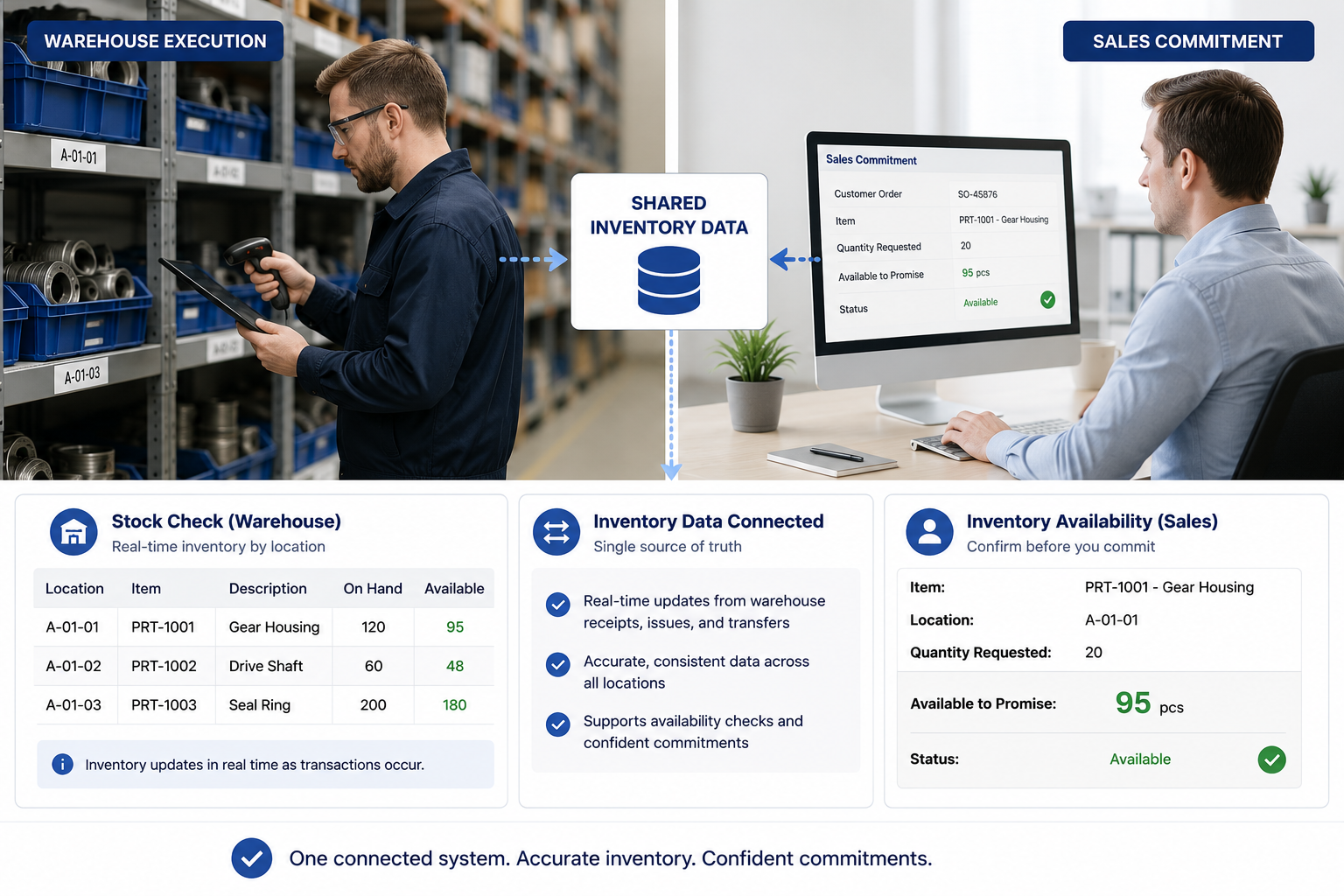
The customer’s recurring issue was that stock might appear available in a system or spreadsheet, but it could not always be promised to a customer. Some quantity might already be reserved for a key account, some might still be under inspection, some might belong to customer-specific stock, and some incoming supply might have shifted because of a supplier delay. To avoid overpromising, sales users often had to ask warehouse, purchasing, and operations users before confirming whether an order could be accepted and when it could ship.
Inventory availability is more complex than inventory balance. The same item may include stock on hand, reserved stock, inspection hold, open purchase orders, return-pending stock, customer-specific inventory, and approved substitutes. Looking only at total stock can lead to overpromising; looking only at physical stock can ignore incoming purchase orders or usable substitutes.
This directly affected customer experience. Industrial parts sales often depend on response speed, and customers want both pricing and delivery confidence. When sales users have to confirm stock status manually every time, quotation speed slows down and delivery commitments become less consistent.
One Stock Logic
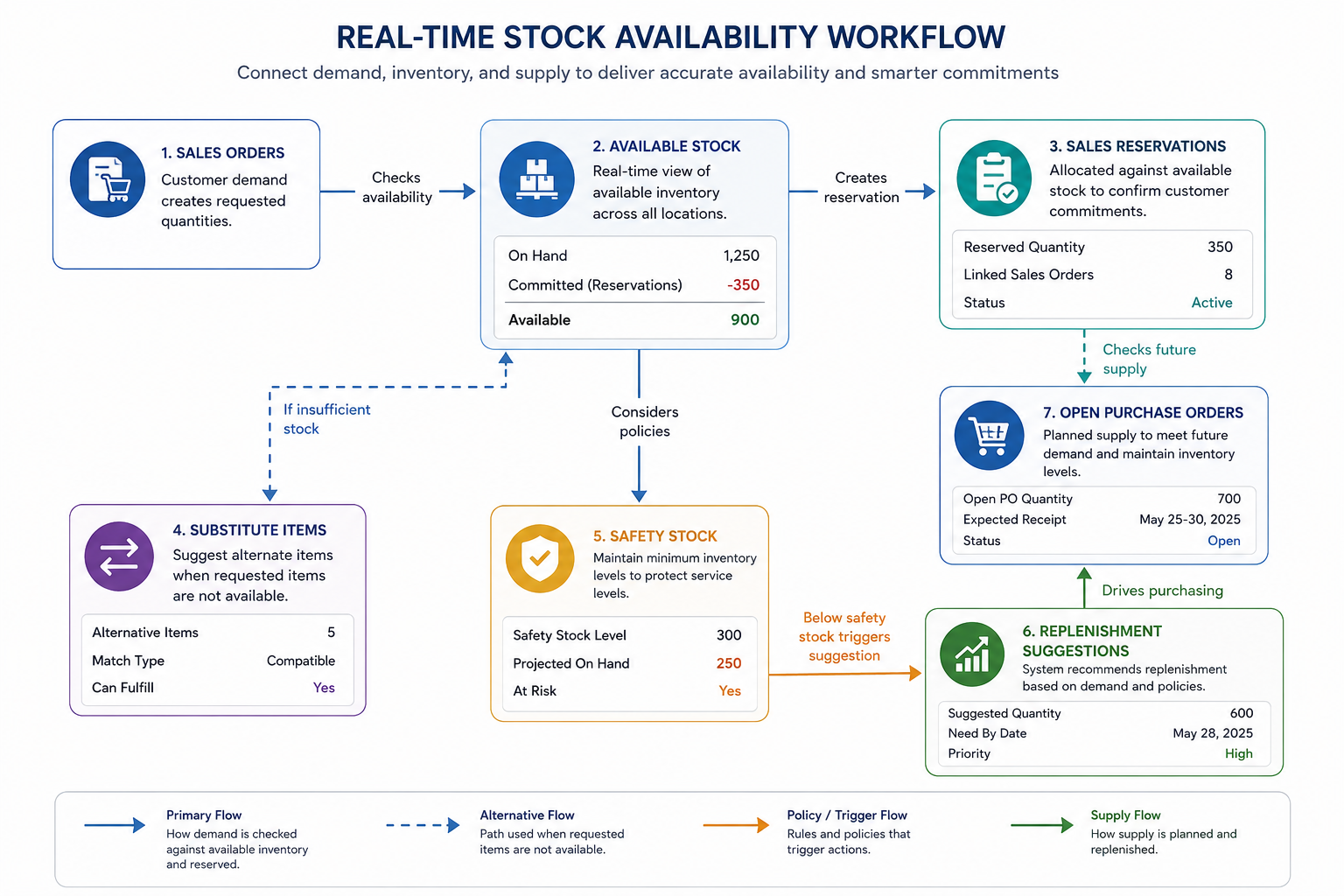
Industry Software worked with the customer to focus the system design on available stock rather than quantity alone. The system classified inventory into stock on hand, available stock, sales-reserved stock, customer-specific stock, open purchase orders, inspection hold, return-pending stock, substitute items, and safety stock. This allowed sales, purchasing, and operations teams to use the same inventory logic to decide whether stock could be promised, when it would become available, and whether replenishment was needed.
Sales commitment scenarios received special attention in the design. When quoting or entering orders, sales users could see available quantity, reserved quantity, expected arrival dates, substitute item suggestions, and customer priority. For key orders that required stock to be held, the system linked reservations to the customer, order, sales owner, and validity period, reducing the risk that the same stock would be promised twice.
Purchasing replenishment was redesigned as well. The system could generate replenishment suggestions based on minimum stock, historical consumption, unfulfilled sales orders, sales reservations, open purchase orders, and supplier lead time. Purchasing teams could therefore see true gaps earlier instead of waiting for sales escalations or customer complaints.
Configured for Three Decisions
Industry Software configured Inventory Management Software to centralize inventory records, sales orders, stock reservations, open purchase orders, replenishment rules, substitute items, shortage follow-up, and management dashboards in one system. The configuration focused on three daily decisions: whether sales could commit, whether purchasing needed to replenish, and whether operations faced delivery or inventory capital risk. The first phase focused on high-turnover items, long-lead-time items, and inventory tied to key customers instead of applying complex rules to every low-frequency historical item from day one.
Real-time available stock visibility: The system distinguishes stock on hand, available stock, reserved stock, inspection hold, open purchase orders, return-pending stock, and customer-specific stock, helping teams understand what can truly be promised.
Sales reservations and order commitments: Sales teams can commit orders based on available stock, expected arrival dates, substitute items, and customer priority, while key reservations are linked to customer orders.
Purchasing replenishment suggestions: The system generates replenishment reminders based on minimum stock, historical consumption, open sales orders, open purchase orders, and supplier lead time.
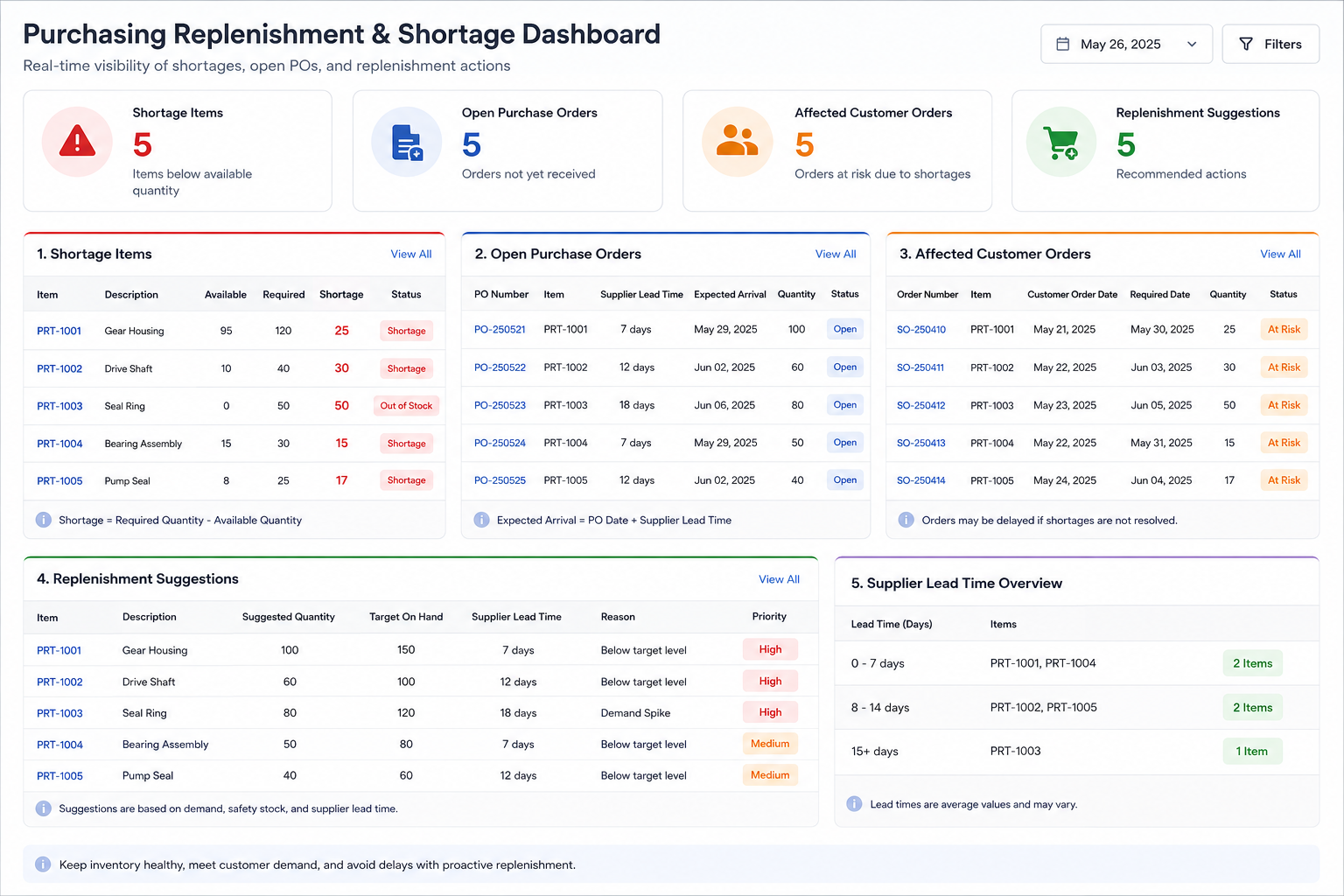
Substitute items and shortage follow-up: For shortage items, the system can show approved substitutes, purchasing status, expected arrival dates, and affected customer orders, helping operations coordinate delivery options faster.
Inventory operations dashboards: The system summarizes stock turnover, shortage items, slow-moving inventory, key customer reservations, open purchase orders, and replenishment risks for management review.
Available-to-Promise
The sales team’s challenge was not understanding customer demand; it was knowing whether inventory could be promised. An item might show quantity in stock, but part of that quantity could be reserved for a key account, another part might still be under inspection, and the remaining amount might not cover a full order. Sales users had to ask warehouse and purchasing teams repeatedly, which slowed customer response.
After implementation, sales users could see stock on hand, available quantity, reserved quantity, open purchase orders, expected arrival dates, and substitute item prompts in one view. For orders that needed stock to be held, the system linked reservations to the customer and order, with a defined validity period. This reduced reliance on memory and helped prevent the same stock from being allocated to multiple sales opportunities.
Sales commitments became more stable. Orders ready to ship could be confirmed faster, orders waiting for purchase arrivals could receive clearer expected dates, and substitute items could be reviewed with operations when appropriate. Inventory data therefore became directly tied to quote speed, customer experience, and order conversion.
Earlier Gap Visibility
Purchasing teams had been caught between two types of pressure. In one case, sales escalated urgent shortages and purchasing had to place emergency orders. In another, slow-moving items continued to tie up capital because old safety stock rules no longer matched current demand. Without real-time demand, reservations, and open purchase order visibility, purchasing teams struggled to know which items were truly short and which were only temporarily allocated.
Industry Software connected sales demand, inventory status, and open purchase orders. The system could calculate replenishment suggestions using historical consumption, unfulfilled orders, sales reservations, safety stock, and supplier lead time. Long-lead-time items could be flagged earlier, high-turnover consumables could be replenished based on consumption rhythm, and slow-moving inventory could trigger operating review.
Purchasing shifted from reacting to shortage messages toward seeing gaps earlier. Purchasing users could distinguish urgent demand, cycle replenishment, available substitutes, and stock reallocation scenarios more clearly. Management could also see the demand logic behind replenishment suggestions instead of reviewing purchase requests without context.
Inventory Risk Dashboard
Inventory problems are rarely caused by one team alone. Sales commitments, purchasing rhythm, warehouse status, supplier delays, and customer priority all affect stock availability. If operations teams only step in after a customer escalation or shortage event, the best response window has often already been missed.
Industry Software configured inventory operations dashboards for the customer. Operations leaders could review shortage risks, key customer reservations, slow-moving inventory, long-lead-time items, purchase orders approaching arrival, and open sales orders. The system could also filter inventory risks by item category, customer type, supplier, warehouse location, and turnover speed, helping teams focus on the items that affected delivery and working capital most.
Dashboards made cross-functional meetings more specific. In the past, sales would say the customer was urgent, purchasing would say the supplier was delayed, and the warehouse would say the stock was already reserved. After go-live, teams could discuss delivery priority, replenishment strategy, and stock reallocation from the same data set, reducing repeated explanation and debate.
Clean Critical Data
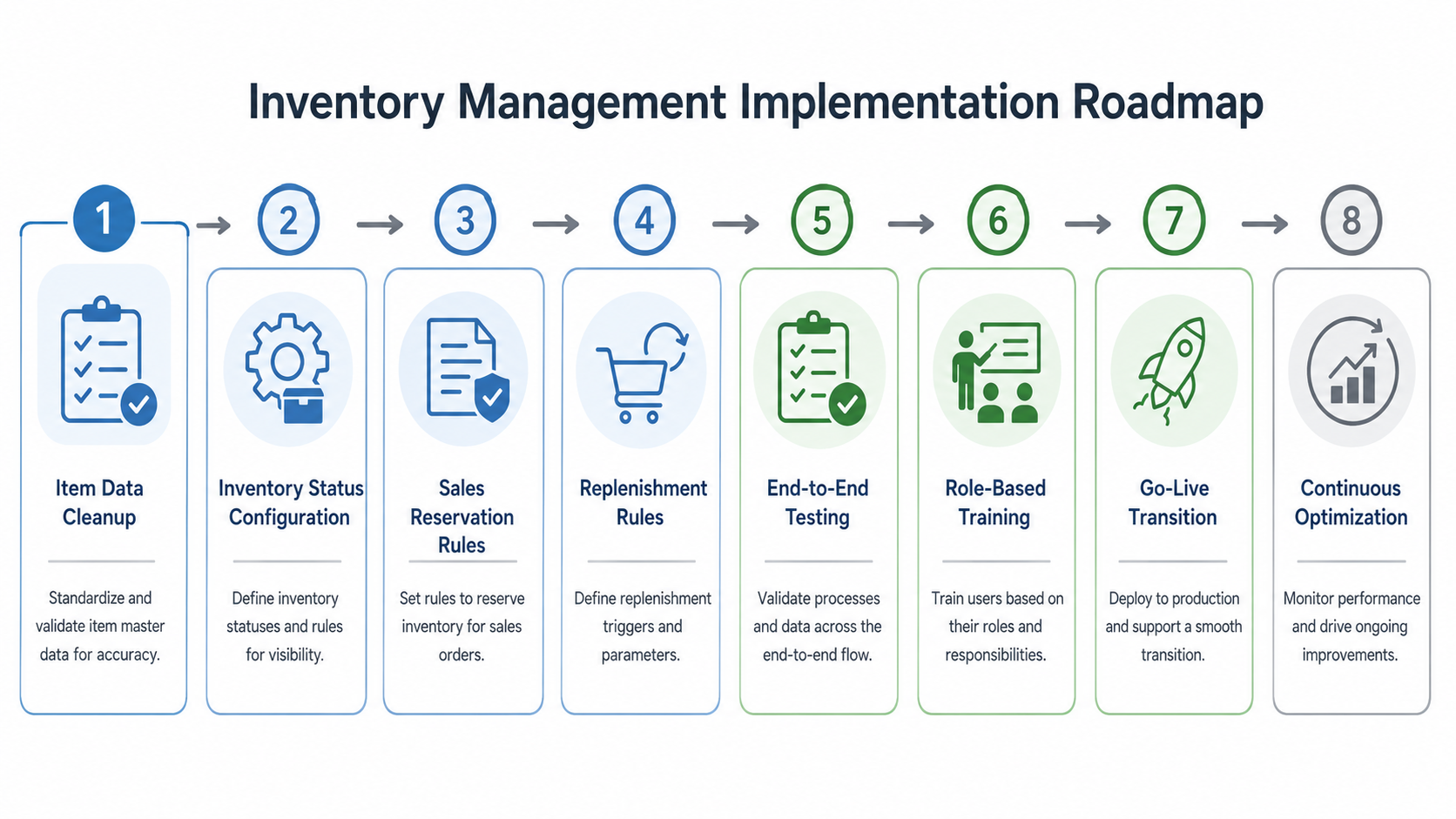
The first implementation challenge was item data cleanup. The customer’s item names included abbreviations, legacy model numbers, supplier item numbers, and internal nicknames. The same part could appear with several descriptions across different spreadsheets, and units of measure were not fully consistent. Industry Software did not recommend cleaning every historical item at once. The project team worked with the customer to prioritize high-turnover items, long-lead-time items, key customer materials, and high-value stock. Low-frequency historical items remained in basic records during the first phase and could be refined later based on usage frequency and business impact.
This prevented the project from being slowed down by historical data. More importantly, the customer brought the items that most affected sales commitments, purchasing decisions, and delivery risk under control first. The first wave of system value therefore appeared in the inventory decisions users faced every day.
Start with Priority Items
The project followed a phased implementation model, starting with high-turnover industrial parts, long-lead-time components, and key customer order scenarios. Industry Software worked with sales, purchasing, warehouse, operations, and finance users to review inventory data flow. The review covered customer inquiries, sales orders, stock reservations, purchase requests, supplier arrivals, receiving confirmation, shortage follow-up, substitute item review, and inventory review.
After workflow confirmation, the project team helped the customer prepare item codes, units of measure, inventory statuses, customer reservation rules, safety stock levels, replenishment parameters, supplier lead times, substitute item relationships, and user permissions. Several areas that had not been fully standardized before, such as reservation validity, customer priority, shortage reasons, return-pending inspection status, and slow-moving inventory definitions, were completed during implementation. As a result, the system could record not only stock quantity, but also whether inventory could be promised, whether it needed replenishment, and whether it affected customer delivery.
Testing focused on real sales and purchasing coordination scenarios. The project team selected instant quotation, stock reservation, key customer order, long-lead-time shortage, purchase order arrival change, and substitute item recommendation scenarios for end-to-end testing. This helped the customer identify inconsistent units of measure, unclear reservation rules, and incomplete supplier lead-time data before go-live.
Core workflows went live within 5–7 weeks, followed by adjustments to inventory statuses, dashboard fields, replenishment rules, and sales reservation prompts based on user feedback. Browser-based access allowed sales, purchasing, warehouse, and operations teams to work from the same inventory view across locations. The first phase stabilized available stock, open purchase orders, and sales reservations, while the second phase extended slow-moving inventory analysis, supplier performance, customer demand trends, and inventory investment analysis.
Change Daily Decisions
Training was designed around daily decisions rather than system menus. Sales users focused on available stock, open purchase orders, substitute items, and reservation validity, while purchasing users focused on replenishment suggestions, supplier lead time, and shortage risk. Warehouse users focused on inventory status updates, inspection hold, and return receiving, while operations users focused on shortage dashboards, slow-moving inventory, key customer reservations, and stock turnover.
After go-live, the Industry Software implementation team continued to collect user feedback. Some sales users wanted expected arrival dates to appear more directly during quotation, so the stock prompt was refined. Purchasing users wanted to separate true gaps from items already covered by open purchase orders, so the replenishment dashboard was adjusted. This ongoing optimization helped the customer move inventory management from warehouse recordkeeping to cross-team decision-making.
The customer also began to establish new inventory ownership. Sales teams no longer asked only whether stock existed; they checked whether it could be promised. Purchasing teams no longer responded only to urgent shortages; they planned based on replenishment suggestions and supplier timing. Operations teams no longer waited for customer escalations; they used dashboards to identify delivery risks earlier.
From Follow-Up to Decisions
An operational review conducted 8–12 weeks after go-live showed that sales stock confirmation time decreased by 40%. Sales users could check available stock, reserved stock, expected arrival dates, and substitute items in the system instead of asking warehouse and purchasing teams one by one. For high-inquiry items, this improved quote response speed and customer communication.
Urgent purchase requests decreased by 30%. Purchasing teams could see replenishment risks, open purchase orders, and true gaps earlier, reducing last-minute ordering caused by delayed information. For long-lead-time items, system reminders helped teams assess supply risk before sales commitments became difficult to fulfill.
Backorder follow-up time decreased by 36%. Operations teams could review shortage reasons, purchasing status, expected arrival dates, substitute items, and affected customer orders in one place. Shortage handling moved from repeated follow-up to system-based coordination across sales, purchasing, and warehouse teams.
Inventory review preparation time decreased by 35%. Management could review stock by item category, customer demand, supplier, turnover speed, and reservation status. For slow-moving and high-value stock, operations teams could identify working capital risks earlier and adjust replenishment or sales focus accordingly.
Commitments and Capital Efficiency
The implementation helped the customer turn inventory from warehouse data into an operating decision foundation. Sales teams could make more accurate customer commitments, purchasing teams could replenish more proactively, and operations teams could identify shortages, excess stock, and supply risks earlier. Inventory management became more than counting and receiving; it became a key process connecting revenue, delivery, purchasing investment, and customer service.
From a long-term ROI perspective, the value of real-time stock visibility increases as data accumulates. By reducing urgent purchase requests by 22%–30% and improving inventory visibility, the customer also reduced duplicate purchasing and expedited freight costs, which are not counted in the percentages above. Management has since used the system to review slow-moving inventory by item category, reservation status, and supplier lead time, supporting more disciplined inventory investment decisions.
These returns do not appear fully on the first day of go-live, but they become more visible as sales orders, open purchase orders, reservations, and turnover data accumulate. More accurate available-to-promise logic can reduce overpromising and order delays, more stable replenishment rules can reduce emergency buying pressure, and clearer slow-moving inventory analysis can help control working capital. Industry Software helped the customer build not a single stock list, but an inventory decision system that purchasing, sales, and operations can use together.
Client Quote
“One sensor order became the turning point for us. Sales saw quantity in the stock list and was ready to promise same-day shipment, but operations later found that half of the quantity was reserved for a long-term customer and the rest was still under inspection. With the system, available stock, reserved quantity, open purchase orders, and expected arrival dates appear in one view, so we make fewer risky commitments and purchasing is not driven only by urgent shortages.”