Quality Management Software for Manufacturers That Need More Than Inspection Records

Summary
×Quality problems rarely begin at the inspection table, especially in automotive parts, electronics, medical device, metal fabrication, machining, and industrial equipment environments where one failed batch can quickly affect inventory, production, shipment, and customer commitments. A customer requirement may be unclear, a supplier lot may not be tracked properly, or a work order may use the wrong revision before anyone marks a product as failed. By the time an inspector catches the issue, the business may already be dealing with blocked inventory, delayed shipments, extra labor, and customer pressure. That is why quality management software should not be viewed as a digital checklist. It should help manufacturers control what happens before and after inspection, not just record the inspection result.
For many growing manufacturers, the difficult choice is not whether they need better quality control. The harder question is how to gain control without taking on a system that feels too large, slow, or expensive to implement. Spreadsheets are flexible, but they depend too heavily on memory, manual updates, and individual discipline. Large enterprise systems can be powerful, but they may feel heavy for teams that need practical rollout and hands-on support. Industry Software fits the middle ground by offering cloud access, configurable workflows, modular deployment, and implementation support that can start with one high-value process and expand over time.
Where This Matters Most
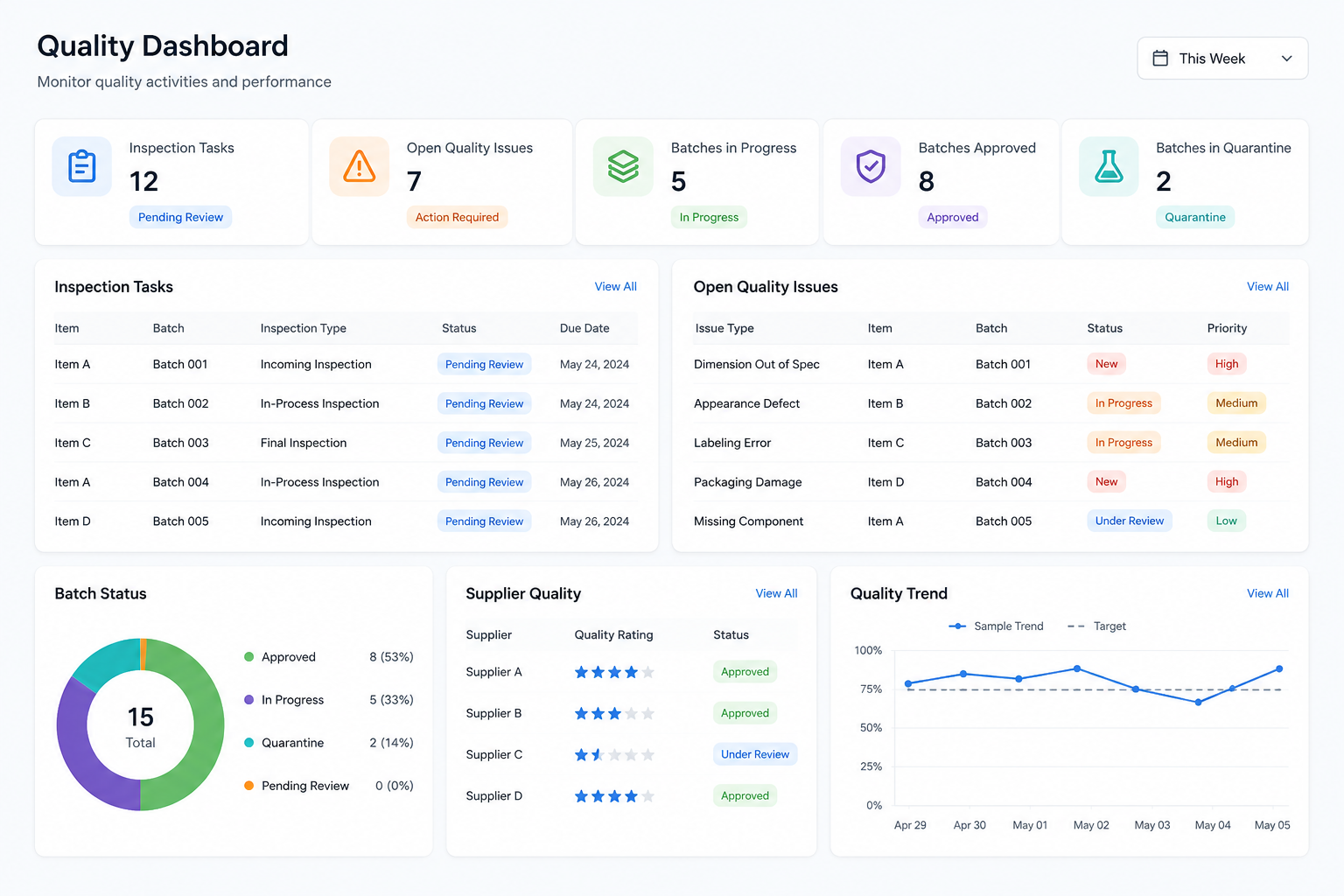
This type of quality management workflow is especially useful for manufacturers where one failed batch can affect production schedules, customer delivery, inventory availability, and cost. Automotive parts suppliers may need tighter control over revision levels, lot traceability, inspection records, and nonconformance follow-up because a small dimensional issue can affect multiple downstream assemblies. Electronics manufacturers may care more about component traceability, process checks, rework history, and final release control because defects can be hard to see until later testing. Medical device and other regulated product manufacturers often need stronger documentation, approval history, and batch status control because quality records must support both internal review and external audit readiness. These environments do not just need inspection records; they need controlled quality movement across the business.
The same logic applies to metal fabrication, machining, industrial equipment, and custom assembly companies. A machine shop may need to track material lots, tolerance failures, measurement records, rework, and customer-specific inspection requirements. An industrial equipment manufacturer may need to connect inspection results with work orders, subassemblies, purchasing, and final shipment review. A custom assembly business may need flexible quality checks because each order can have different customer requirements, BOM structures, and acceptance criteria. Industry Software is useful in these environments because it can start with the workflow that matters most, such as incoming inspection, batch control, or nonconformance, and then expand into inventory, production, purchasing, sales, accounting, and reporting.
Automotive Parts: revision control, dimensional inspection, lot tracking, nonconformance follow-up.
Electronics Manufacturing: component traceability, process checks, rework history, final release review.
Medical Devices and Regulated Products: documentation, approval history, batch status, audit-ready records.
Metal Fabrication and Machining: material lots, tolerance checks, measurement records, rework control.
Industrial Equipment: work order quality, subassembly inspection, supplier issues, shipment release.
Custom Assembly: customer-specific requirements, BOM checks, flexible inspection plans, acceptance records.
Quality Requirements Should Not Live in Static Files
A manufacturer can have all the right quality documents and still struggle to execute them. Customer specifications may sit in emails, product drawings may be stored in folders, and process requirements may be passed around as PDFs. The problem is not always that the information is missing. The problem is that the information is not tied to the product, work order, inspection step, or batch that needs it. When requirements stay disconnected from daily execution, teams often discover the gap only after a failed inspection or customer complaint.
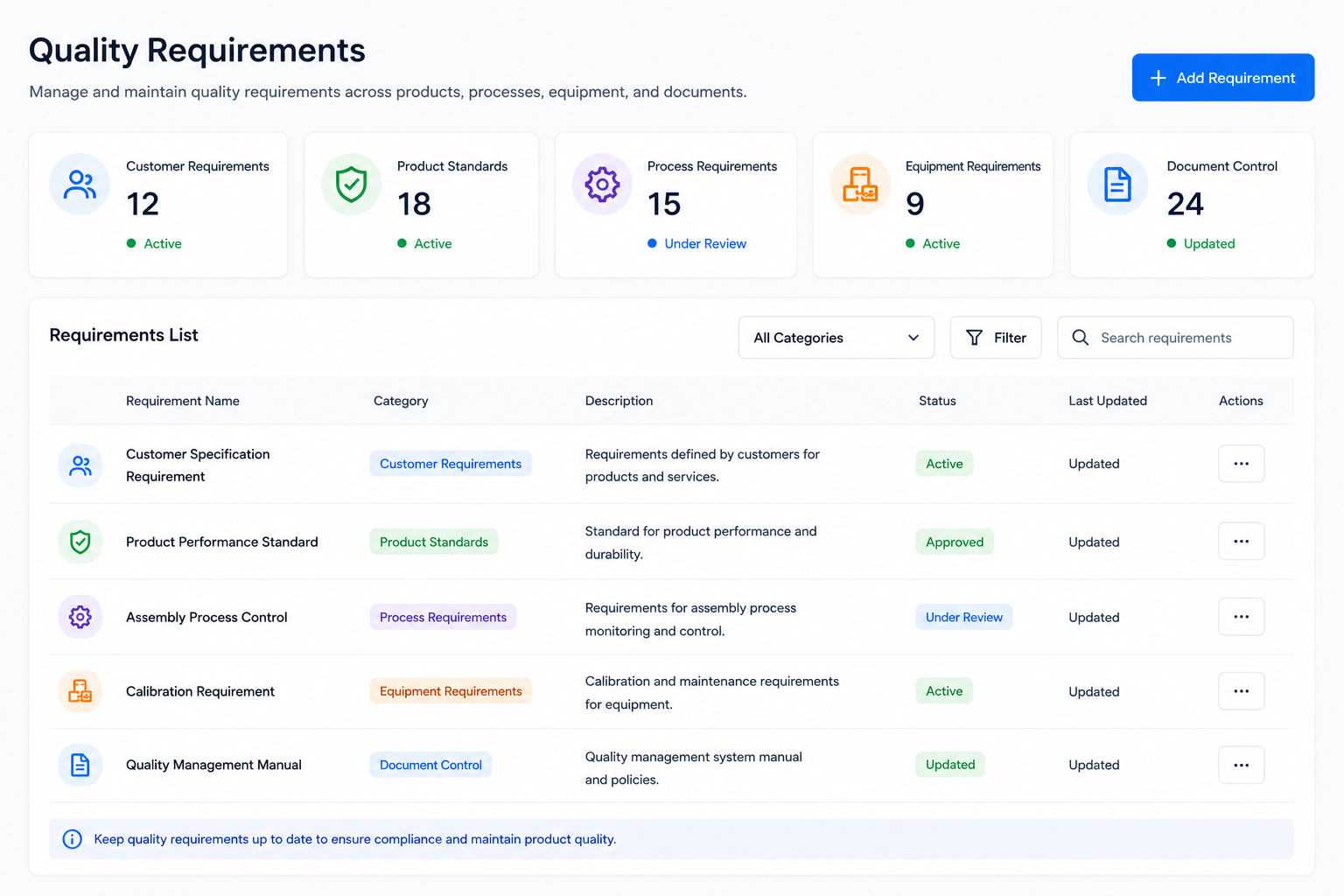
A stronger QMS starts by turning requirements into usable system data. A customer requirement should connect to the relevant product, order, revision, or inspection plan. A process requirement should connect to the operation where it needs to be followed. Equipment requirements should connect to machine settings, calibration needs, or maintenance timing. Industry Software can support this through configurable fields, categories, templates, permissions, and workflow statuses, so requirements are not just stored but actively used in the quality process.
Customer Requirements: customer specifications, order requirements, revision records, approval status.
Product Standards: dimensions, tolerances, materials, test methods, inspection criteria.
Process Requirements: work instructions, operation standards, approval steps, review status.
Equipment Requirements: machine settings, calibration schedule, maintenance rule, usage limit.
Document Control: version history, effective date, change record, approval trail.
A practical example is a metal shop producing parts for multiple customers with different tolerance rules. If the tolerance requirement is only stored in a PDF, the inspector has to know where to look and which revision applies. If the requirement is tied to the product and inspection plan, the right standard appears at the point of inspection. The difference sounds small, but it reduces the chance that quality depends on someone remembering which file to open. That is the kind of control manufacturers usually need before they need a complicated enterprise rollout.
Inspection Results Need Context, Not Just Pass or Fail
A pass or fail result is not enough to improve quality. If a batch fails, the team needs to know what failed, where it failed, which requirement it failed against, which supplier lot or production order was involved, and whether the issue affects inventory or customer delivery. A simple inspection log may prove that an inspection happened, but it does not always help the business decide what to do next. The inspection record should capture the reason behind the result in a way that can be searched, filtered, and used later. Without that structure, the same problem can repeat while everyone still believes the company is “tracking quality.”
A useful inspection module should separate structured data from notes. Notes are still helpful for explanation, but key details such as failed variable, batch number, supplier lot, inspection type, operation, and disposition should be fields the system can report on. Industry Software can help build that structure without forcing every manufacturer into the same template. A machine shop may need dimensions and tolerance fields, while an assembly business may care more about component verification, visual checks, and final acceptance. The workflow should match the work.
Incoming Inspection: supplier lot, received quantity, sampling rule, inspection status.
In-Process Inspection: operation step, work order, production batch, inspection item.
Final Inspection: finished item, release status, shipment restriction, approval result.
Failure Variables: dimension, material, appearance, performance, packaging, assembly fit.
Attachments: photos, measurement files, test reports, certificates, sign-off records.
Imagine a supplier delivers steel sheets under a lot number, and incoming inspection finds the thickness outside tolerance by 0.05 mm. If that failure is only written in a comment, the team may still need email, spreadsheets, and verbal updates to understand the impact. If it is captured as a structured inspection result, the lot can be restricted, purchasing can see the supplier issue, production can see affected work orders, and quality can open a nonconformance record from the same flow. The value is not just better documentation. The value is faster containment before the issue spreads.
Batch Status Is Where Quality Becomes Operational
Quality control becomes much more powerful when it changes what the business can do with inventory. A lot that is waiting for inspection should not be treated the same as approved stock. A failed lot should not be available for production just because someone forgot to update a spreadsheet. A finished goods batch under review should not be shipped because the sales team only sees that inventory exists. Batch status is where quality moves from recordkeeping into operational control.
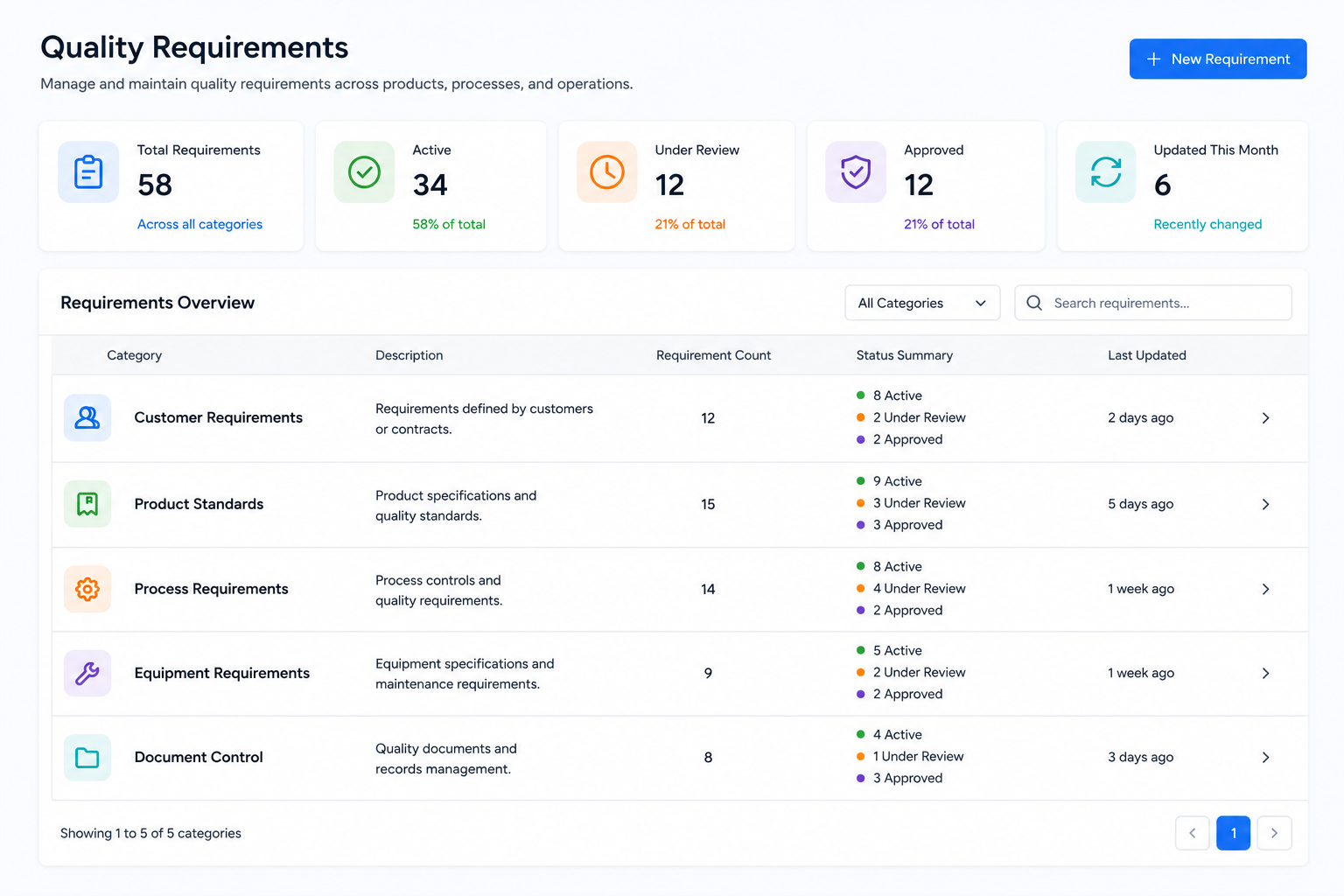
Industry Software can support batch workflows through configurable statuses such as Pending Inspection, Approved, Quarantine, Reinspection, Released, Rework, or Scrap. The status should be visible to the teams that need it, but permissions should control who can change it. This avoids the common problem where quality makes a decision in one file while warehouse and production continue working from another version of the truth. It also gives management a cleaner view of inventory that is technically on hand but not actually usable. That distinction matters when delivery promises are tight and production schedules are already full.
Raw Material Lots: supplier lot, receiving date, inspection status, inventory location.
Production Batches: work order, consumed materials, production quantity, operation record.
Finished Goods Batches: finished item, release status, customer order link, shipment record.
Status Control: pending inspection, approved, quarantined, reinspection, released, scrapped.
Traceability Path: supplier to inventory, inventory to production, production to customer.
A common case is a received material lot that fails inspection while three work orders are waiting on it. Without status control, production may find out late, after schedules have already been built around that material. With a controlled workflow, the failed lot moves into quarantine, the related work orders can be reviewed, and purchasing can follow up with the supplier. Nobody has to interpret a side spreadsheet or wait for a verbal update. The inventory status itself tells the business what can and cannot happen next.
Nonconformance Should Create a Path to Resolution
A failed inspection is not the end of the quality process. The company still needs to decide who owns the issue, what caused it, whether the batch should be reworked or scrapped, whether the customer order is affected, and how the issue will be closed. This is where many manufacturers lose discipline. The problem is recorded, but the follow-up lives in emails, meetings, or someone’s personal task list. By the time the same issue appears again, the team may have no clean history of what was done last time.
A nonconformance workflow should create a path from issue to resolution. It does not need to be overly complex, especially for smaller manufacturers, but it does need ownership, status, due dates, root cause categories, corrective actions, and closure review. Industry Software can support different paths for supplier issues, production issues, finished goods failures, and customer-related quality events. This flexibility matters because a material defect, machine setup issue, and packaging error should not necessarily follow the same route. The workflow should be structured enough to trust, but simple enough for people to actually use.
Nonconformance Record: item, batch, issue type, discovery point, severity level.
Root Cause Review: material, machine, process, operator, documentation, supplier.
Responsibility Assignment: department, owner, due date, current status, escalation rule.
Corrective Action: temporary action, long-term action, reinspection, verification result.
Closure Review: final disposition, approval record, release decision, historical record.
Think about a finished goods batch of machined brackets that fails final inspection because width is outside tolerance. The batch is already tied to a customer shipment later in the week, so the issue is not only a quality problem. It also affects production planning, inventory availability, and customer communication. A controlled workflow can restrict the batch, assign production to review the machine setup, require reinspection after rework, and keep sales from promising shipment before release. The system does not remove judgment, but it makes sure the judgment happens inside a trackable process.
Dashboards Should Show Decisions, Not Decoration
Many dashboards look impressive but do not change daily behavior. A quality manager does not need a colorful chart if the open issues are still hard to prioritize. A production manager does not need a pass-rate graph if they cannot see which work orders are blocked by inspection. An executive does not need a summary number if the cost of rework, scrap, and delayed delivery is still hidden. A useful dashboard should make decisions easier, not just make data look organized.
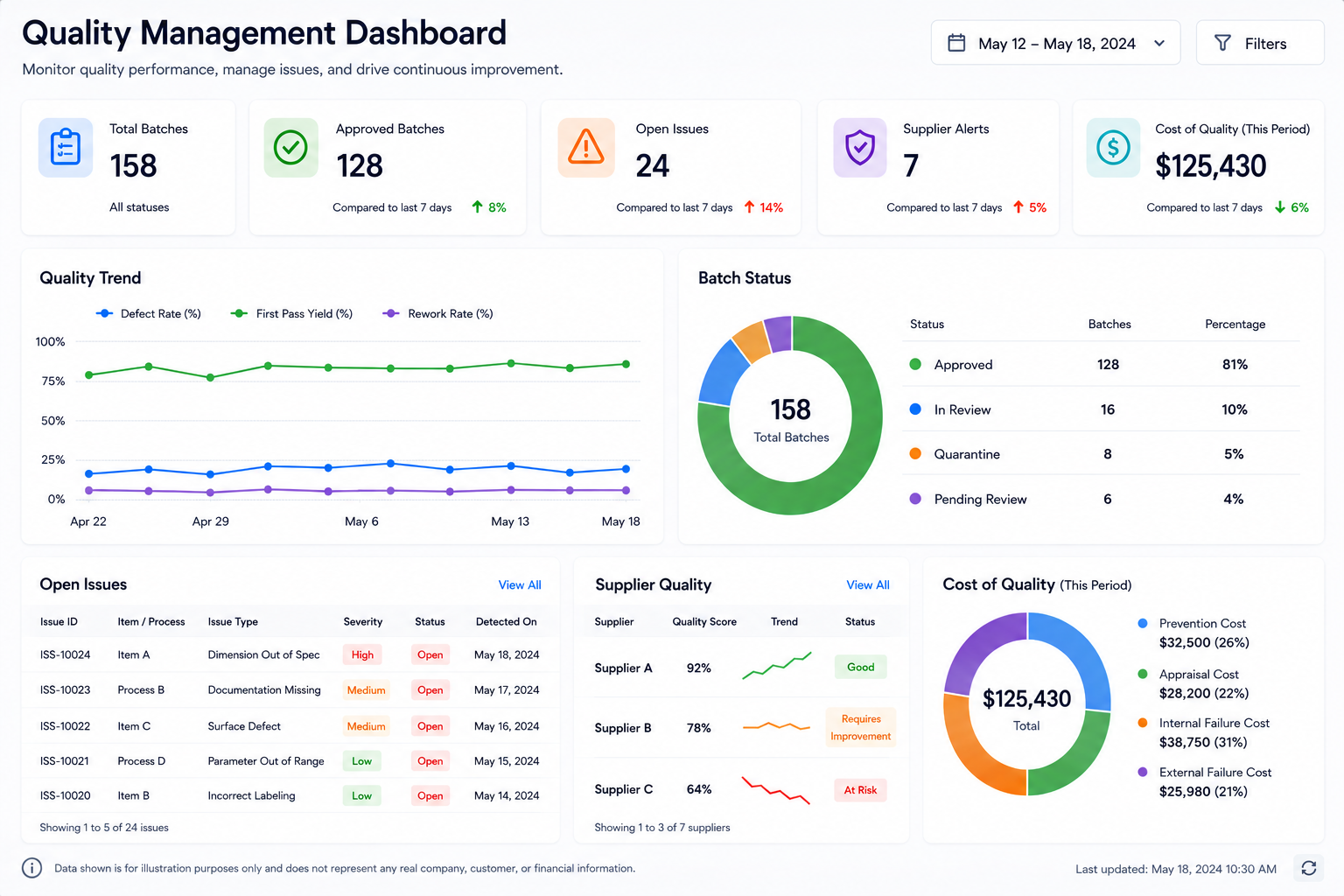
Industry Software can support role-based dashboard views, so different users see the same underlying quality data through different lenses. Quality can focus on failures, nonconformances, and open corrective actions. Warehouse can focus on batch status and restricted inventory. Production can focus on work orders affected by inspection or rework. Management can review trends, supplier issues, open risks, and quality-cost indicators.
Quality View: failed inspections, open nonconformances, reinspection queue, closure status.
Warehouse View: pending inspection, quarantine inventory, released batches, blocked stock.
Production View: affected work orders, rework queue, batch restrictions, process issues.
Purchasing View: supplier issue count, incoming inspection failures, lot rejection history.
Management View: quality trends, issue aging, supplier performance, quality-cost review.
The danger with dashboards is that they can create the feeling of control without the workflow behind it. A pass-rate trend may show that quality is slipping, but it does not tell the team what to release, what to hold, or who owns the next action. A better system ties dashboard numbers back to records that users can open, review, and resolve. That is where quality software becomes practical. It shortens the distance between seeing a problem and doing something about it.
Quality Data Should Reach Business Decisions
Quality problems affect more than the quality department. A failed batch can create rework hours, scrap, extra purchasing, production delays, shipment risk, and uncomfortable customer conversations. If quality data stays inside inspection records, management may see the defect but miss the business cost. The better question is not only “Why did this batch fail?” It is also “What did this failure do to inventory, labor, delivery, supplier performance, and customer commitments?”
Industry Software’s modular structure helps quality data become part of broader operational review. A supplier issue can inform purchasing review. A failed production batch can inform rework and labor tracking. A restricted finished good can inform sales order risk. A scrap decision can inform cost review. These are practical business questions, not abstract software integrations.
Quality to Inventory: quarantine status, release control, available stock, scrap decision.
Quality to Production: work order impact, rework labor, process issue, blocked batch.
Quality to Purchasing: supplier rejection, incoming failure trend, supplier review.
Quality to Sales: customer order risk, shipment hold, customer communication need.
Quality to Cost Review: scrap cost, rework cost, inspection effort, delay impact.
A lightweight quality tool may be quick to launch, but it can become another silo if it cannot influence inventory or production. A large enterprise platform may cover everything, but the implementation can become too heavy for a smaller team. Industry Software is meant for companies that need a practical middle path. The system can start with a focused quality workflow and expand into connected operational modules as the business is ready. That makes the improvement easier to absorb without losing the bigger picture.
Start With One Workflow That Proves Value
Not every manufacturer should begin with a full quality transformation. For many teams, the better first step is a narrow workflow that creates visible control quickly. Incoming inspection and batch status are often a strong starting point because they touch purchasing, warehouse, quality, and production without requiring every process to change at once. If the team can clearly see which received lots are pending, approved, quarantined, or rejected, the system has already solved a real daily problem. That early win builds trust.
A practical first project might focus on supplier lot tracking, receiving inspection, status control, and basic reporting. The goal is not to build the perfect system in the first month. The goal is to remove one painful manual handoff and prove that users can trust the workflow. Once the team sees value, the company can expand into nonconformance, production inspection, dashboards, supplier scorecards, and cost analysis. Industry Software’s modular approach supports this type of rollout because the system does not need to be implemented all at once.
Setup Phase: item records, supplier lots, receiving fields, inspection statuses, permissions.
Launch Phase: incoming inspection, quarantine status, approval status, reinspection review.
Review Phase: supplier issue trends, blocked inventory, inspection turnaround, user adoption.
This also makes adoption less intimidating. Users are not being asked to learn every possible module immediately. They are being asked to manage one process better than they manage it today. That distinction matters. A focused rollout gives the company room to clean data, adjust fields, train users, and refine workflow before expanding the system.
Buyer Guide: Look Past the Feature List
Most vendors can say they support quality management, inventory, production, approvals, and reporting. That does not mean they support the way a manufacturer actually works. The real test is whether the system can handle common exceptions: failed incoming inspection, restricted inventory, reinspection, partial release, supplier review, finished goods hold, customer order impact, and corrective action closure. A feature list can make two systems look similar. A workflow demonstration usually reveals the difference.
Manufacturers should also think about implementation risk. If the system is too rigid, users may return to spreadsheets because the software does not reflect the real process. If the system is too loose, the company may collect records without creating control. If the system is too heavy, the rollout may stall before users see value. Industry Software addresses these risks through configurable fields, workflow statuses, role-based access, modular rollout, cloud access, and dedicated implementation support.
Can inspection results update inventory status?
Can failed lots be quarantined and restricted from production use?
Can nonconformance workflows assign owners, dates, actions, and closure review?
Can dashboards show open issues, restricted batches, and supplier trends by role?
Can the system start with one workflow and expand into more modules later?
Can fields, statuses, reports, permissions, and workflows be adjusted after launch?
Does the provider support data setup, user training, and post-launch improvement?
The best buying conversation should not stop at “Do you have a QMS module?” A stronger question is, “Can you walk through what happens when a supplier lot fails inspection and three work orders depend on it?” That scenario shows whether the system can support real quality control, inventory restriction, production impact, and follow-up. It also shows whether the vendor understands manufacturing operations or is only demonstrating screens. Industry Software is strongest when the conversation moves from features to workflow.
How Industry Software Supports Growing Manufacturers
Industry Software is a strong fit for manufacturers that want practical control without a long, overwhelming rollout. The system is cloud-based, so teams can access it without local software installation. It is modular, so companies can start with quality, inventory, production, purchasing, sales, accounting, or reporting based on priority. It is configurable, so fields, statuses, permissions, pages, and reports can be adjusted around the company’s actual process. It is also supported by a dedicated team that can help with workflow review, setup, data import, training, and post-launch changes.
This combination is important because software success depends on more than the tool itself. A manufacturer needs clean data, a realistic launch plan, trained users, and support after go-live. Industry Software’s value is not just that it can store quality records. Its value is that it can help shape quality management into a usable operating workflow. For growing teams, that can be the difference between buying software and actually changing how work gets done.
Cloud-Based Access: no local download, multi-location use, shared operational data.
Workflow Customization: configurable fields, pages, statuses, permissions, and reports.
Modular Structure: quality, inventory, production, purchasing, sales, accounting, reporting.
Fast-Launch Support: focused rollout, workflow setup, user training, go-live guidance.
Ongoing Training: post-launch support, process adjustments, new user enablement.
Strong Value: practical functionality, controlled rollout, scalable structure.
Dedicated Team Service: one-on-one setup, data review, workflow planning, launch support.
Broad Experience: manufacturing, distribution, engineering, service, and operations.
Better Quality Management Starts With Control
Quality management software should not only help a company record what happened. It should help teams control what happens next. When a lot fails inspection, inventory should reflect it. When a batch is restricted, production and sales should see the impact. When a nonconformance is opened, someone should own the resolution. When management reviews quality, the discussion should include cost, delivery, supplier performance, and customer risk.
Industry Software gives manufacturers a practical way to build that kind of control without starting with an oversized implementation. A company can begin with incoming inspection and batch status, then expand into nonconformance, production inspection, dashboards, supplier analysis, and cost reporting. The goal is not to make quality management more complicated. The goal is to make it easier to trust. For manufacturers that want fewer surprises, fewer side spreadsheets, and better follow-through, that is where quality software becomes truly useful.