B2B Sales Order Management Software for Order-to-Cash Control

Summary
×A sales order is where many B2B companies start losing control without noticing it. The quote may look profitable, the customer PO may be approved, and the shipment may go out on time, but the order can still lose margin through missed freight, unbilled rush charges, partial shipments, invoice delays, or AR steps that never get finished. These problems rarely look dramatic at first. They show up later as a tense month-end review, a customer asking for an invoice that was never sent, or accounting discovering completed work that never moved into receivables.
Good sales order management software should not simply make order entry faster. It should help teams control the messy middle between order entry, fulfillment, invoicing, payment follow-up, and closeout. Industry Software fits this need through a practical configuration layer: custom fields, order line types, workflow statuses, role-based permissions, action buttons, templates, and report views. In plain terms, the system can be shaped around how the company actually handles sales orders instead of forcing every exception into a generic order screen.
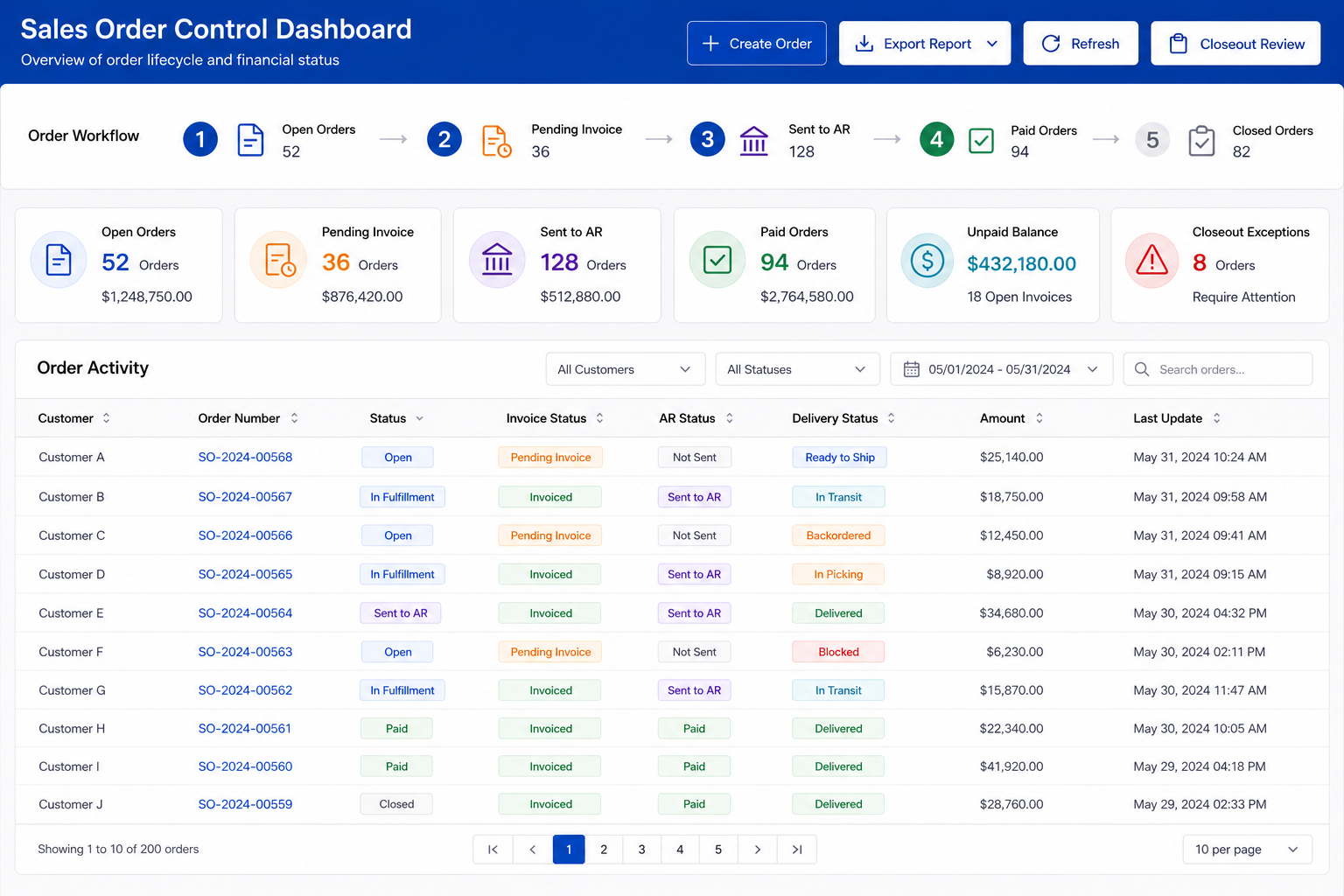
Margin Leakage Starts Inside the Order
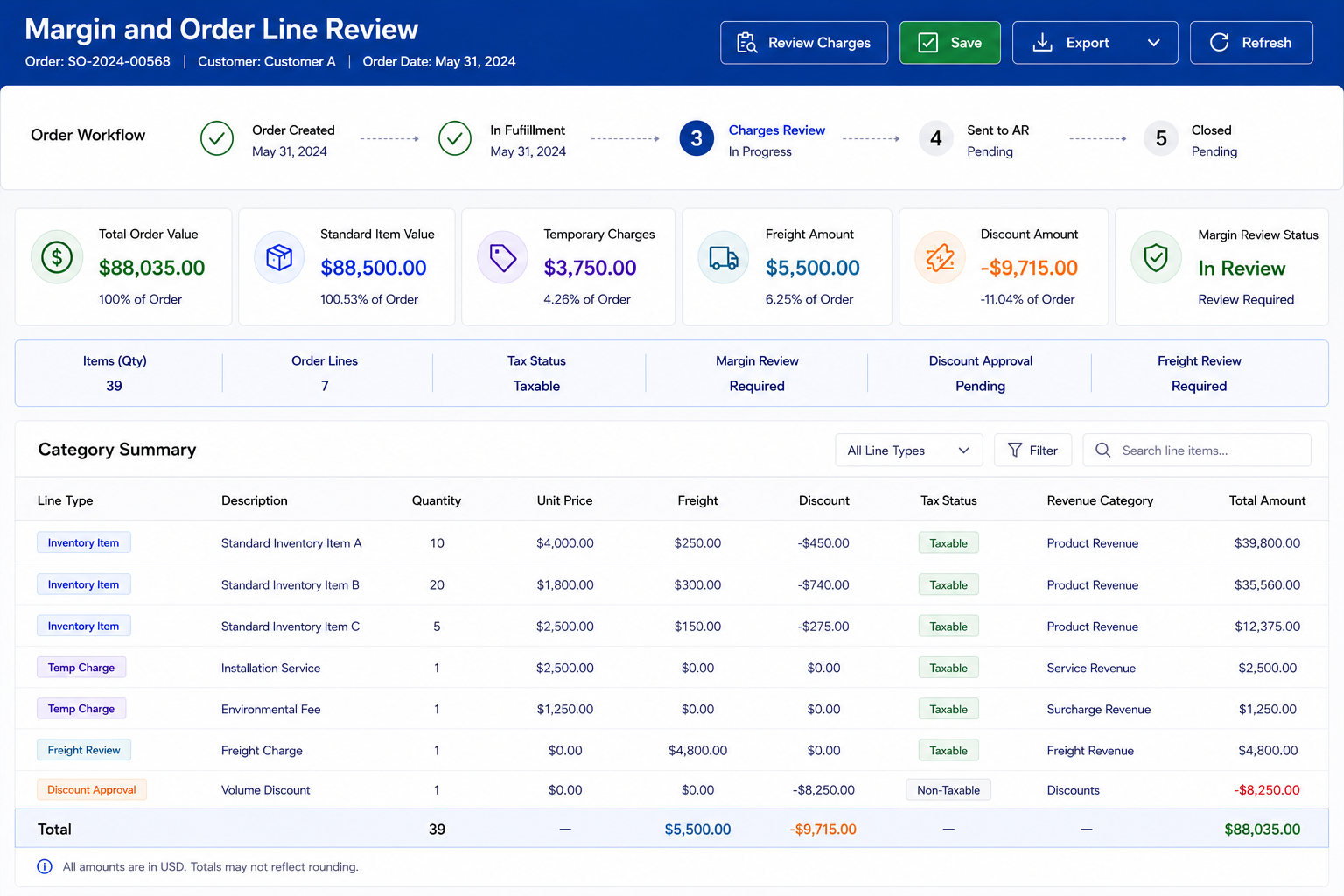
Margin leakage often starts after the sale is already “won.” A customer asks for rush handling, a salesperson agrees to special freight, or a temporary service charge is discussed but never added to the order. Warehouse does the extra work, accounting invoices only the standard item lines, and management later sees a completed order without realizing margin was lost. Nobody intentionally made a large mistake, but the business still absorbed cost it should have billed. That is why the sales order needs to hold more than product, quantity, and price.
Industry Software can support this by separating standard inventory items from temporary charges, freight, discounts, and special services. The important point is not just having extra fields. The system needs enough structure so those fields carry forward into invoices, reports, and closeout checks. A rush charge should not live only in an email thread. A freight exception should not disappear before billing.
Inventory Items: SKU, item cost, sale price, quantity, fulfillment status.
Temporary Charges: rush fee, setup charge, service labor, special packaging.
Freight Handling: shipping method, freight charge, billed freight, absorbed freight.
Discount Tracking: special price, manual adjustment, approval note, reporting category.
Margin Review: item cost, sale price, extra charge, order-level exception flag.
Delivery Risk Hides Behind Simple Statuses
A single due date does not tell the full story of an order. An order may be partially available, waiting on one item, split across warehouse locations, or dependent on a custom service line. If the system only shows “Open” or “Shipping,” every department interprets the order differently. Sales thinks the customer is being handled, warehouse sees missing stock, accounting does not know whether to invoice, and the customer only knows the delivery is unclear. That kind of confusion is not a visibility problem; it is a workflow design problem.
A better sales order workflow should make the operational condition of the order visible. Industry Software can use configurable statuses and line-level order information to show whether an order is ready, partially fulfilled, waiting on stock, waiting on invoice, or ready for AR review. These are not just dropdown labels. They become working signals that tell users what still needs action. This reduces the chance that the real order status lives in someone’s inbox or spreadsheet.
Delivery Commitment: requested date, confirmed date, shipment date, delivery status.
Partial Fulfillment: shipped quantity, remaining quantity, split delivery, open balance.
Backorder Review: shortage, expected availability, next shipment, customer update.
Customer Communication: delay notice, partial shipment message, revised delivery date.
Order Risk Review: late order, missing shipment detail, pending approval, open exception.
Temporary Items Need Control, Not Just Flexibility
Temporary items are necessary in real B2B order management. Customers may need one-time services, field labor, rush handling, setup fees, tooling charges, or custom packaging. If the system forces every one-time charge into the item master, the item list becomes cluttered. If it allows uncontrolled free-text entry, reporting and invoicing become unreliable. Both problems eventually push users back into manual tracking.
The stronger approach is controlled flexibility. A temporary item should have description, price, quantity, tax treatment, revenue category, and invoice behavior. It should not behave like a stocked item, but it should still be structured enough for accounting and reporting. Industry Software can support separate order line types so inventory items and temporary items can exist in the same order without damaging inventory accuracy. This is one of the small design details that makes a sales order system usable in daily work.
One-Time Services: setup charge, repair service, field labor, rush handling.
Custom Charges: tooling fee, special packaging, handling charge, customer-specific work.
Tax Treatment: taxable status, non-taxable status, tax code, invoice treatment.
Reporting Category: service revenue, custom work, miscellaneous sale, special charge.
Invoice Carryover: description, quantity, price, tax, total amount.
Completed Orders Should Not Fall Out of AR
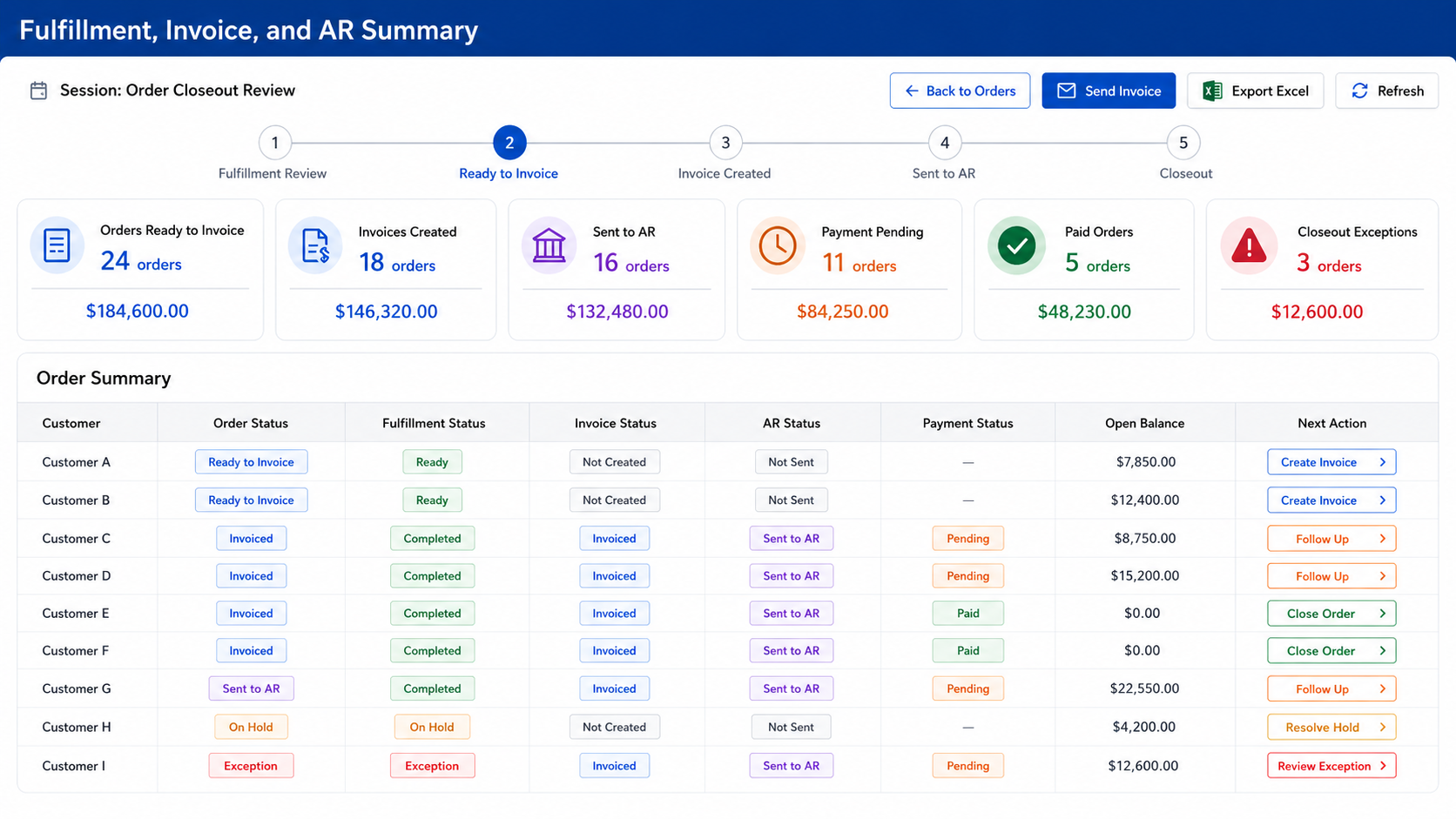
A completed order is not a financially closed order. This is one of the most painful gaps because the business has already done the work, but the money trail is still unfinished. At month-end, accounting may find orders that were fulfilled but never invoiced, invoices that were created but never sent, or balances that never moved into AR review. That discovery usually creates a familiar scramble: sales checks emails, warehouse confirms shipment, accounting rebuilds the trail, and the customer may already be wondering why billing is inconsistent. A better system should catch those gaps before they become month-end stress.
Industry Software can support status-based handoffs between completed orders, invoice actions, customer emails, AR review, and payment status. For example, a completed order with no invoice can appear as a closeout exception. An invoiced order not sent to AR can remain visible for accounting follow-up. A payment received status can update the order’s financial position instead of sitting in a separate note. The logic is simple: the system should expose unfinished financial steps while the order is still fresh.
Invoice Status: invoice pending, invoice created, invoice sent, invoice reviewed.
AR Status: ready for AR, sent to AR, pending payment, payment received.
Billing Exceptions: missing invoice, missing freight, missing temporary charge, tax review.
Customer Balance: unpaid amount, paid amount, return balance, account summary.
Payment Follow-Up: reminder sent, due date, account terms, collection note.
Closeout Should Find What the Day Missed
Daily closeout should not be a passive report. It should answer a sharper question: what did the team complete today, and what did it forget to finish? A useful closeout process highlights completed orders without invoices, invoices not sent to AR, missing customer emails, payment mismatches, returns needing review, and open delivery issues. These are small problems when caught the same day. They become expensive when they survive until Friday, month-end, or the next customer complaint.
Industry Software can make closeout practical by tying exception review to order statuses and action buttons. The system does not need to overwhelm users with every transaction. It should focus attention on the orders that are not clean yet. This is where configurable report views matter. A manager should see the missing handoffs, not just the sales total.
Completed but Not Invoiced: fulfilled order, missing invoice, billing follow-up.
Invoiced but Not Sent to AR: invoice created, AR handoff missing, accounting review.
Missing Customer Email: invoice not sent, delivery update missing, confirmation needed.
Payment Mismatch: payment entered, balance not updated, account review.
Open Delivery Issue: due date passed, shipment unclear, customer update needed.
Why Teams Return to Excel
Teams do not go back to Excel because they enjoy duplicate work. They go back because the official system cannot express the messy parts of the order. The spreadsheet becomes the place where people track partial shipments, special freight, temporary charges, customer promises, missing invoices, AR exceptions, and closeout notes. At that point, the company has two systems: the official one and the one people actually trust. That is a dangerous place to be because management reports may no longer reflect the real workflow.
The causes are usually specific. The system may have fixed statuses that do not match the company’s process. It may handle standard orders well but fail on temporary items, partial shipments, or customer-specific billing. It may show totals but not exceptions. It may require too many clicks for users to find the next action. Industry Software reduces that risk through configurable fields, line types, statuses, permissions, templates, and saved report views, so the system can reflect the real workflow more closely.
Status Mismatch: system labels do not match actual order stages.
Exception Mismatch: special charges and custom work do not fit cleanly.
Fulfillment Mismatch: partial shipments and backorders are not visible enough.
Finance Mismatch: invoice, AR, and payment follow-up are disconnected.
Reporting Mismatch: dashboards show totals but hide exceptions.
Ownership Mismatch: users cannot tell who owns the next step.
How Industry Software Makes the Workflow Configurable
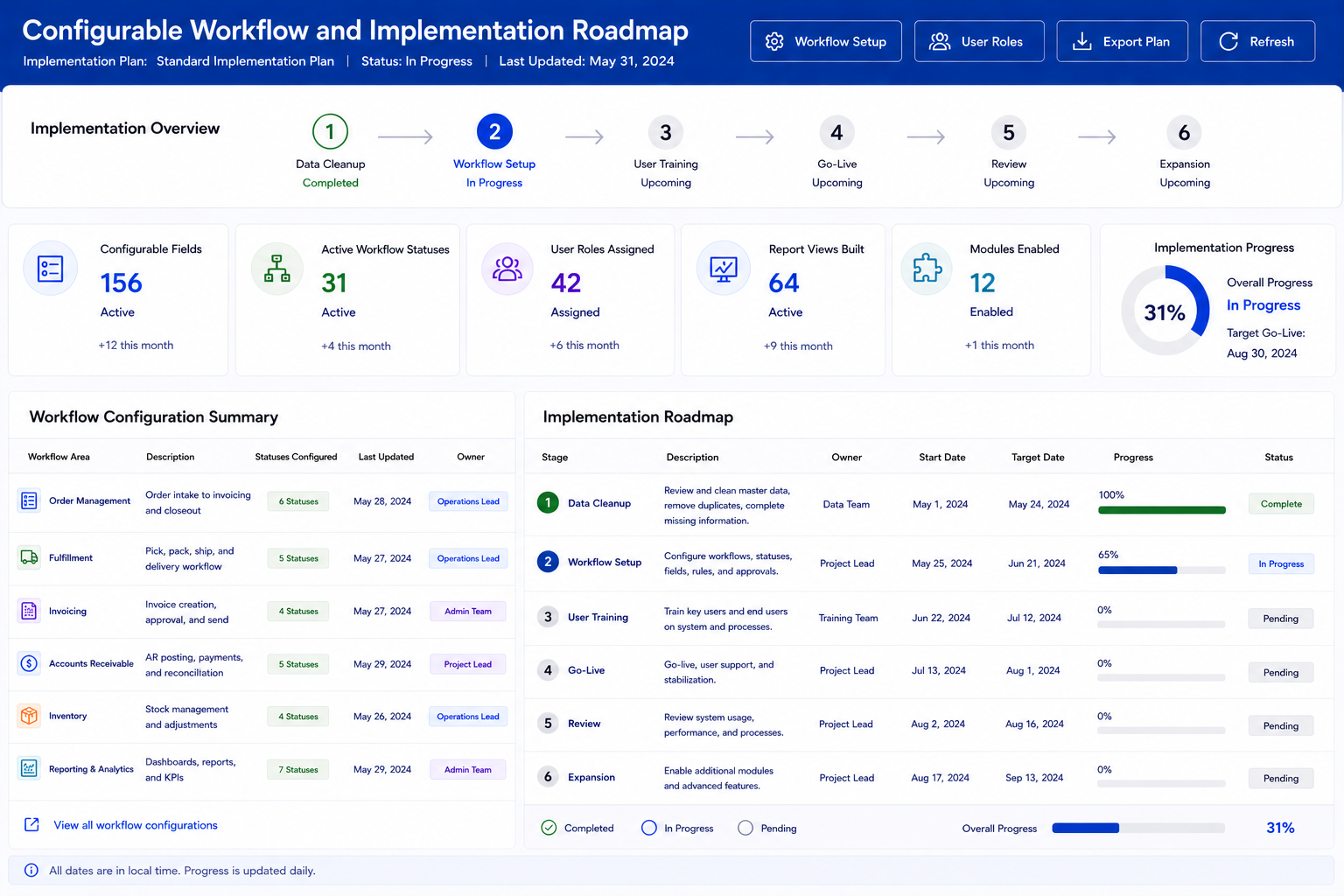
Industry Software should be understood as a configurable workflow platform, not just a set of sales order screens. In practical terms, that means businesses can define the order fields they need, create statuses that match their process, separate inventory and temporary line types, assign role-based access, use templates for repeat order patterns, and build report views around exceptions. A sales user may need fast order entry and customer communication. Accounting may need invoice status, AR handoff, and unpaid balance review. Management may need margin exceptions, closeout gaps, and order status summaries.
The configuration logic is straightforward. Fields capture the right data, statuses define the order stage, permissions control who can take action, buttons move the order into the next step, and reports show what is complete or missing. This is not the same as a simple dropdown-only system, and it does not require every company to adopt a heavy enterprise process. The goal is to configure the smallest useful workflow that keeps orders controlled. Industry Software’s cloud-based access, modular setup, fast-launch support, ongoing training, strong value, dedicated one-on-one service, and operational experience make that approach easier to implement.
Configurable Fields: customer PO, order type, freight rule, special charge, delivery reference.
Workflow Statuses: open, review, shipping, partial, completed, invoiced, sent to AR, paid.
Role-Based Permissions: sales access, warehouse access, accounting access, management review.
Action Buttons: invoice, email customer, send to AR, closeout, export.
Report Views: unpaid orders, missing invoices, pending AR, partial shipments, closeout exceptions.
Modular Expansion: sales orders, inventory, purchasing, production, accounting, AR, reporting.
Implementation Still Needs Discipline
No system fixes a messy process by magic. Sales order implementation touches customer records, item data, pricing, tax rules, shipping methods, payment terms, invoice behavior, user roles, and reporting. If the company imports duplicate customers, inconsistent items, unclear status names, or unfinished open orders, the software will only make the confusion easier to search. Data cleanup matters before launch. So does deciding who owns each handoff.
User adoption is another real challenge. People may resist a new process if the old spreadsheet feels faster, even when the spreadsheet is causing errors. Training has to show users how the workflow protects their daily work, not just where to click. Managers also need to enforce the process around invoices, AR handoff, customer email status, and closeout. Industry Software can support setup, training, workflow adjustment, and post-launch improvements, but internal ownership still matters.
Data Migration: customer records, item records, open orders, balances, historical references.
Process Design: status definitions, handoff ownership, exception rules, approval steps.
User Training: sales workflow, warehouse steps, accounting actions, management reports.
Change Management: spreadsheet reduction, role clarity, adoption review, process accountability.
Post-Launch Adjustment: field changes, report tuning, workflow cleanup, additional modules.
Better Sales Order Software Means Better Control
Better sales order management is not about making order entry prettier. It is about controlling the places where B2B companies lose money, time, and trust: missed charges, partial shipments, delayed invoices, AR gaps, unclear customer updates, and weak closeout routines. These are not rare edge cases. They are the daily cracks where companies slowly drift back to Excel. A strong system should make those cracks visible while the team can still fix them.
Industry Software gives growing companies a practical path to better order-to-cash control without jumping straight into an oversized enterprise rollout. A team can start with core sales order workflow, invoice actions, AR handoff, customer email status, closeout, and reporting, then expand into inventory, purchasing, production, accounting, and deeper reporting over time. Its strength is the combination of cloud access, workflow configuration, modular setup, fast-launch support, ongoing training, strong value, and dedicated service. The best sales order system is not the one with the most buttons. It is the one that helps every order move through the business with fewer leaks, fewer blind spots, and fewer reasons to rebuild the truth in Excel.