Construction Project Budget Management Software for Budget vs. Actual Control

Summary
×Most project teams do not lose control because they forgot to create a budget. They lose control because the budget stops reflecting the field. Materials arrive at a different price, labor hours run longer than planned, equipment stays on site longer than expected, and change work starts before the paperwork catches up. By the time the variance appears in a month-end report, the job may already have drifted too far to recover cleanly. A project budget is only as reliable as the last cost entered.
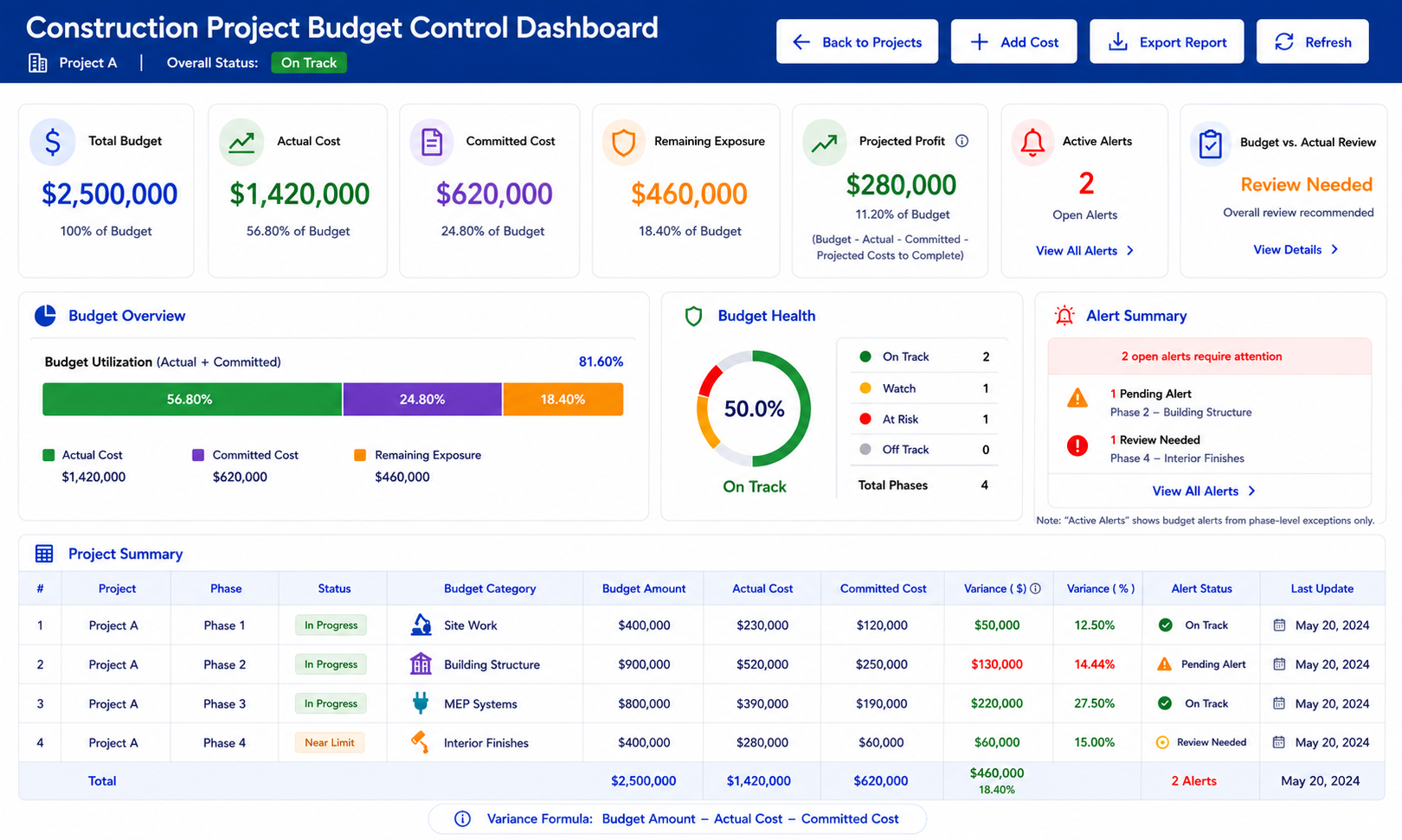
Construction project budget management software should keep the budget alive while the project is still moving. It should show planned budget, actual cost, committed cost, phase performance, contingency usage, alerts, and current profit before the job reaches closeout. For general contractors, specialty contractors, project-based manufacturers, installers, service teams, and construction managers, this matters because margin is protected through small decisions made during the job. Industry Software supports this type of workflow with configurable project records, budget categories, actual cost entry, committed cost review, reporting, alerts, cloud-based access, and modular expansion into purchasing, AP, inventory, sales, and accounting.
The Budget Has to Survive the Job Site
A project estimate often looks organized before work begins. Materials, labor, overhead, equipment, subcontractors, and contingency may all be separated into neat categories. The job site rarely stays that neat once work starts. A material delivery may include extra freight, a crew may spend two more days on site preparation, or a subcontractor may submit a revised cost after the schedule changes. If those movements do not flow back into the project budget quickly, the project manager is managing yesterday’s plan.
Industry Software can help turn the project budget into a working financial view instead of a static starting document. Budget categories such as materials, labor, equipment, overhead, subcontractors, and contingency can be compared against actual cost entries and committed costs. Project status, phase status, and budget variance can be reviewed without waiting for someone to rebuild a spreadsheet. The system does not make the project profitable by itself, but it helps the team see the financial direction while there is still time to respond. That difference matters when a project still has enough time left for schedule changes, purchasing adjustments, or customer conversations.
Materials Budget: raw materials, consumables, freight, supplier price changes, waste allowance.
Labor Budget: planned crew hours, overtime exposure, subcontracted labor, productivity variance.
Equipment Budget: rentals, owned equipment allocation, fuel, maintenance, mobilization cost.
Overhead Budget: supervision, site administration, permits, insurance, indirect project costs.
Subcontractor Budget: approved subcontract amount, pending subcontract changes, committed work.
Project Contingency: risk allowance, approved drawdown, remaining reserve, contingency usage reason.
A contractor may start a project with a clean materials budget, but by the second week the site has already used more gravel, more hauling, and more labor than planned. If those costs are entered only at the end of the month, the project report stays calm while the job is already slipping. If actual costs are entered against the project as they happen, the variance becomes visible earlier. That early visibility gives managers a chance to adjust purchasing, staffing, scope discussions, or customer communication before the job is too far gone. This is where budget management becomes practical instead of retrospective.
Committed Cost Is the Blind Spot Between Budget and Actual
Many project teams watch budget and actual cost, but they miss the middle layer: committed cost. A purchase order may be issued, a subcontractor may be approved, or equipment may be scheduled before the invoice appears as an actual cost. If the system waits until invoices arrive, the project can look under budget even though the money is already committed. This creates false confidence because the project does not look expensive yet, but the cost is already on its way. Committed cost is often where margin risk becomes visible before accounting sees the invoice.
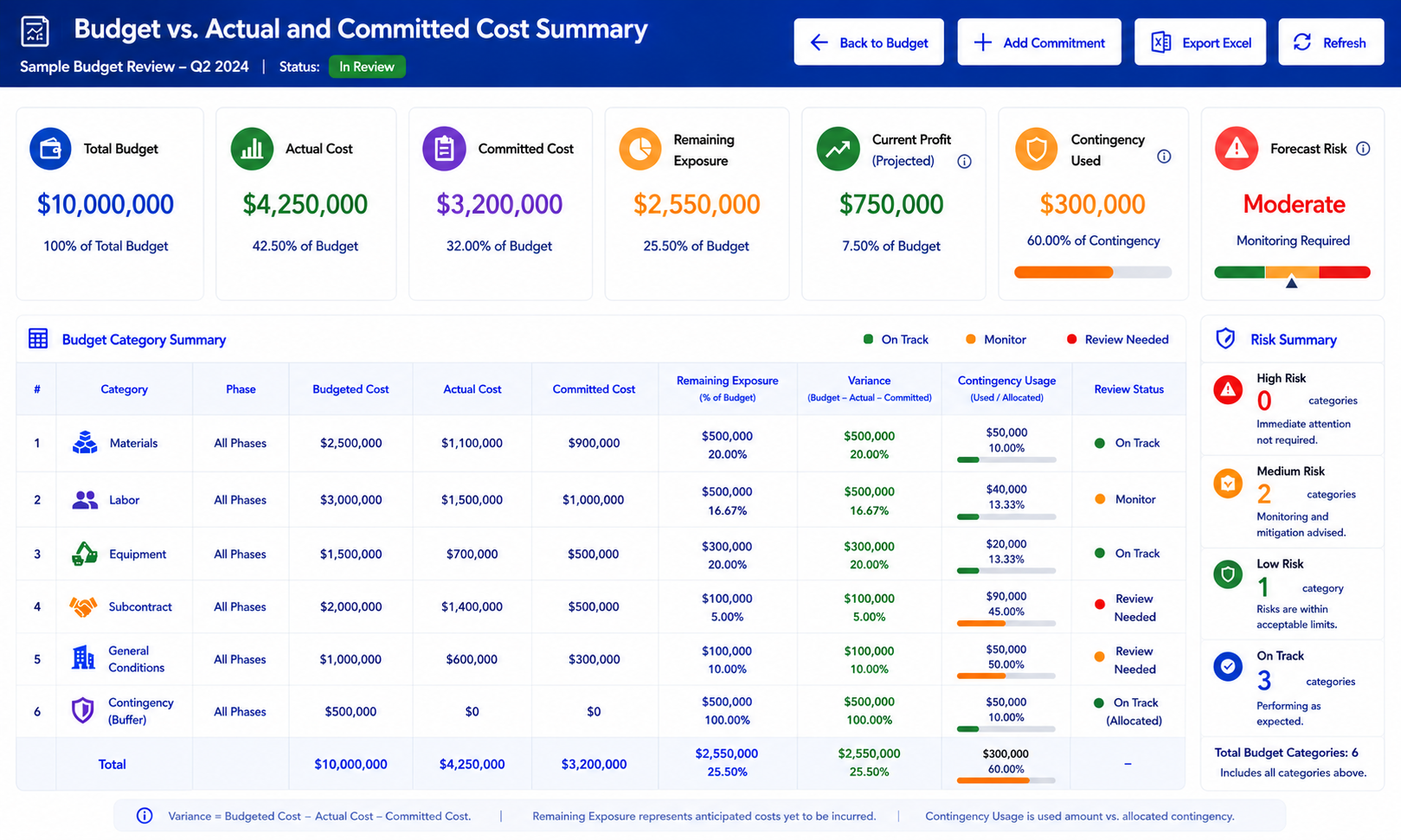
A stronger project budget workflow should separate budgeted, committed, and actual amounts. Budget tells the team what was planned. Committed cost shows what the company has already promised through purchase orders, subcontractor agreements, rental commitments, or approved work. Actual cost shows what has been posted, entered, or paid. Industry Software can support this structure by allowing project costs and commitments to be organized by category, phase, and status, so managers can see cost exposure before the invoice hits accounting.
Budgeted Cost: planned material, planned labor, planned overhead, planned subcontractor cost.
Committed Cost: purchase order, subcontractor agreement, equipment rental, approved service.
Actual Cost: vendor bill, labor entry, posted expense, paid cost.
Remaining Exposure: open commitment, unbilled work, expected cost, pending invoice.
Review Status: approved, pending, posted, disputed, closed.
A simple example makes the problem clear. A project has a materials budget of $80,000 and actual posted material costs of only $42,000, so the job appears safely under budget. The team has already issued purchase orders for another $35,000 in materials that have not been invoiced yet. The real exposure is not $42,000; it is $77,000 before the next delivery even arrives. Without committed cost visibility, management may approve extra spending based on an incomplete picture. With committed cost review, the project manager can see the pressure before it turns into a month-end surprise.
Phases, Actual Costs, and Change Work Need One Record
A total project number can hide the phase that is causing the damage. Site preparation may be over budget while materials for later phases are still untouched. Labor may be running high in framing, but the overall project still looks acceptable because other categories have not started. This is how budget drift stays hidden. The project is not failing everywhere, but one phase may already be pulling margin away from the job.
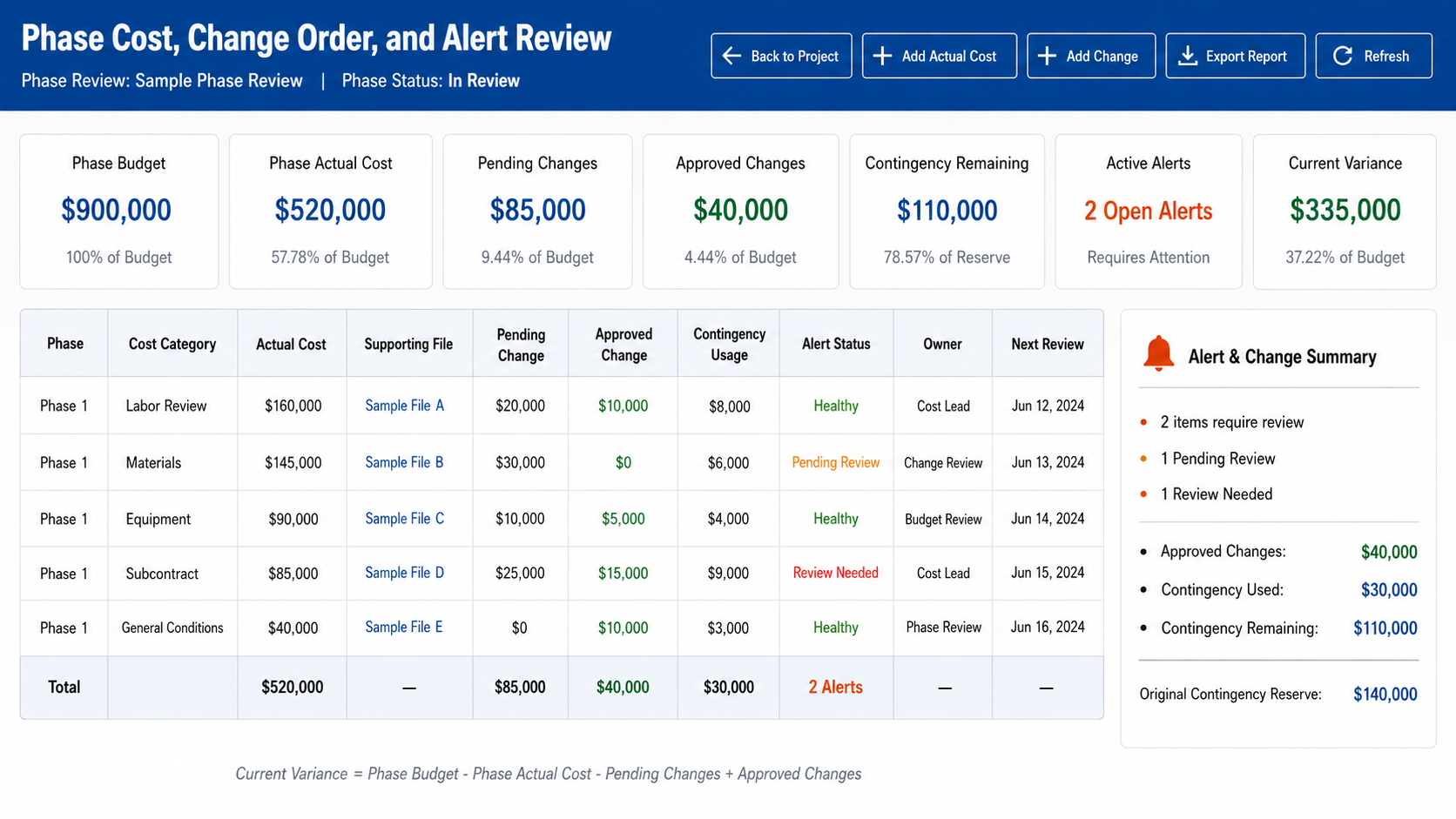
Industry Software can support phase-by-phase tracking so each stage has its own budget, actual cost, committed cost, and variance. For construction teams, phases may include site clearing, foundation, framing, systems, finishing, and closeout. For project-based manufacturers or installers, phases may be design, procurement, fabrication, delivery, installation, and service. The names can be configured around how the business actually manages work. Each phase should tell the team whether it is still financially healthy.
Site Preparation: clearing, excavation, grading, hauling, early labor.
Foundation Phase: concrete, rebar, forms, inspection, subcontractor work.
Structural Phase: framing, steel, materials, equipment, labor hours.
Systems Phase: electrical, plumbing, HVAC, specialty subcontractors.
Finish Phase: fixtures, interior work, final labor, punch list costs.
Closeout Phase: cleanup, warranty items, final review, project completion.
Actual cost entry decides whether this project view can be trusted. If labor hours, vendor bills, equipment rentals, field expenses, and material costs are entered late, the dashboard may look clean while the field tells a different story. This is where many teams get frustrated because the report says the job is fine, but the superintendent knows extra work happened and the office knows invoices are waiting. A project budget is only as reliable as the last cost entered. The faster actual costs enter the system, the sooner the budget becomes useful.
Change work adds another layer of risk. A client asks for an adjustment, the field team handles it to keep the project moving, and the cost starts accumulating before the change is formally approved. Later, everyone agrees that the work happened, but the record may not clearly show whether it was extra scope, rework, warranty, allowance usage, or internal cost. Industry Software can help separate original budget, approved changes, pending changes, unapproved costs, and contingency drawdown. That gives the project team a cleaner story before the budget meeting becomes a blame session.
Cost Entry: project, phase, category, amount, date, description.
Supporting Files: vendor bill, receipt, field note, approval document.
Approved Change: signed change, added budget, revised phase cost, customer approval.
Pending Change: requested work, estimated cost, awaiting approval, risk status.
Contingency Usage: approved drawdown, remaining reserve, usage reason, review status.
Alerts and Reports Should Help Managers Act Earlier
Alerts are useful only when someone knows what to do with them. A warning that labor is over budget does not solve anything by itself. A project manager may need to review productivity, accounting may need to verify cost coding, and operations may need to adjust crew planning. If alerts are not tied to ownership, they become noise. People stop paying attention because the system keeps warning them without driving action.
Industry Software can support alerts based on cost thresholds, phase status, missing updates, low profit, or budget variance. A material overrun may belong to purchasing or the project manager. A missing actual cost update may belong to the field supervisor. A negative profit alert may belong to management. Good alerts do not just say something is wrong; they guide the next review. The best alert is not the loudest one, but the one that reaches the right person early enough to matter.
Budget Thresholds: over budget, near budget, category limit, phase limit.
Profit Alerts: low margin, negative profit, profit drop, review needed.
Cost Entry Alerts: missing updates, late entries, unapproved costs.
Phase Alerts: overdue phase, inactive phase, blocked phase, completion review.
Review Ownership: project manager, accounting user, operations lead, executive review.
Reports should then explain how the variance happened. A report that says a project is over budget is only the beginning. The useful question is whether the original estimate was too low, materials changed, labor ran long, a phase took too much time, committed cost increased, or unapproved scope crept into the job. Industry Software can support reporting by category, phase, variance, actual cost entries, committed cost, contingency usage, and current profit. These reports can be used in project meetings, customer discussions, closeout reviews, and management reporting.
The best reports are not only for after the project is done. They support decisions while work is still active and there is still time to protect margin. If overhead is rising, management can review whether the project timeline is stretching, whether supervision cost is increasing, or whether indirect expenses are being assigned too late. If materials are under budget but labor is running high, operations can review crew productivity, rework, scheduling delays, or field conditions before the next phase begins. Reporting becomes more valuable when it helps the team ask better questions earlier, not when it only explains the damage after closeout.
When the Budget Spreadsheet Becomes the Shadow Forecast
Project teams do not return to spreadsheets because they want another place to enter data. They return because the project system stops matching the way the job is actually being managed. The official software may show the approved budget, but the spreadsheet tracks what the project manager really worries about: pending change work, unbilled commitments, labor drift, field allowances, missing cost entries, and contingency already spoken for. Once that happens, the company has two forecasts. One is in the system, and the other is the spreadsheet everyone trusts in the budget meeting.
This is especially common when the system only tracks budget and actual cost, but not the gray area in between. A purchase order may be issued but not invoiced. A subcontractor may be verbally approved for extra work but not yet entered as a change. A field supervisor may know a phase is running long before accounting sees the labor cost. If the project system cannot hold those signals, users will build a spreadsheet that can. That spreadsheet may feel practical, but it also creates a dangerous gap between management reporting and field reality.
Forecast Gap: the system shows approved budget, while the spreadsheet tracks likely final cost.
Commitment Gap: purchase orders, subcontractor changes, and rentals are not visible early enough.
Phase Gap: site work, foundation, structure, systems, and closeout costs are tracked outside the system.
Contingency Gap: reserve usage is discussed informally instead of recorded against the project.
Change Gap: pending change work is known in the field but not reflected in the project budget.
Ownership Gap: project managers, accounting, and operations do not share one cost view.
The point is not to eliminate every spreadsheet a project manager might use for analysis. The real problem begins when the spreadsheet becomes the shadow forecast. Industry Software can reduce that risk by giving teams configurable budget categories, phase tracking, committed cost review, actual cost entry, alerts, and project reports in the same workflow. When the live project record is trusted, spreadsheets become optional analysis tools instead of the place where the real budget lives.
How Industry Software Supports Project Budget Control
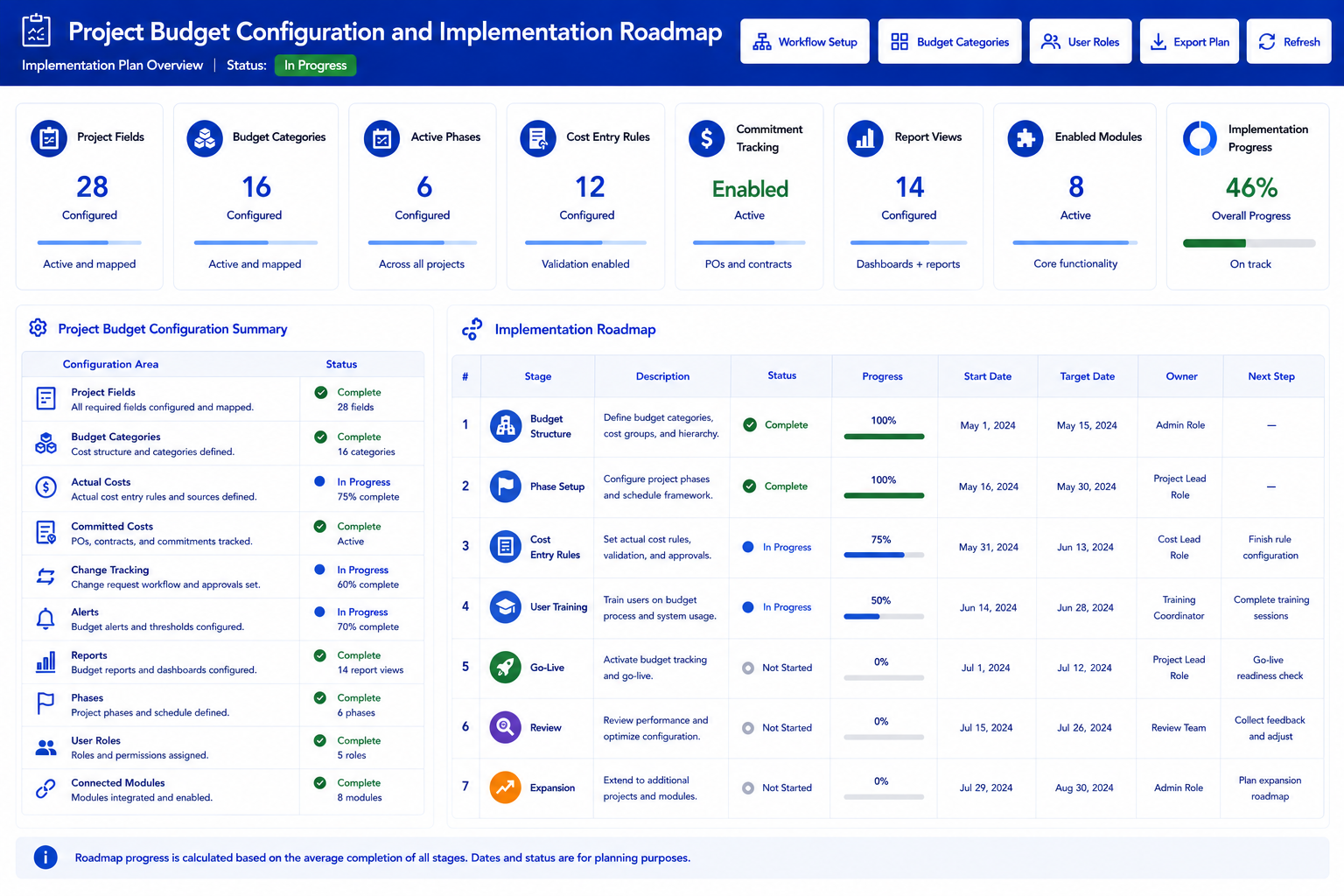
Industry Software should be understood as a configurable project budget workflow platform, not just a dashboard. Fields capture project details, categories structure the budget, statuses show project progress, actual cost entries update performance, committed cost review shows exposure, alerts highlight risk, and reports explain variance. This matters because project control is not one action. It is a sequence of updates, reviews, and decisions that happen from project setup to closeout. The software needs to support that movement without forcing every company into the same rigid process.
Industry Software is useful for project-based companies because it treats budget control as a live workflow, not a static report. A team can start with project records, budget categories, actual cost entry, committed cost review, alerts, and budget vs. actual reporting. As the process matures, the same system can expand into purchasing, AP, inventory, sales, accounting, and broader reporting. The cloud-based setup helps project managers, accounting users, and owners review the same project data without depending on local files or delayed spreadsheet updates. The modular structure gives companies a way to improve cost control step by step, while dedicated support helps refine categories, reports, permissions, and alerts after launch.
Project Setup: project code, customer, location, start date, end date, status, project owner.
Budget Structure: materials, labor, equipment, overhead, subcontractors, contingency.
Actual Cost Entry: phase, category, amount, date, notes, file attachment, review status.
Committed Cost Review: purchase orders, subcontractor commitments, rentals, pending invoices.
Change Tracking: pending change, approved change, rejected change, contingency usage.
Alerts and Reviews: budget threshold, low margin, missing cost update, overdue phase.
Reporting: budget vs. actual, phase performance, committed cost, current profit, forecast risk.
Modular Expansion: purchasing, AP, inventory, sales, accounting, project reporting.
Because Industry Software is cloud-based, teams do not need to install local software just to review project records. A project manager can check budget status, an accounting user can review actual cost entries, and an owner can look at project exposure from different locations. The system can also be configured around each company’s project structure, rather than forcing every contractor or project-based manufacturer into the same setup. With fast launch support, ongoing training, strong value, dedicated one-on-one service, and broad operational experience, Industry Software gives growing teams a practical path to stronger project budget control. Companies can start with the workflow causing the most margin pressure and expand once users trust the data.
Project Budget Software Still Needs Budget Discipline
Project budget software will not fix a loose estimating process or weak cost-control process by itself. Before launch, the company needs to define how budgets will be structured, which cost categories matter, how project phases should be named, and when actual costs must be entered. If one project uses “materials,” another uses “supplies,” and another uses “field purchases” for the same type of cost, reports will look organized but remain hard to trust. The same problem happens when project phases are too broad, too detailed, or inconsistent across jobs. A system can support budget control, but the company still has to decide what control means.
The most important setup work is usually operational, not technical. Project managers, accounting, and operations need to agree on what counts as actual cost, what counts as committed cost, how contingency can be used, and when a budget change requires approval. A labor overrun, equipment rental extension, or pending change order should not be handled differently on every project. Industry Software can support configurable fields, statuses, permissions, alerts, and reports, but the company needs clear rules behind those configurations. Those rules are what make project data comparable from one job to the next.
Budget Structure: materials, labor, equipment, overhead, subcontractors, contingency.
Cost Entry Rules: who enters actual costs, how often costs are updated, what files are required.
Phase Setup: standard project phases, phase ownership, phase budget, phase completion status.
Commitment Tracking: purchase orders, subcontractor agreements, rentals, pending vendor invoices.
Change Approval: approved change, pending change, rejected change, contingency drawdown.
Forecast Review: current profit, expected final cost, open exposure, remaining contingency.
User adoption depends on whether the workflow helps project managers instead of only serving accounting. If the system feels like extra administration, field and project teams will delay updates until someone asks for them. Training should focus on the questions managers actually care about: which phase is drifting, which costs are missing, which commitments are not invoiced yet, and how much contingency remains. Once users see that the system protects their project margin, adoption becomes easier. Industry Software can help with setup, training, report tuning, and post-launch adjustments, but the company still needs internal discipline around cost entry and review timing.
Most Projects Drift Before They Break
Most projects do not blow up overnight. They drift through late cost entry, vague budget categories, untracked commitments, labor overruns, scope changes, weak alerts, and reports that arrive too late. Better project budget software gives teams a way to catch that drift earlier. It helps managers see not only the final variance, but the path that created it. That is the difference between reviewing a project after the damage is done and managing it while decisions still matter.
Industry Software gives project-based companies a practical way to manage that drift before it becomes a margin surprise. A team can begin with project setup, budget categories, actual cost entry, committed cost review, phase tracking, alerts, and budget vs. actual reporting. From there, the workflow can expand into purchasing, AP, inventory, sales, accounting, and broader reporting as the company becomes ready. The value is not simply having more dashboards. The value is having a project record that reflects the field closely enough for managers to trust it. For contractors, project-based manufacturers, installers, and service businesses, better budget software means fewer shadow spreadsheets, clearer contingency usage, and stronger control from estimate to closeout.