Work-in-Process Software for Manufacturing Production Control

Summary
×WIP shows what the shop can actually move, finish, and ship. A production plan may look clean when jobs are released, materials are listed, and deadlines are still open, but the floor can tell a different story. One order waits because a component is not allocated, another sits between operations, and another looks productive until scrap reduces the usable output. When routing, material status, schedule, scrap, and cost are tracked in different places, the system may say “In Progress” while the real job is already drifting. That gap is where production managers lose time, trust, and sometimes the delivery promise.
Public manufacturing research gives this problem real weight. In a 2024 supply-chain survey, nine in ten respondents said they encountered supply-chain challenges during the year, and a manufacturing outlook reported that many manufacturers were adopting digital tools to improve supply-chain transparency. A downtime report also estimated that large plants still lose significant production hours each month to unplanned downtime, even after reducing the number of downtime incidents compared with 2019. WIP software will not solve every material shortage, equipment delay, or labor constraint, but it gives production teams a better operating layer for seeing those risks before they turn into missed shipments.
For machine shops, electronics manufacturers, metal fabrication companies, assembly operations, packaging teams, and project-based manufacturers, WIP is the point where inventory, routing, labor, equipment, quality, and customer delivery meet. A released work order still has to earn its place on the floor. The useful question is not only “What jobs are open?” It is “Which jobs can actually move today, which ones are blocked, and which ones are quietly becoming expensive?” Industry Software supports that kind of production control through configurable work orders, routing, material status, scheduling, scrap tracking, cost tracking, reporting, cloud access, and connected modules for inventory, purchasing, quality, sales, and accounting.
The Job That Looks Ready May Not Be Ready
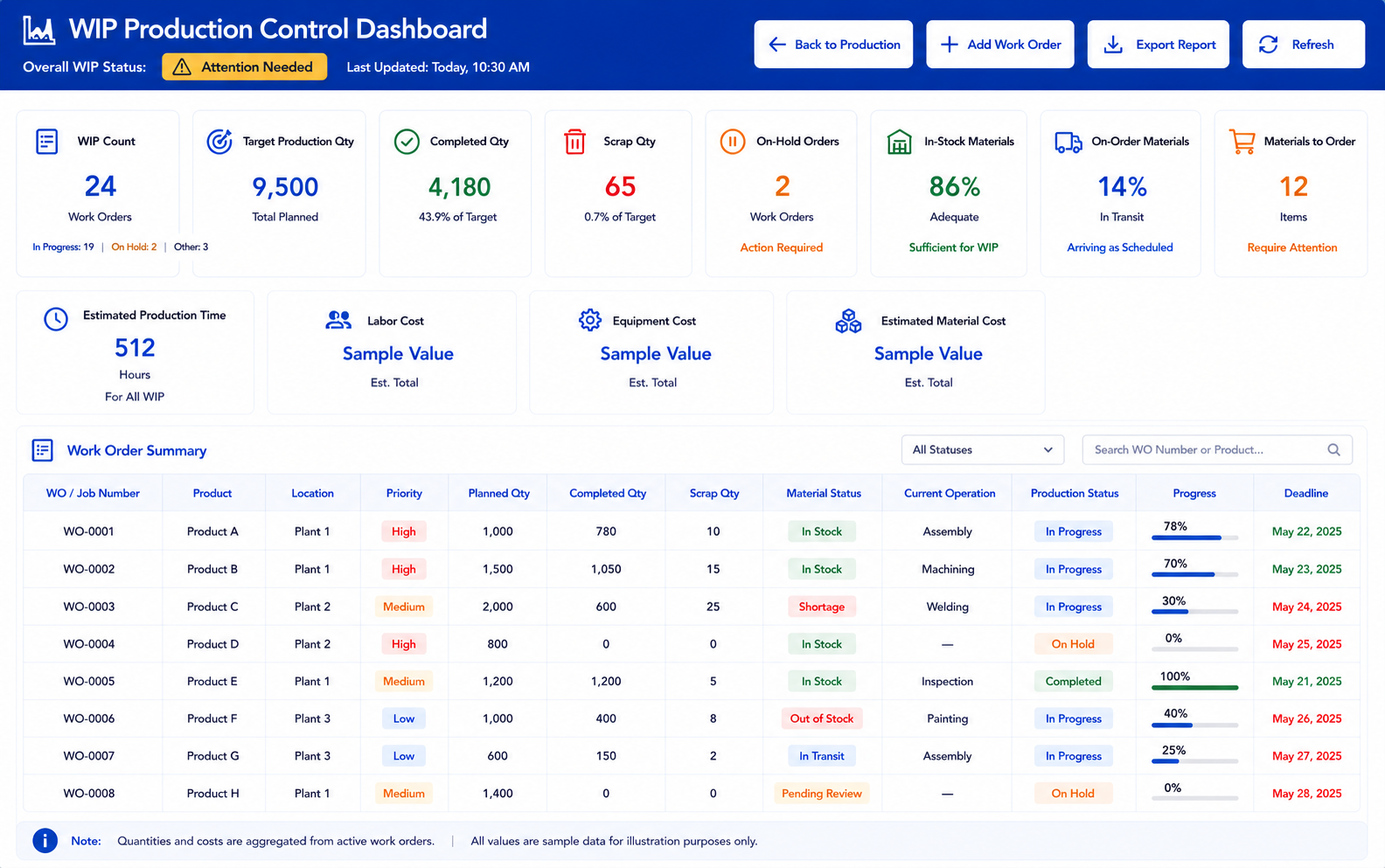
A common WIP case starts with a job that appears ready for production. The work order is released, the product is correct, the planned quantity is clear, and the deadline still looks reachable. The job list shows materials as mostly available, so the team expects the order to move through routing without much discussion. Then the details start to pull in different directions: one required component is still on order, one operation depends on a station already loaded with other jobs, and the first completed quantity includes more scrap than expected. Nothing looks dramatic at first, but the order is no longer as clean as the status label suggests.
That type of case is exactly why WIP needs more than a list of open jobs. The work order record should hold planned quantity, completed quantity, scrap quantity, priority, start date, production time, deadline, material status, current operation, and progress in one place. The production manager should not need to compare a spreadsheet, a warehouse note, and a routing page just to understand whether the order can keep moving. Industry Software can be configured so different users see the signals they need: production sees progress, warehouse sees allocation, purchasing sees shortages, and management sees delay and cost exposure. The job record becomes the shared operating view instead of another place to store updates.
A strong WIP list also exposes contradictions that would otherwise stay hidden. A job can be Released but still have a material shortage. It can be In Progress but show no movement at the next operation. It can show a healthy completed quantity while scrap is already reducing usable output. These are not small display details; they are the signals that decide whether a production meeting starts with action or confusion.
Work Order Identity: WO/job number, product, location, customer reference, priority.
Production Quantities: planned quantity, completed quantity, scrap quantity, remaining quantity.
Timing Fields: start date, production time, deadline, completed date, delay status.
Material Status: in stock, on order, not available, allocated, need to order.
Progress Fields: current operation, completed steps, remaining steps, released status.
Review Actions: view job, update status, review materials, check routing, export report.
Material Status Can Rewrite the Production Plan
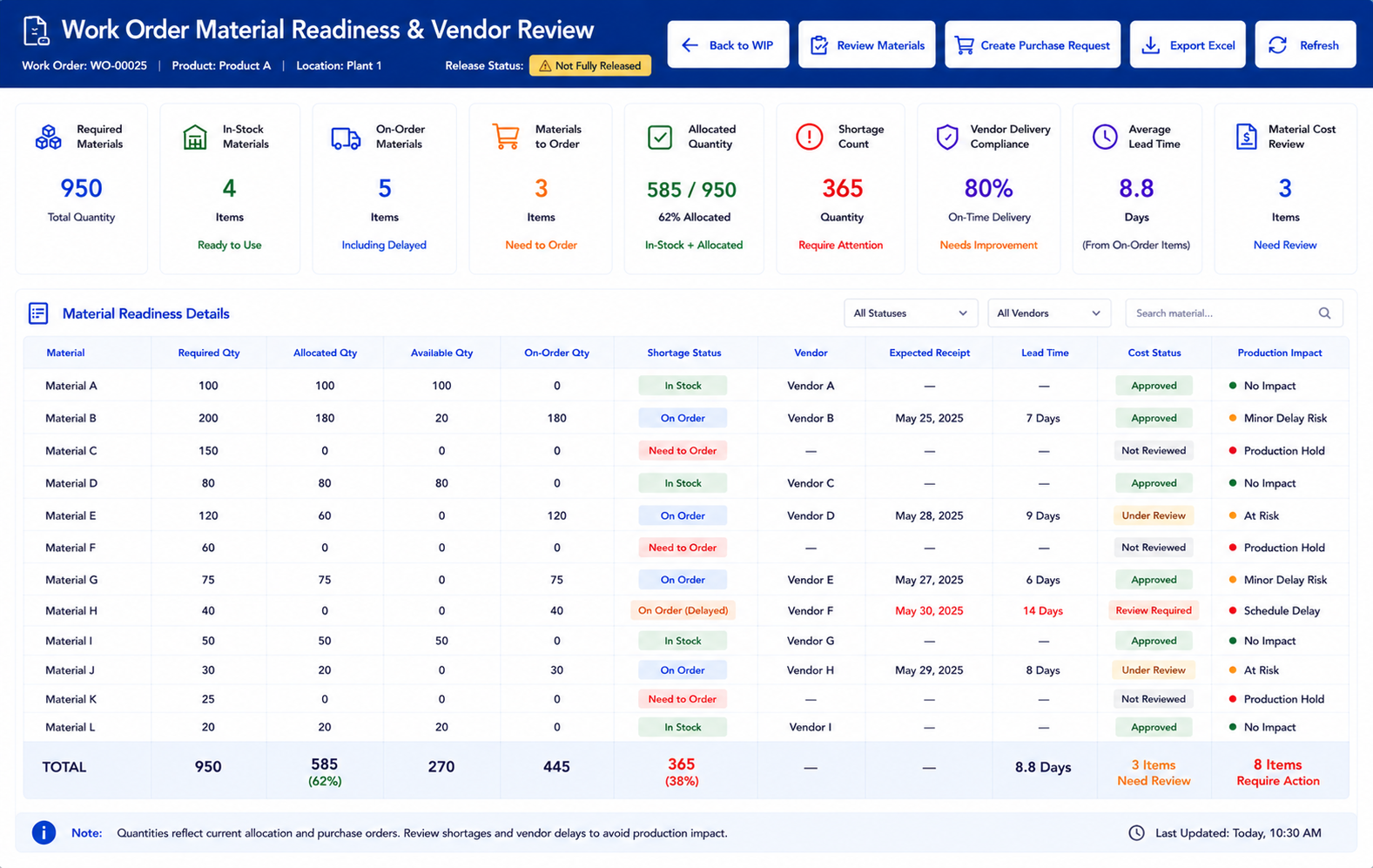
Material availability changes the meaning of production readiness. A job may be approved to start, but one short component can still block the next operation. If material status lives only in inventory or purchasing, production may build a schedule around work that cannot actually run. The result is familiar: supervisors reshuffle jobs, warehouse users answer the same questions again, purchasing gets pulled into urgent follow-up, and the deadline starts moving from manageable to uncomfortable. The job did not fail because the plan was missing; it failed because the material signal did not travel with the job.
Industry Software can keep material readiness attached to the work order instead of leaving it buried in a separate report. Required materials can be marked as in stock, on order, unavailable, allocated, consumed, or needing purchase action. Shortages can be tied to active jobs, not just open item records. Purchasing can see which shortages threaten production first, while warehouse users can confirm what is allocated before the order moves. Production managers can decide whether the job should stay released, move to hold, or be resequenced behind work that is actually ready.
Vendor performance belongs close to this discussion. If the same material repeatedly arrives late, the floor may blame scheduling while the root issue starts upstream. If one supplier’s lead time keeps stretching, active jobs absorb the damage through idle time, substitutions, or partial production. Reports for vendor delivery compliance, average lead time by material and vendor, and cost by material and vendor help separate internal production delay from supply-side risk. This keeps WIP review from turning into guesswork about whether the shop, warehouse, or supplier caused the problem.
Routing Shows the Difference Between Active and Moving
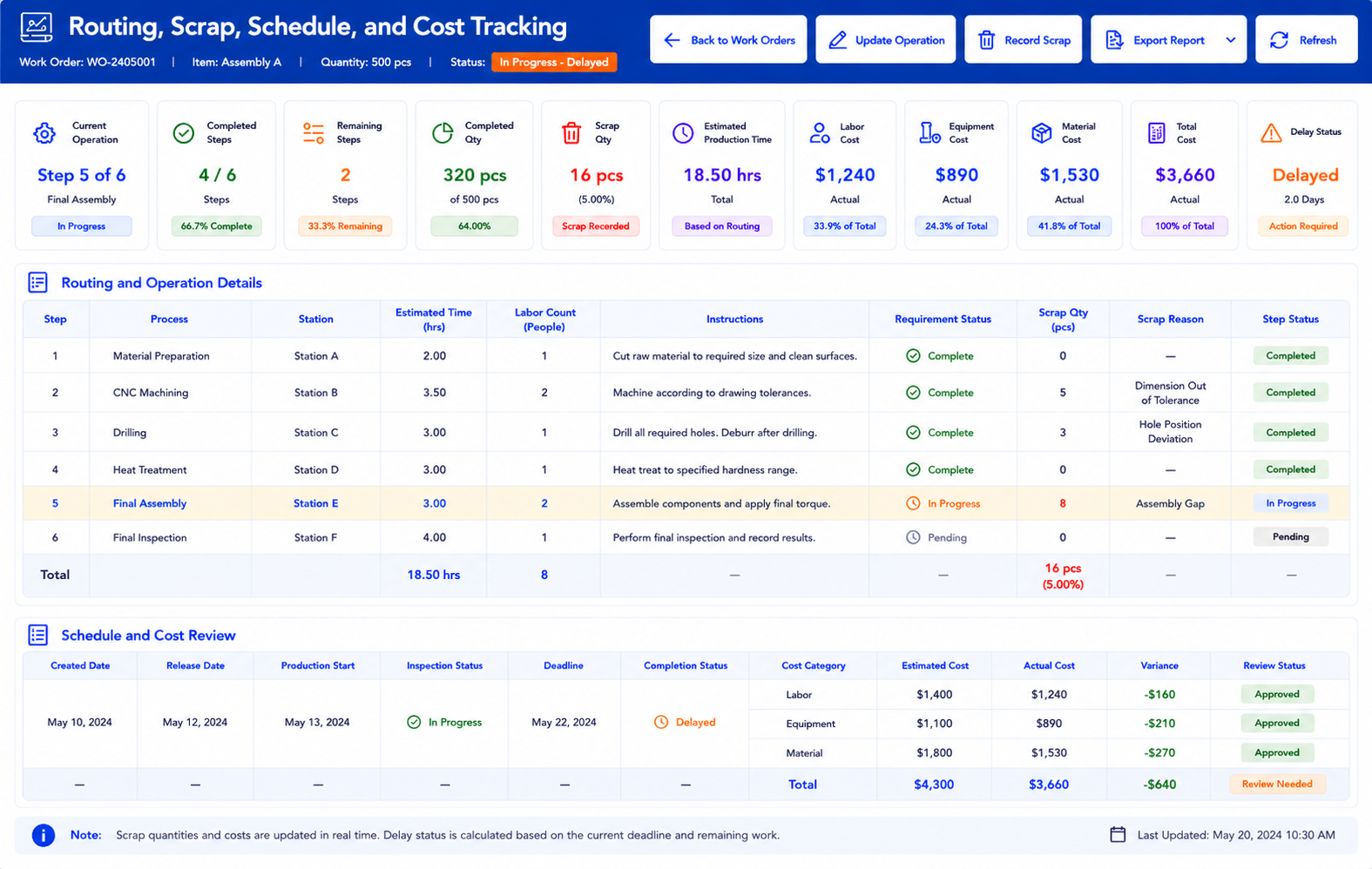
A job header tells the company what needs to be made. Routing shows whether the work is actually moving. Each operation can carry its own process, equipment or station, estimated time, labor requirement, instructions, and production requirements. Without that structure, a delayed work order becomes a vague production complaint. With routing visibility, the team can see whether the order is waiting at setup, inspection, assembly, finishing, material handling, or another step.
The composite job from earlier may still show In Progress, but the routing record tells a sharper story. The first step is complete, the second step is waiting on a station, and the third step cannot begin because the required material is not allocated. The completed quantity looks acceptable until the scrap record shows that usable output is lower than expected. A supervisor can discuss the job with production, warehouse, and quality using the same record instead of collecting separate explanations. That does not make the delay disappear, but it makes the decision cleaner.
Scrap deserves special attention because it changes the meaning of output. A job can report strong production activity and still fail the delivery plan if too much of that activity produces unusable parts. Scrap should be tied to the job, operation, material, product, or station where it occurred. If the same routing step keeps producing scrap, the likely questions change: equipment setup, tooling wear, material quality, operator instruction, or inspection criteria. A final scrap number is accounting history; scrap by operation is production evidence.
Routing Steps: step number, process name, equipment, station, sequence.
Operation Detail: description, estimated production time, labor count, requirement record.
Work Instructions: operator notes, process instructions, quality requirements, attachment reference.
Scrap Context: scrap quantity, scrap reason, affected operation, material impact, review owner.
Step Status: current step, completed step, delayed step, skipped step, remaining operation.
Schedule and Cost Tell the Same Story From Different Angles
Schedule tracking should show how work moved, not only when it was supposed to finish. A job created date, release date, production start, inspection start, inspection completion, deadline, and completion date can reveal where time disappeared. One job may sit too long between release and the first operation. Another may start on time but stall at inspection. A group of jobs may wait at the same station, pointing to a capacity issue rather than a planning mistake. The timeline gives production teams a factual record of the delay instead of another round of opinions.
Cost tracking gives the same job a financial voice. A work order may still be moving through the route, but rising labor cost, equipment cost, production time, or scrap cost may already be damaging margin. Estimated material cost, estimated labor cost, estimated equipment cost, completed quantity, scrap quantity, and total cost should not wait until the order closes. They can warn the team while production choices still exist. A late job and an expensive job are not always the same problem, but they often share the same root cause.
Across multiple jobs, these patterns become more valuable than one isolated delay. If one product repeatedly takes longer than the routing estimate, the standard may need review. If one station creates delays across many orders, the capacity plan may be too optimistic. If one material creates scrap across several jobs, purchasing or quality may need to review the supplier. WIP data gives manufacturers a way to learn from production instead of treating every delay as a separate emergency.
How Industry Software Supports WIP Control
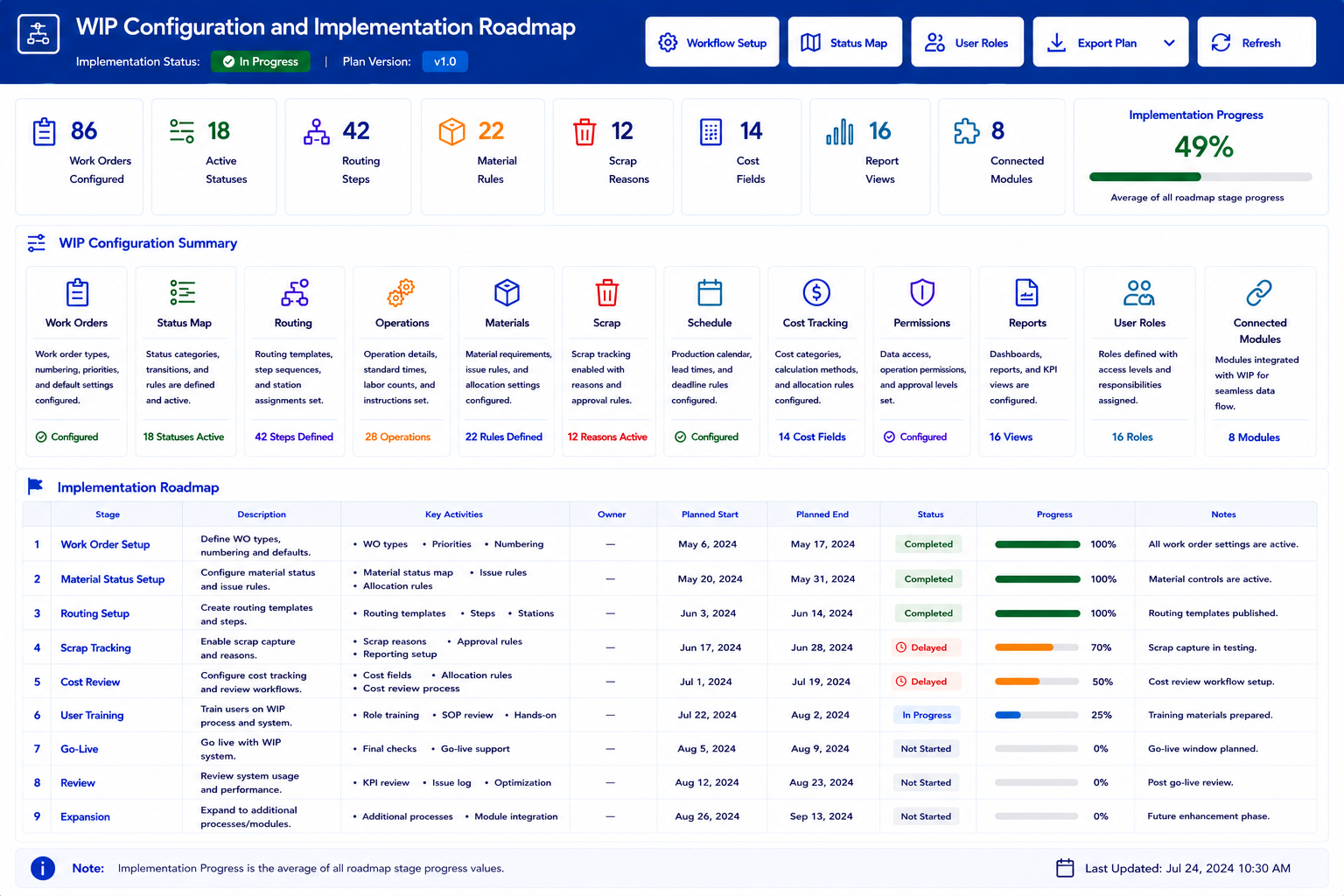
Industry Software supports WIP control by giving manufacturers a configurable production workflow instead of a fixed work order table. The system can be set up around the way jobs actually move through the shop, including release status, material readiness, routing steps, scrap review, schedule movement, and cost tracking. A manufacturer does not have to start with every production module at once. The rollout can begin with work order visibility and routing, then expand into materials, scrap, cost, purchasing, inventory, quality, sales, and accounting as the team becomes ready.
Because the system is cloud-based, users do not need to install local software just to review production status. A production manager can check delayed jobs, a warehouse user can review material availability, purchasing can follow open material needs, and ownership can review WIP cost exposure from different locations. The value is not only remote access. It is that different teams can work from the same live production record instead of passing updates through spreadsheets, emails, or separate floor notes. That shared record is especially important when one job involves materials, routing, inspection, scrap, and customer delivery pressure at the same time.
Industry Software also gives companies room to customize the workflow around their own production rules. Statuses can be configured for Unreleased, Ready to Release, Released, In Progress, Waiting on Material, Waiting on Inspection, Rework, Completed, or Closed. Fields can be adjusted for planned quantity, completed quantity, scrap quantity, current operation, material status, priority, production time, delay reason, and cost review. Permissions can control who releases a job, updates material status, records scrap, closes operations, or reviews cost. Reports can be built around the signals managers actually care about, such as delayed jobs, material holds, high scrap levels, long production times, inspection waits, and vendor-related material risk.
Cloud-Based WIP Access: no local download, shared production records, multi-location review.
Modular Production Setup: work orders, routing, materials, scrap, scheduling, cost tracking.
Workflow Customization: job statuses, production fields, user permissions, report views.
Routing and Operation Logic: step sequence, station assignment, labor count, instructions, requirements.
Material-to-WIP Logic: required quantity, allocated quantity, shortage status, PO reference, expected receipt.
Scrap and Cost Logic: scrap reason, affected operation, material impact, labor cost, equipment cost.
Connected Modules: inventory, purchasing, quality, sales, accounting, AP, reporting.
Fast Launch Support: focused setup, work order review, routing setup, user training.
Ongoing Training: post-launch adjustments, new user support, report refinement, workflow cleanup.
Dedicated Team Service: one-on-one setup, production workflow review, launch guidance.
Strong Value: practical functionality, controlled rollout, scalable module expansion.
Broad Experience: manufacturing, distribution, service operations, project-based workflows.
The implementation logic should stay practical. A company may first launch work order tracking with basic statuses, deadlines, planned quantity, completed quantity, and material status. Once users trust that view, the next step can add routing detail, operation progress, scrap reasons, and schedule review. After that, cost tracking and connected reporting can give management a clearer view of labor, equipment, material, and scrap impact. This phased approach keeps WIP improvement manageable while still building toward a more connected production system.
Why WIP Data Loses Trust
WIP data loses trust when the floor has a better story than the system. A supervisor knows which job is truly stuck, a planner knows which material will not arrive in time, and a warehouse user knows which stock is technically available but already spoken for. Each note may be reasonable, but together they create a second production view. Once that side view becomes more trusted than the official WIP record, every production meeting starts with reconciliation. The system says one thing, the floor says another, and management has to decide which version to believe.
The fix is not to ban side notes or demand perfect data from day one. The better path is to move the most important production signals into the work order itself. If material shortages, routing delays, scrap reasons, inspection holds, and cost warnings have a place in the system, users have fewer reasons to rebuild WIP control outside the software. The company also needs rules for when jobs are released, when material status blocks production, when operations are closed, who records scrap, and how cost variance is reviewed. Clear rules make WIP data comparable from one job to the next.
Industry Software can support that discipline with configurable fields, statuses, permissions, and report views, but the company still needs production ownership. Production, warehouse, purchasing, quality, and accounting should agree on what each status means before the system goes live. Training should focus on real decisions, not just screen navigation: which job can move, which job is blocked, which job is creating scrap, and which job is becoming expensive. When users see that the system answers those questions, adoption becomes much easier. The live WIP record becomes the place people work from, not the table they update later because someone asked for a report.
WIP Is the Operating View Between Planning and Shipment
Work in process is where a production plan proves itself. It shows whether materials are ready, jobs are moving, operations are delayed, scrap is rising, and cost is staying close to plan. A work order can look active and still be in trouble, especially when the next operation is blocked or usable output is shrinking. Better WIP software gives manufacturers a way to catch those signals before the deadline becomes the only visible problem. It makes production control less dependent on memory, side trackers, and after-the-fact explanations.
Industry Software gives manufacturers a practical way to bring WIP into one connected workflow. A team can start with work orders, routing, materials, scheduling, scrap, and cost tracking, then expand into purchasing, inventory, quality, sales, accounting, and reporting as the process matures. The benefit is not simply having more production data. The benefit is having production data that matches the floor closely enough to guide daily decisions. For manufacturers that want fewer delayed jobs, fewer material surprises, cleaner routing visibility, and better cost awareness, WIP software becomes the operating view between planning and shipment.