Production Scheduling Needs to Move from Planning Tables to Operational Control

Summary
×Execution Is the Real Test of a Schedule
Production scheduling is not only about placing work orders on certain dates. Delivery stability depends on equipment capacity, material readiness, fixture and tool availability, labor shifts, order priority, and shop-floor execution status. When these details are scattered across spreadsheets, emails, or disconnected system screens, planners struggle to confirm whether a schedule is truly executable. A plan may look complete on paper, but that does not mean the shop floor has the conditions required to start and finish production on time.
Industry Software supports a more connected approach to production scheduling. Work orders, capacity, load, resources, and execution status can be managed in one shared environment, giving planners a clearer view before they make schedule changes. The schedule becomes more than a record of planned dates; it becomes an operating workflow that connects planning, production, procurement, warehouse, and maintenance teams. This also helps companies reduce last-minute coordination and align different roles around the same production facts.
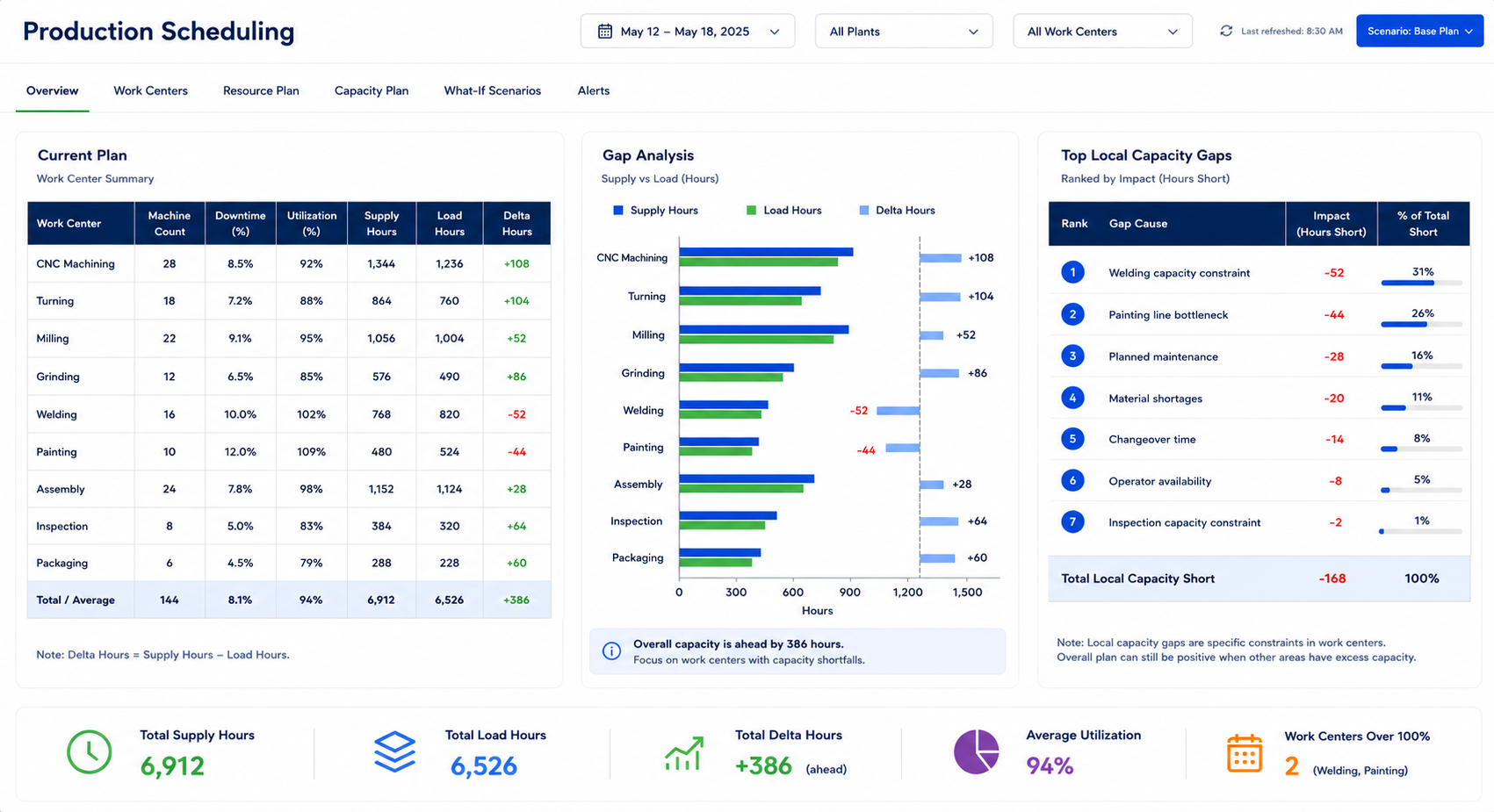
Capacity Gaps Should Be Visible Early
Production risk often comes from the gap between available capacity and actual workload. A work center may appear to have open time, but once maintenance windows, downtime, process load, and usable hours are considered, it may already be overloaded. Showing supply hours, load hours, and delta hours in one view helps managers identify resource shortages and overloaded plans earlier. This gives planners a clearer basis for deciding whether to rebalance work, adjust job sequence, revise delivery timing, or add temporary resources before production pressure reaches the shop floor. It also helps management review whether production commitments are realistic, especially when multiple jobs compete for the same equipment, labor, or time window.
A practical scheduling system should help teams answer:
Is current capacity enough for scheduled work orders?
Which work centers or machines are approaching bottleneck status?
Which orders carry higher delivery risk?
Which material, labor, or resource conditions are not ready?
Will one schedule change affect other jobs?
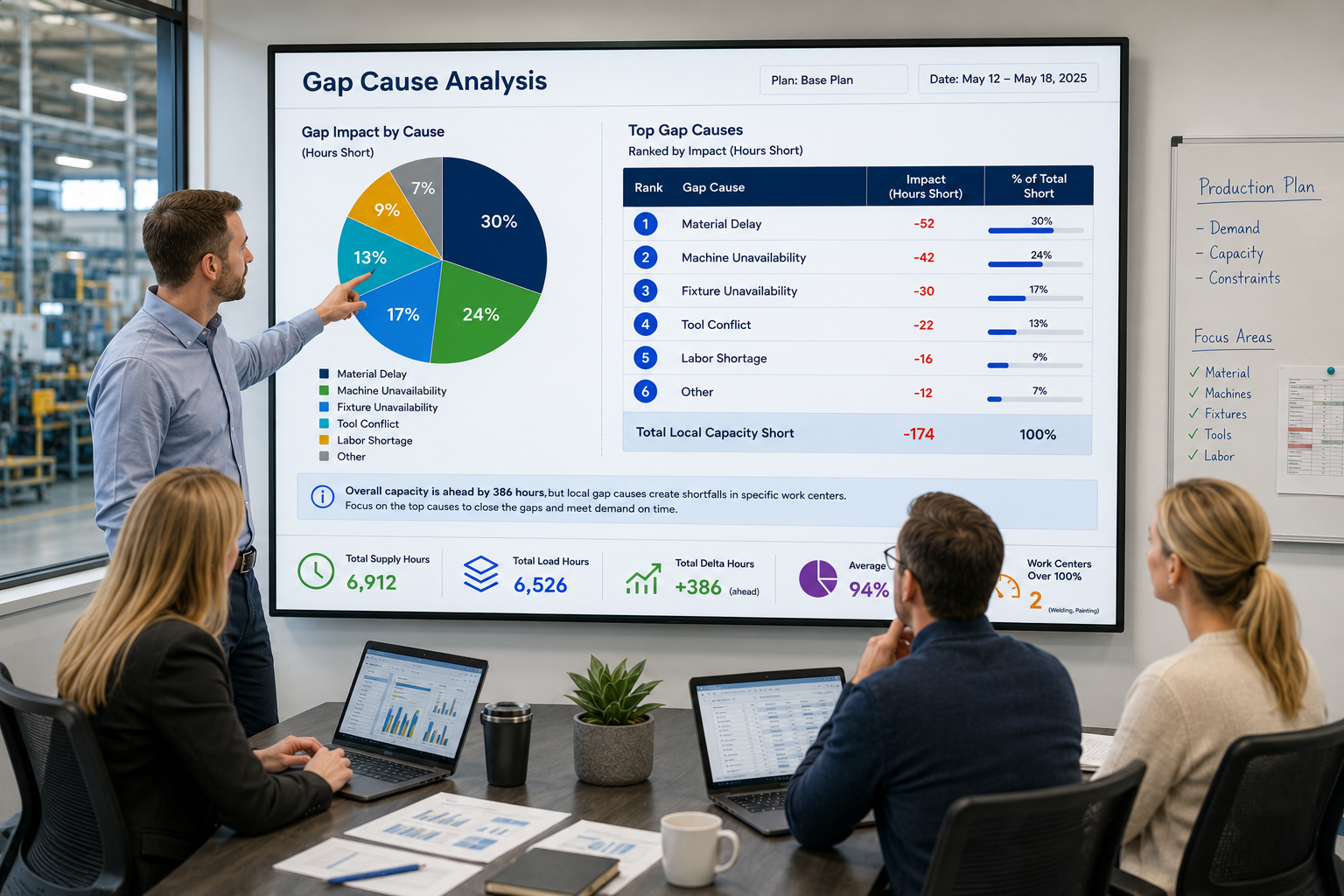
Gap Causes Should Lead to Action
Knowing that a schedule has a gap is not enough. Teams also need to understand why the gap exists. Common causes may include material delays, machine unavailability, fixture shortages, tool conflicts, equipment malfunctions, labor shortages, or priority order changes. Without clear reason tracking, planning meetings can easily stay focused on repeated checking and responsibility discussions instead of problem resolution. Industry Software can structure these causes so each function can see what needs to be handled and turn scheduling risk into practical action.
When material delays represent a large share of the problem, purchasing and warehouse teams can prioritize critical items instead of spreading follow-up efforts evenly across all orders. When machine unavailability or equipment issues appear frequently, maintenance teams can adjust inspections, refine preventive maintenance plans, or prepare backup equipment for key jobs. When fixtures or tools are the constraint, planners can change job sequencing to avoid multiple tasks competing for the same resource. In this way, the scheduling system does more than display problems; it helps teams break those problems down into executable business steps.
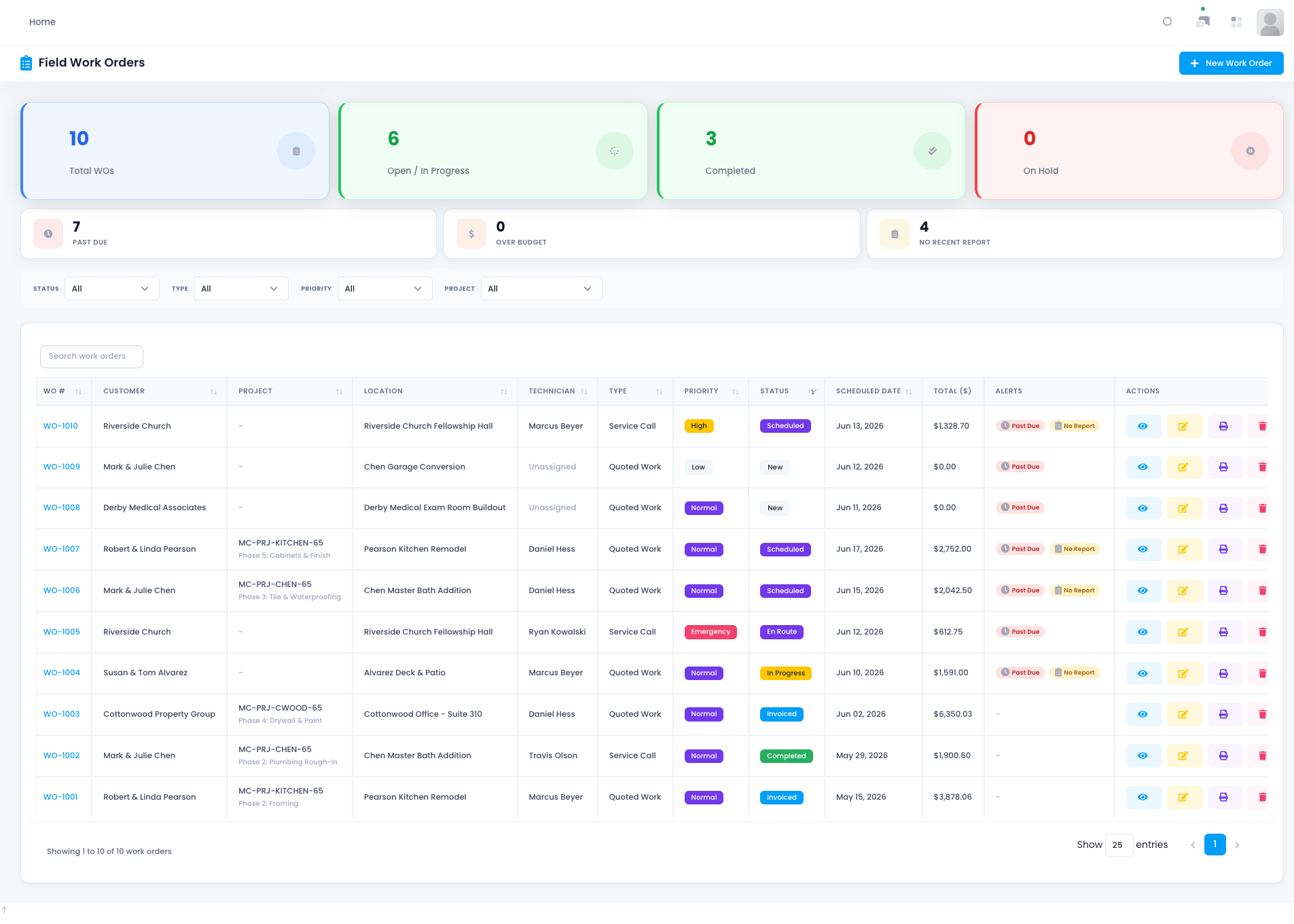
Job Details Improve Execution Visibility
A schedule must connect down to the work order level. Product, quantity, priority, production time, deadline, material status, execution status, equipment, and resources all affect whether a job can move forward on time. If this information cannot be reviewed in one place, every schedule change may create new conflicts or affect downstream tasks that have already been arranged. For planners, limited work-order visibility can turn scheduling into repeated trial and error instead of a controlled operating decision. The more complete the job-level view is, the easier it becomes to understand what can be changed safely.
A centralized job view helps planners answer practical questions quickly. They can see which jobs are in progress, which orders are approaching their deadlines, which tasks require long production time, and which jobs still need material or resource confirmation. Production supervisors can use the same information to organize teams, confirm equipment readiness, and reduce waiting time on the shop floor. Management can also understand execution progress faster without relying on multiple rounds of manual reporting.
In daily production management, this kind of job view can support:
Filtering tasks by work order, product, priority, or status
Checking whether materials are ready for production
Reviewing equipment, labor, fixture, and tool readiness
Tracking the status of jobs already in progress
Editing or rescheduling tasks when changes are required
Resource Views Reveal Bottlenecks Earlier
In multi-machine, multi-process, and multi-shift environments, bottlenecks do not always appear first as delays. They may begin as repeated use of the same machine, concentrated demand for a fixture type, or excessive load on a resource group within the same time window. If these relationships only exist in a planner’s experience, the company will struggle to act before the risk becomes visible in production. Clear resource-to-job visibility allows teams to identify conflicts earlier and adjust before delivery pressure grows. This is especially important when a small resource issue can affect several jobs at once.
Industry Software can show how machines, fixtures, tools, and labor are connected to scheduled jobs. Planners can identify frequently used resources, tasks that may conflict, and resource groups that may need reassignment. Production supervisors can use this information to prepare equipment, coordinate teams, and set shop-floor priorities with greater confidence. For companies balancing multiple lines, equipment types, and delivery windows, resource visibility can significantly improve schedule control.
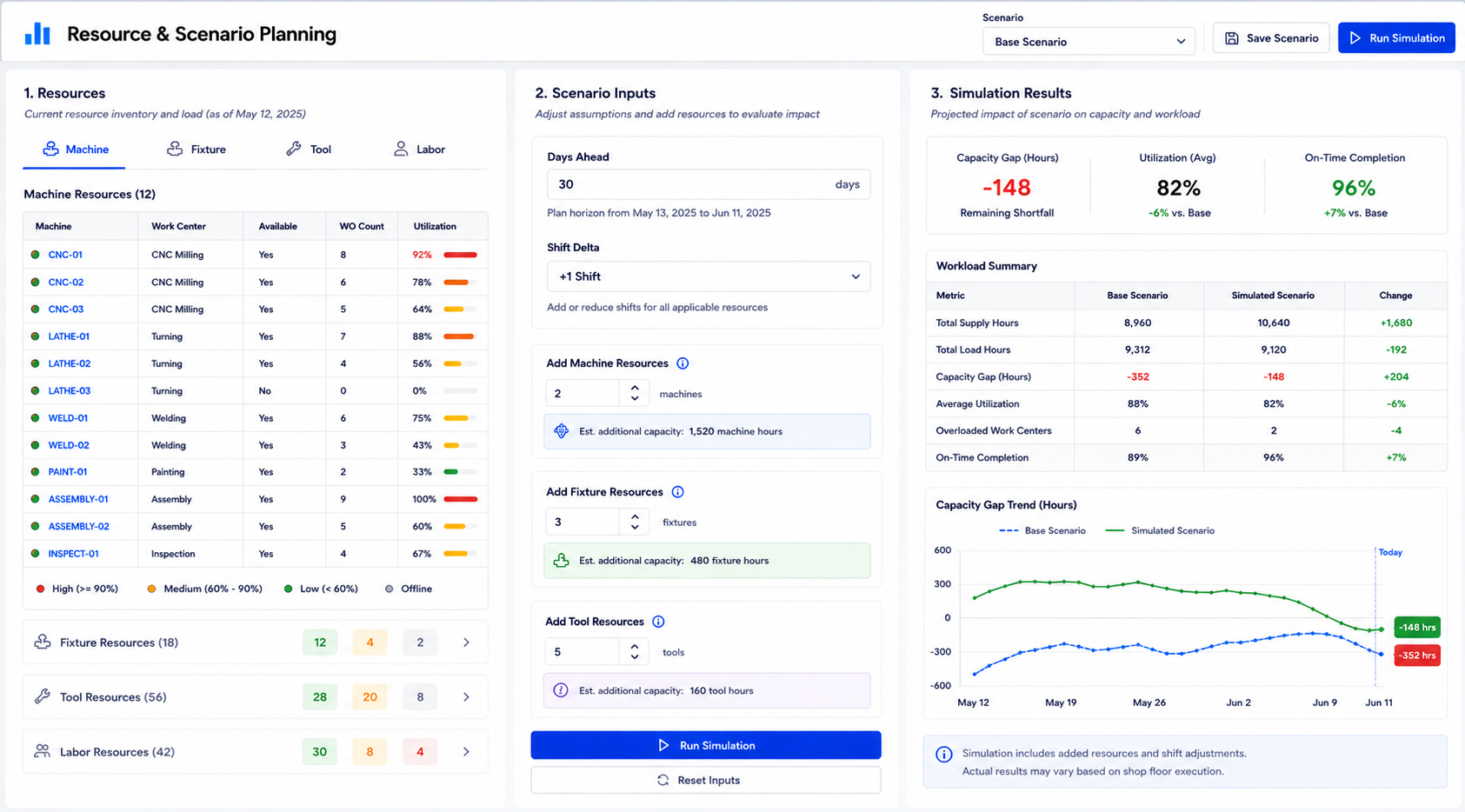
Scenario Planning Reduces Scheduling Trial and Error
Production schedules often require teams to choose between several adjustment options. These may include ordering materials earlier, adding shifts, increasing machine resources, reallocating fixtures, or changing the priority of selected jobs. The challenge is that experience alone may not show whether a change will solve the bottleneck or simply move the problem elsewhere. Without scenario planning, teams may need several meetings and repeated schedule revisions to test an idea. This slows decision-making and makes it harder for production teams to trust the plan.
Scenario planning turns these assumptions into comparable planning results. Planners can enter conditions such as earlier material readiness, shift changes, or additional resource types, then review the updated capacity load and plan variance. This helps teams evaluate the impact before execution, reducing blind rescheduling and repeated coordination. For management, scenario planning also supports more disciplined resource decisions, such as whether it is worth adding temporary shifts, purchasing additional tools, or changing delivery priorities.
Typical scenario planning options include:
Ordering critical materials several days earlier
Adding one or more temporary production shifts
Increasing available machine, fixture, or tool resources
Moving lower-priority jobs to release capacity for urgent orders
Comparing load differences under multiple resource configurations
Calendar-Based Scheduling Supports Coordination
Tables are useful for reviewing details, but calendars are better for understanding time occupation. When work orders are placed into monthly, weekly, or daily calendar views, planners can immediately see multi-day jobs, overlap risks, and concentrated workload on specific dates. This is especially important for manufacturers that handle urgent orders, priority changes, or frequent rescheduling. A calendar view turns complex scheduling data into a time layout that is easier for different teams to understand. It also helps reduce misunderstandings when production, procurement, and management teams discuss the same schedule from different perspectives.
Unscheduled orders should also be connected to the calendar workflow. Planners need to see which orders are ready based on material and resource status, which orders cannot be scheduled yet, and which orders require additional coordination. Procurement teams can align material priorities with job timing, production teams can prepare labor and equipment based on the calendar, and management can review whether delivery windows are becoming tight. By placing the unscheduled order pool and production calendar in the same workspace, teams can move faster from order review to schedule placement.
Industry Software’s Implementation and Service Advantages
Selecting production scheduling software is not only about choosing a complete feature set. Manufacturers also need to know whether the system can go live smoothly, fit their actual workflows, and continue to receive support after deployment. Scheduling rules, work order fields, approval steps, and resource categories often differ from company to company, so implementation cannot rely only on a standard template. Industry Software focuses on connecting software capability with real operating processes through cloud-based usage, flexible configuration, and phased deployment. This approach helps reduce the pressure of system change and allows companies to start with high-priority business scenarios before expanding further.
Industry Software supports customers through:
Cloud-based usage with lower deployment barriers: Users can access the system through a browser, reducing local installation complexity and supporting collaboration across teams and locations.
Tailored configuration for real workflows: Scheduling rules, work order fields, resource categories, approval flows, and reporting needs can be configured around actual operating requirements.
Modular go-live and phased expansion: Companies can begin with production scheduling, job management, or resource management, then expand as their operational maturity grows.
Fast go-live support: The implementation team can help review workflows, import core data, configure system views, and train users to accelerate practical adoption.
Ongoing training and after-sales service: Continued support, training, and optimization guidance help planning, production, procurement, and management teams improve system usage over time.
Dedicated one-to-one service: A dedicated project and support team can follow up on customer needs directly, reducing communication gaps and improving response quality.
Strong cost-effectiveness for growing companies: The solution is designed to meet core operating needs while controlling implementation complexity and total usage cost.
Experienced delivery capability: The team brings manufacturing, operations, and business software experience to help customers align system setup with real shop-floor and management needs.
These services make Industry Software more than a system that is handed over after initial deployment. It can become a practical software foundation that supports continuous operational improvement. Manufacturers can start by solving urgent scheduling and resource coordination issues, then gradually expand into production execution, analytics, and cross-functional workflow management. As business requirements evolve, the system can continue to adapt through modular expansion and tailored configuration. Ongoing training and dedicated service also help users turn the platform into a daily working tool instead of stopping at basic setup.