Accounts Receivable Software for Invoice Tracking and Cash Flow Management

Summary
×AR Is Not Only About How Much Has Been Invoiced
Accounts receivable management is not only about how much sales value has been invoiced. The real question is how much of that value has been received, how much is still open, which customers require follow-up, and whether each payment record can be connected to the original sale, inventory item, tax, discount, shipping, and deposit account. Many AR problems do not come from missing records; they come from gaps between invoices, collections, customer communication, and aging analysis. Revenue may appear in the system, but cash has not yet reached the account.
Industry Software’s Accounts Receivable capability is designed to connect sales transactions, collection status, aging reports, and detailed entries in one financial workflow. Balance Overview, Not Received Balance, Received Balance, Entry List, Add Entry, Aging Summary, Aging Report, Account Statement, and Import Transactions support different parts of the receivables process. Instead of treating AR as a static invoice table, teams can manage whether sales have actually turned into cash. Finance teams can review the balance picture first, then work through individual invoices, customers, payment terms, received dates, and deposit accounts.
Balance Views Should Show Whether Cash Has Arrived
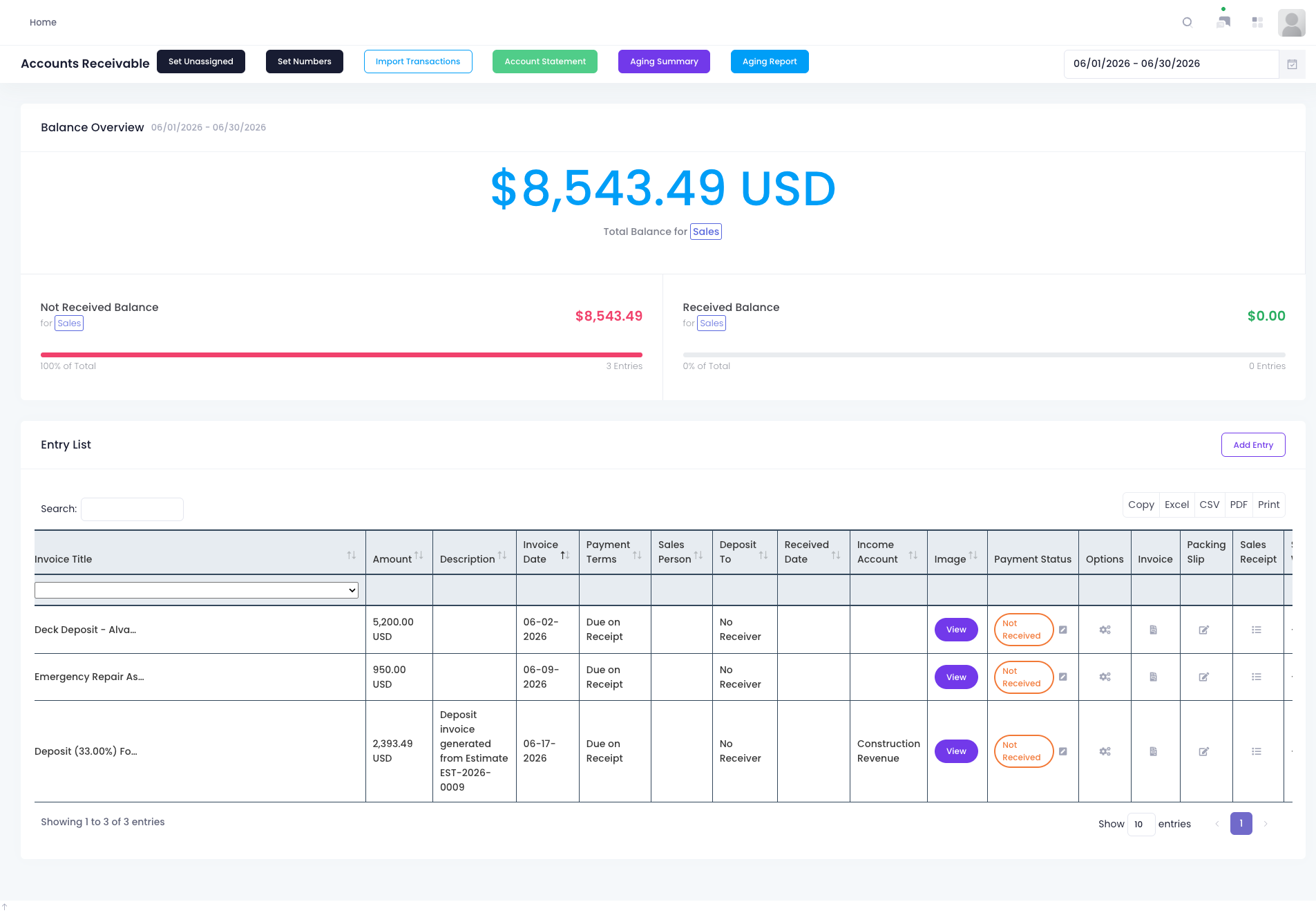
An AR balance is more than a total number. Total Balance shows the sales value created in a selected period, Not Received Balance shows how much remains open, and Received Balance shows what has already been confirmed as collected. For finance teams, the relationship between these numbers is more useful than invoice value alone. A high not-received balance may indicate normal payment terms, delayed customer payment, missing invoice documentation, or collection status that has not been updated in time.
This type of balance view helps sales, finance, and management work from the same facts. Sales teams care about customer relationships and payment commitments, finance teams care about cash receipt, aging, and forecasting, and management cares about whether revenue is turning into cash. By separating received and not received amounts, Industry Software reduces confusion between sales completion and cash collection. AR becomes a workflow that can be monitored during the period, not only reconciled at month-end.
An AR balance view can help teams focus on:
Total receivables created in the selected period
Whether not-received balance is too high
Whether received amounts have been recorded correctly
Which customers or invoices need priority follow-up
Whether collection progress supports cash flow planning
Invoice Details Need Collection Context
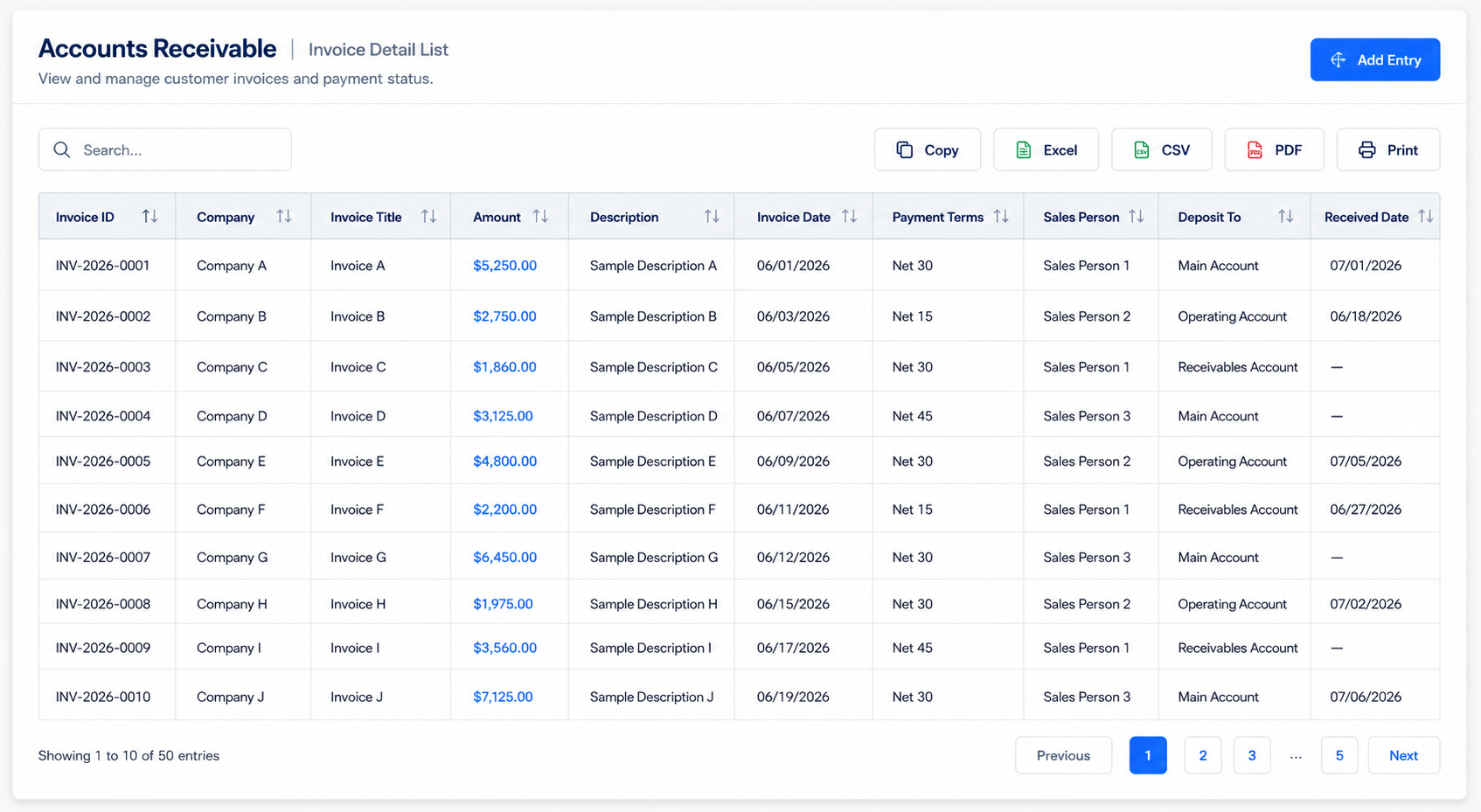
AR detail records should include more than invoice number and amount. Fields such as Invoice ID, Company, Invoice Title, Amount, Description, Invoice Date, Payment Terms, Sales Person, Deposit To, and Received Date create the business context behind each receivable. Finance users need to know which customer the receivable belongs to, when the invoice was issued, what payment terms apply, who owns the customer relationship, where the payment should be deposited, and whether the received date has been recorded. When this information is centralized, collection status and responsibility become easier to understand.
This structure also reduces repeated checks across departments. Sales users can confirm customer and transaction information, finance users can validate payment terms and deposit accounts, and managers can review risk by customer, amount, or invoice date. If invoice data, sales ownership, and deposit account information are spread across separate files, reconciliation becomes slower and more error-prone. Industry Software gives each receivable a clearer transaction trail.
New AR Entries Should Capture the Full Transaction
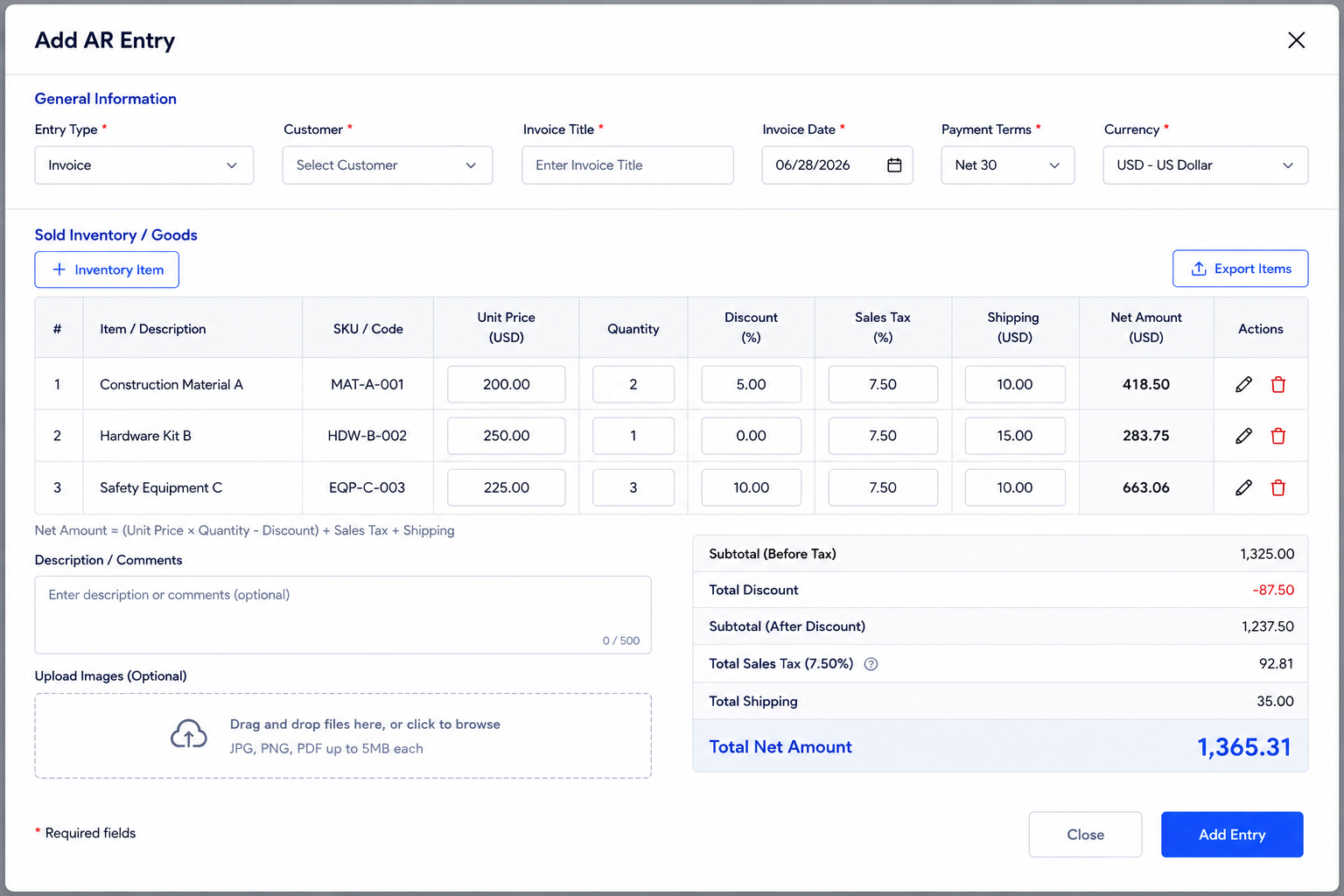
Adding an AR entry should not mean entering only a single amount. Sold Inventory/Goods, inventory items, unit price, quantity, discount, sales tax, shipping, subtotal, net amount, comments, image attachments, and currency all affect the final receivable. For companies that sell products, materials, equipment, or services, invoice value is often built from multiple components. If any component is missing or calculated outside the system, customer reconciliation and internal review become more difficult.
Attachments and comments also matter. Customer orders, delivery proof, signed documents, service evidence, or related communication may be needed during collection or dispute resolution. Currency fields are important for companies working with customers across regions or multiple currencies. Industry Software keeps transaction components, supporting files, and currency information inside the AR entry so each receivable is easier to explain later.
Aging Analysis Creates Collection Priority
Receivables should not be managed only by total amount. Aging Summary and Aging Report help teams distinguish between invoices that are still within normal payment terms and invoices that need follow-up. Two invoices with the same amount can carry very different risk if one is newly issued and the other has passed its payment window. Aging views turn “not received” into a time-based collection problem.
Aging analysis also brings sales and management into the collection conversation. Sales teams can help follow up with customers who have long-open balances, while management can monitor high-value or repeated late-payment accounts. For companies that rely on predictable cash flow, aging structure is often more useful than a single AR total. Industry Software places aging views inside the AR workflow so collection management becomes more proactive.
Aging analysis can support:
Viewing open balances by aging bucket
Identifying long-open customers or invoices
Separating normal terms from overdue risk
Supporting sales and finance collection follow-up
Improving cash flow visibility
Transaction Imports Reduce Manual Entry Gaps
Import Transactions is important because sales and collection data often originate outside the AR module. Some transactions may come from sales systems, inventory tools, bank records, historical spreadsheets, or external accounting platforms. If all AR records must be entered manually, delays, duplicate entries, and field errors can weaken collection visibility. Industry Software’s import capability helps companies bring historical and external transactions into one AR workflow.
Import quality depends on mapping rules. Invoice ID, Company, Amount, Invoice Date, Payment Terms, Deposit To, Received Date, and Currency need consistent formatting. Without clean customer names, account mapping, and invoice references, imported data can create duplicate customers or records that are difficult to reconcile. A structured import process reduces manual work while making AR data more reliable for reporting and aging analysis.
Numbering and Deposit Rules Keep AR Traceable
Set Numbers and Deposit To may look like small details, but they support basic financial control. If invoice numbers are inconsistent, searching, reconciliation, audit review, and customer communication become harder. If deposit accounts are not standardized, teams may struggle to connect payments to bank accounts or accounting categories. Reliable AR management starts with consistent numbering and account mapping.
Industry Software helps keep these rules inside the receivables workflow instead of leaving them to manual naming or comments. Numbering rules make invoices easier to trace, while deposit mapping helps connect payment records to cash or bank accounts. As transaction volume grows, this structure becomes increasingly important. It saves finance teams time and reduces explanation work during reconciliation.
Transaction Analytics Adds Business Context
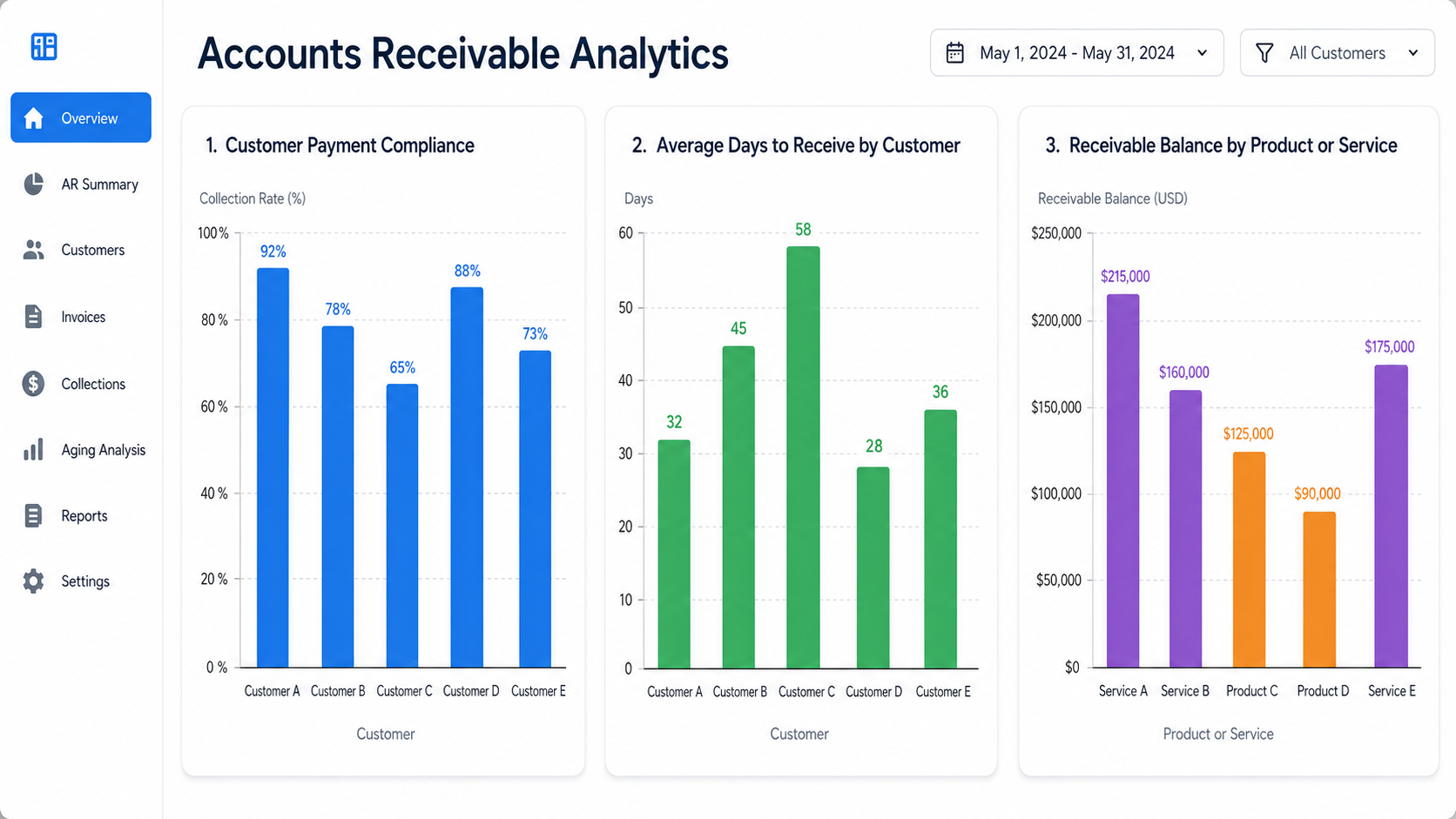
AR focuses on customers and collections, but finance teams often need broader transaction analysis to understand business quality. Charts such as delivery compliance, lead time by material and vendor, and cost by material and vendor show how transaction data can be analyzed across parties, materials, and cost dimensions. These examples may belong more naturally to purchasing or supply performance, but they point to a broader principle: financial records become more useful when they are connected to operational context. Cash collection, cost, delivery, and customer experience often influence one another.
The same analytical approach can apply to AR. Companies can review collection patterns by customer, salesperson, project, product category, or payment terms. They can identify which customers pay slowly, which transaction types create more open balance, and which receivables require management attention. Industry Software helps move finance data beyond lists and toward patterns that support better decisions.
AR Go-Live Requires Customer, Invoice, and Collection Rules
AR implementation should not only import historical invoices into the system. The real foundation is whether the company has consistent customer names, invoice numbering, payment terms, deposit accounts, currencies, tax rules, discount rules, import templates, and aging buckets. Without these rules, the system may still produce duplicate customers, hard-to-search invoices, inconsistent deposit accounts, and unreliable aging reports. Industry Software is most useful when it helps companies define receivables master data and collection rules before importing transactions and activating reports.
AR configuration should match how the business sells and collects. Companies may use due on receipt, Net 10, Net 30, or custom payment terms, and they may also manage multiple currencies, partial collections, sales tax, discounts, shipping, and supporting documents. Industry Software can configure invoice entry, transaction import, account statements, aging summaries, aging reports, and deposit account mapping around the company’s process. The result is not a simple receivables spreadsheet, but a financial workspace for customer reconciliation, collection follow-up, and cash visibility.
For AR module implementation, Industry Software can focus on:
Customer master data setup: Standardizing customer names, IDs, contacts, payment terms, and status.
Invoice numbering rules: Configuring invoice ID or numbering logic so records remain traceable.
Payment term standardization: Setting due on receipt, Net 10, Net 30, or custom collection terms.
Deposit account mapping: Connecting Deposit To with cash accounts, bank accounts, or accounting categories.
Transaction import template design: Structuring Invoice ID, Company, Amount, Invoice Date, Received Date, Currency, and related fields.
Tax and discount logic: Configuring sales tax, discount, shipping, subtotal, and net amount calculations.
Aging bucket setup: Defining aging summary and aging report intervals based on the company’s collection cycle.
Attachment and proof management: Supporting contracts, delivery proof, screenshots, or other collection evidence.
Account statement format setup: Configuring statement fields, display logic, and export format.
Collection review process design: Defining how received balance, not received balance, and received date should be checked.
This support is specific to AR operations. Companies do not only need invoices entered into the system; they need every receivable to connect customer data, terms, amount, tax, account, collection status, and aging analysis. Industry Software helps finance teams turn AR records into a manageable collection workflow. As transaction volume grows, the system can continue adapting import rules, report logic, and analytics dimensions for more complex receivables management.