Turn Supplier Quotes into a Front-Line Control for Project Cost Risk

Summary
×Expired Quotes Distort Margin Before Anyone Places the Order
An expired supplier quote may look like a small data issue, but the real problem begins much earlier. A purchase request may continue using an outdated price, a project budget may still assume material cost is under control, and leadership may review margin based on a unit price that no longer applies. When the order is finally placed, the supplier may reprice the material, market conditions may have changed, and the original cost assumption may collapse. At that point, the issue is no longer updating a quote; it becomes budget variance, approval rework, and margin pressure.
The difficulty in price management is not saving more supplier quotes. It is knowing which quotes can still support decisions. A material may have three supplier prices, but if the unit, validity period, lead time, and terms are different, the lowest price may not be executable. A quote may look attractive, but if it has expired or has no expiry date, it may be the riskiest price in the file. Supplier Price Tracking should turn quotes from purchasing records into cost control signals so teams can see risk before budgets become distorted.
The Lowest Price Is Not the Answer. Price Basis Is the Problem
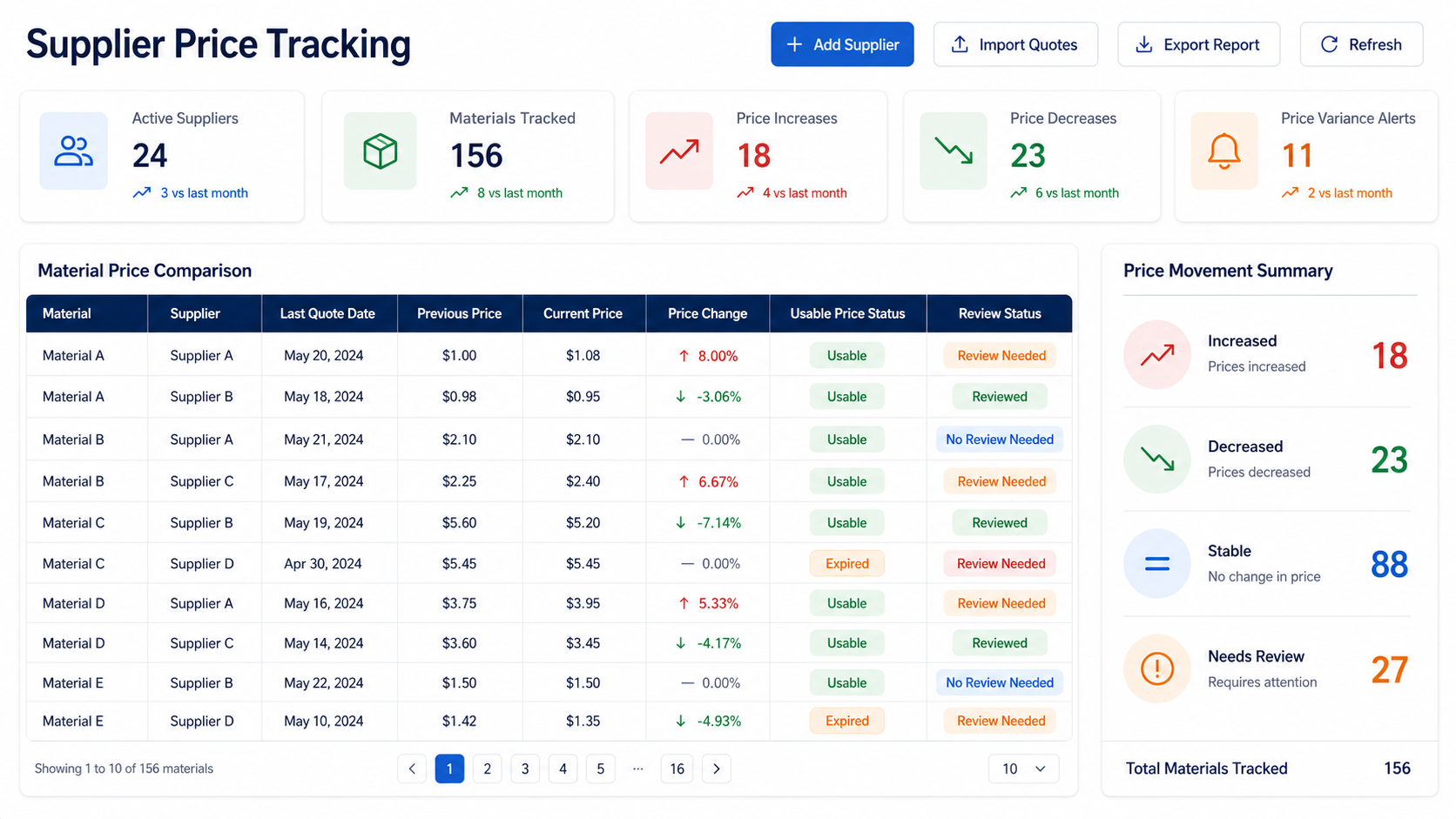
Many price comparisons appear to compare supplier prices, but they often compare different assumptions. Supplier A may quote by ton while Supplier B quotes by piece. One price may include delivery, while another excludes it. One quote may remain valid for 30 days, while another has already expired. If unit, quote date, expiry date, material description, and supplier terms are not aligned first, the lowest price may look more attractive than it really is. Procurement teams do not need a longer quote list; they need rules that show whether prices are comparable.
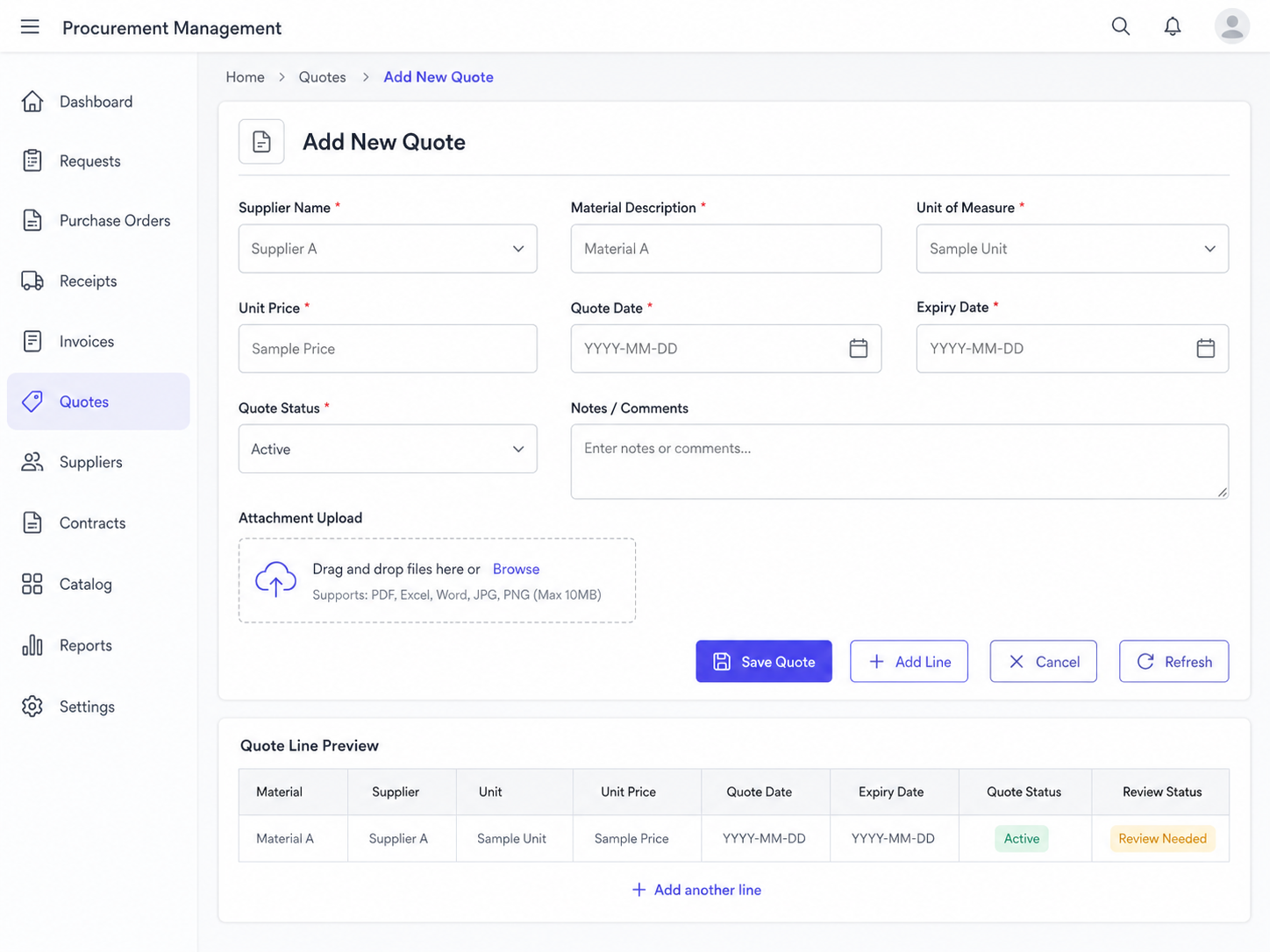
Add New Quote should therefore be more than a price entry step. It should capture supplier, item description, unit price, unit, quote date, and expiry date in one structured record so comparison, validity reporting, and export reporting all work from reliable data. The more complete the quote fields are, the easier it becomes to explain price differences. The more casual the fields are, the more likely best price and worst price will become misleading. Industry Software helps companies turn quotes scattered across emails, spreadsheets, and messages into reviewable, comparable, and traceable price data.
Large Price Gaps Require an Explanation
A wide supplier price gap does not automatically mean one supplier is expensive and another is cheap. It means there is a question to answer. Best price, worst price, average, and spread help buyers understand whether supplier prices are clustered or widely dispersed. A narrow spread may suggest a consistent market range, while a wide spread may point to differences in specification, unit, lead time, payment terms, quote date, or supplier risk. When leadership sees spread increasing, the right question is not only “Why not choose the lowest price?” It is “Are these prices based on the same assumptions?”
Teams can make this discussion more concrete with Price Spread %, calculated as Price Spread % = (Worst Price - Best Price) / Average Price × 100%. If the percentage exceeds an internal threshold such as 15% or 20%, buyers should explain the source of the difference before moving forward. For example, two suppliers quoting Steel reinforcement 12mm may have different validity periods, delivery terms, payment terms, or units of measure. Price variance is not a problem by itself; unexplained price variance is what turns into budget risk.
Savings and Budget Exposure Turn Price Data into Business Impact
Procurement teams often say one quote is more competitive, but leadership needs to understand the financial impact. A 3% price advantage may sound minor, but on a large planned quantity it can become a significant savings opportunity. Teams can estimate that impact with Potential Savings = (Selected Price - Best Valid Price) × Planned Quantity, turning price comparison into a measurable procurement opportunity. This gives procurement managers a stronger basis for negotiation, supplier review, or substitution.
Project managers need another view: whether the latest valid quote has moved above the budget unit price. If material prices rise while the project continues using an older budget assumption, the remaining quantity creates budget exposure, which can be estimated with Budget Exposure = (Latest Valid Price - Budget Unit Price) × Remaining Quantity. This is more useful than saying a material price increased because it connects the change directly to project margin, cash planning, and possible approval adjustments. When Supplier Price Tracking can show both savings opportunities and budget exposure, it becomes a project cost control tool, not only a procurement tool.
Executives Need a Price Risk View, Not a Quote List
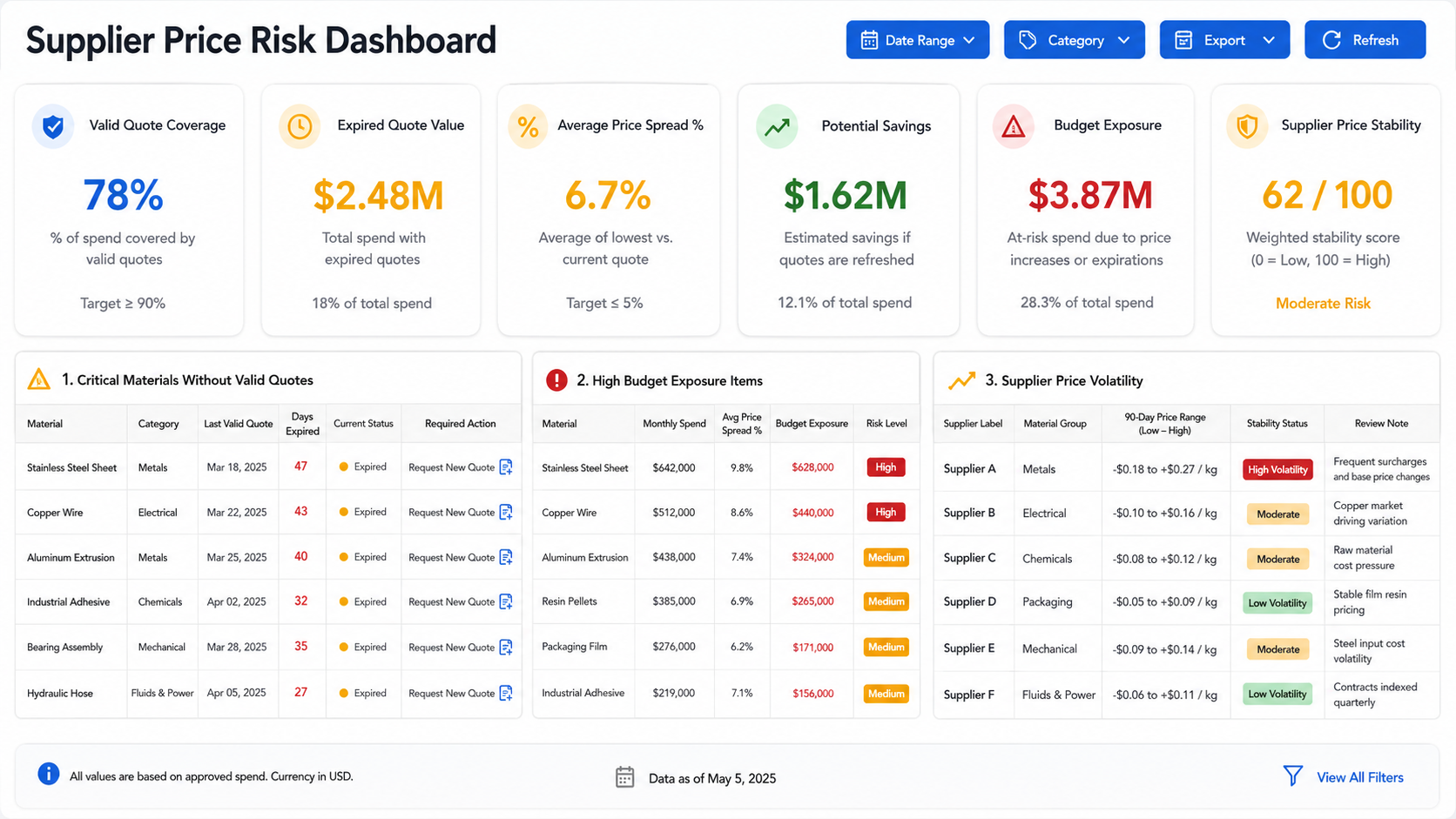
Executives do not need to inspect every supplier quote every day. They need to know whether current price data is strong enough to support project decisions. A large quote library does not prove price reliability. If valid quote coverage is low, expired quote value is high, or price spread is widening across critical materials, cost decisions are already exposed. Valid Quote Coverage, calculated as Valid Quote Coverage = Materials with Valid Quotes / Total Tracked Materials × 100%, answers a practical management question: how much of the material price base can actually be used for purchasing and budget decisions?
Expired quotes should also be prioritized by impact, not only by date. A low-value material overdue by 20 days and a critical steel quote overdue by 5 days do not carry the same project risk. Companies can use Quote Risk Score = Days Overdue × Material Criticality × Spend Weight to combine overdue time, material importance, and spend impact into one priority signal. This helps procurement teams handle the quotes that matter most to budget, delivery, and margin first.
A management dashboard can focus on:
Critical materials without valid quotes: Whether the project cost base is reliable
Expired quote value: How much potential spend is tied to outdated pricing
Abnormal Price Spread %: Which materials require price basis review
Supplier price volatility: Which suppliers show stable or unstable pricing behavior
Potential savings: Where negotiation or supplier substitution may create value
Budget exposure: Which projects may need cost review or approval adjustment
Quote Review Should Follow a Rhythm, Not a Last-Minute Rescue
Many pricing problems are not missed because the system cannot detect them. They are missed because teams check too late. Buyers often verify quote validity right before order placement, which leaves little time to respond if pricing has expired. A stronger approach is to build a fixed review rhythm. Critical materials can be reviewed weekly, standard materials monthly, and long-project materials at budget review, purchase request, and purchase order points.
Warning periods should not be the same for every material. Steel, copper, imported components, and project-critical items may need shorter warning windows because they are volatile or have long lead times. Low-value, stable, and readily available materials can use longer windows. This keeps alerts useful rather than noisy and allows the system to send different priority signals based on material risk and purchasing impact.
A practical review rhythm can include:
Weekly checks for critical materials: Focus on high-spend, volatile, long-lead, or project-critical items
Monthly checks for standard materials: Review missing expiry dates, supplier price changes, and stale quotes
Budget exposure checks before cost review: Confirm whether latest valid prices affect project assumptions
Validity checks before purchase request: Prevent expired prices from entering approval workflows
Supplier confirmation before order placement: Confirm price, unit, lead time, and validity are still executable
Monthly management risk review: Monitor quote coverage, expired quote value, and potential savings
Expired Quotes Need Owners, Deadlines, and Escalation
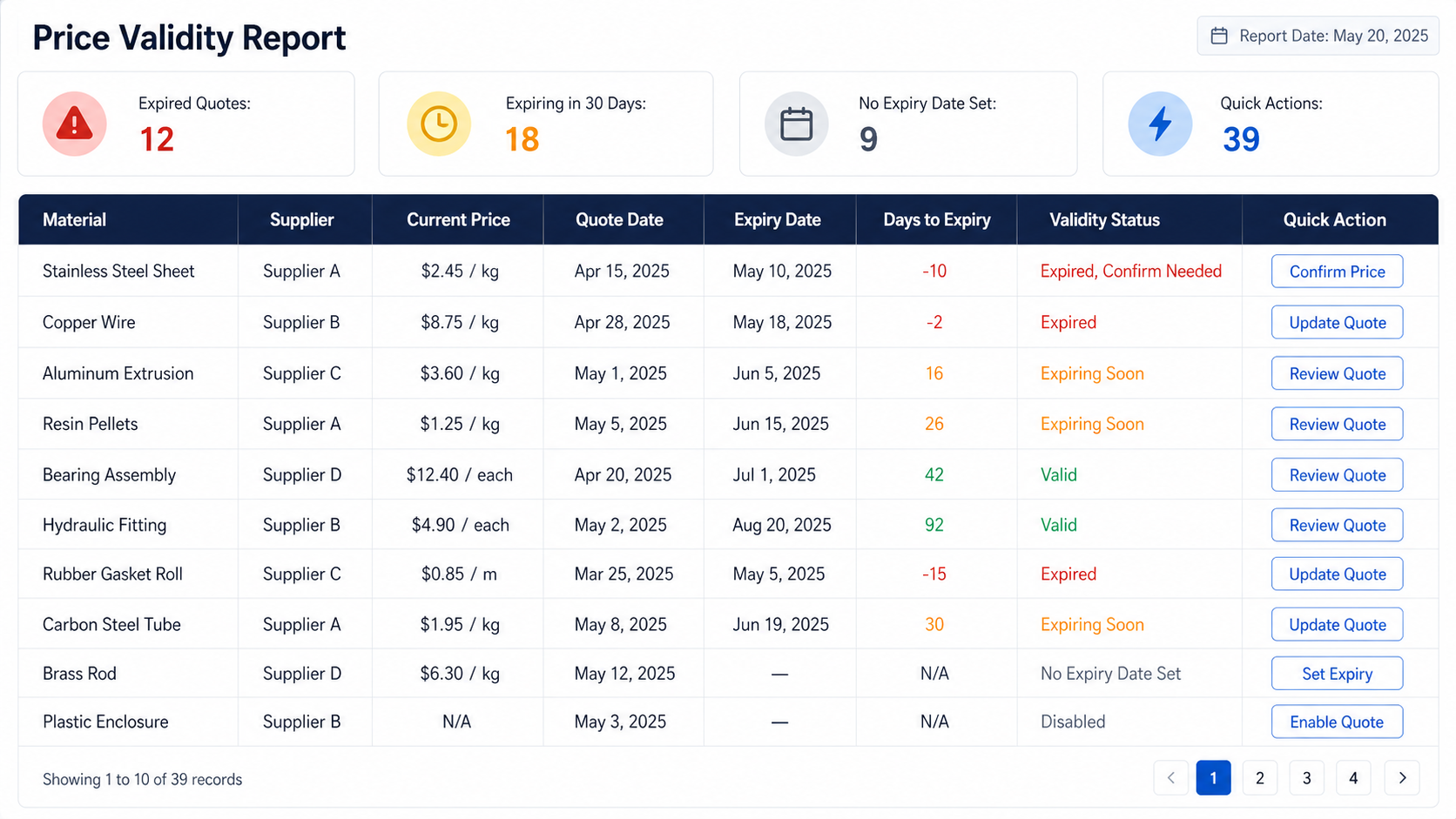
Price Validity Report should not simply tell teams that quotes have expired. It should move every expired or incomplete quote into a defined action path. Expired Quotes, Expiring in 30 Days, and No Expiry Date Set should each trigger different responses. Expired quotes need to be updated or disabled. Quotes expiring soon need supplier follow-up before they become unusable. Quotes without expiry dates need the missing field completed before they can be used formally. Without owners and deadlines, these risks remain visible but unresolved.
Quick Actions connect visibility to action. When a buyer sees an overdue quote, they can add a new quote, return to Price Tracking to compare related supplier prices, or export a report for project and management review. For high-value or critical materials, escalation rules can notify the procurement manager or project owner if the quote remains unresolved past the deadline. This changes expired quote management from “seen in the system” to “assigned, followed up, and closed.”
Price Rules Should Give Risk an Owner and a Deadline
Rule configuration should not only decide who receives a notification. It should define who owns the risk, how soon it must be handled, and when it should escalate. Expired critical material quotes, high-value quotes approaching expiry, abnormal Price Spread %, Budget Exposure above tolerance, and large Potential Savings opportunities can all become rules. Each rule should include a trigger, owner, deadline, and escalation path. This prevents price risk from staying inside personal judgment and turns it into an operating routine.
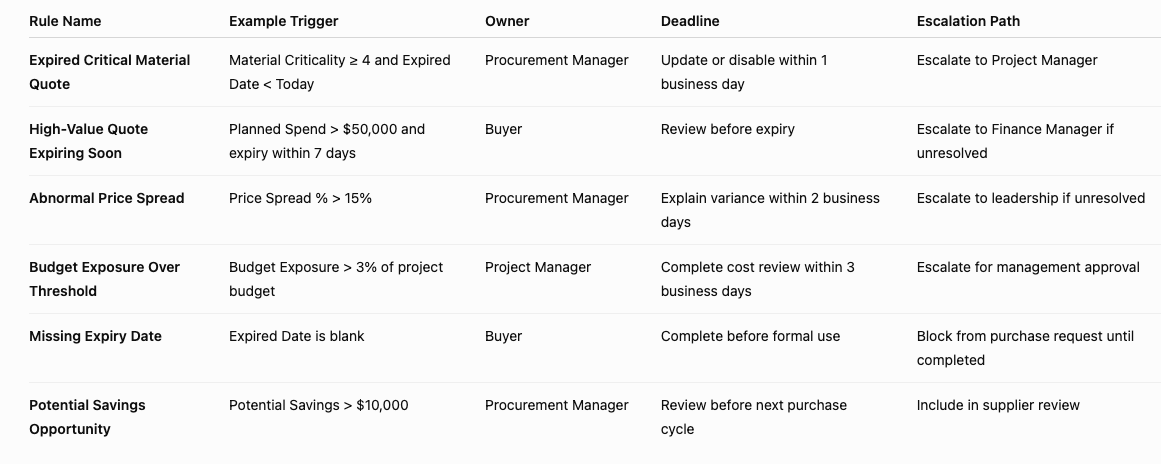
The goal is not to add process burden. The goal is to give price risk a clear exit path. Procurement knows what to address first, project managers know which price changes affect budgets, finance knows which high-value quotes need review, and leadership knows which risks have crossed tolerance. Industry Software can configure these rules and alert settings so price governance becomes part of daily execution, not only a meeting topic.
Go-Live Should Build Quote Governance, Not Just Import History
The easiest mistake during Supplier Price Tracking rollout is importing historical quotes before standardizing the rules behind them. If supplier names are inconsistent, material descriptions vary, units do not match unit prices, and quote dates or expiry dates are missing, later comparison and validity reports will not be trusted. The first step should be defining quote governance: which materials require expiry dates, which materials need shorter warning periods, which quotes can support budget calculations, and which expired quotes must be reconfirmed. A quote library only has management value when the company has defined what makes a quote trustworthy.
A practical rollout starts with critical materials and main suppliers. Steel, copper, core components, imported items, and high-spend project materials can enter the quote library first. Buyers can then validate whether material description, unit, quote date, expiry date, Price Spread %, Budget Exposure, and Potential Savings match real management needs before the scope expands. This turns go-live from a data migration exercise into a working model for how prices are trusted, compared, and reviewed.
Implementation can be organized around four workstreams. First, define quote master data standards, including supplier naming, material descriptions, specifications, units, and price fields. Second, define price risk metrics such as valid quote coverage, price spread, potential savings, and budget exposure. Third, configure review cycles and rule thresholds so critical materials, high-value quotes, and abnormal variance enter follow-up workflows automatically. Fourth, establish cross-functional usage so procurement, project, finance, and leadership teams discuss cost risk from the same price basis.
Industry Software supports more than the software screens in this process. Teams can use the cloud-based environment to let procurement and project users work from the same quote data, then expand the quote library by material category. Training should not only show users where to click; it should help each role understand which indicators to review, when to update quotes, and which exceptions require escalation. Post-go-live optimization can focus on warning periods, report fields, rule thresholds, and supplier review logic so the system continues to fit real procurement management as material categories and project volume grow.