Results Snapshot
Customer history, estimates, projects, and service records can remain connected throughout the customer lifecycle
Standard costs, Assemblies, and Digital Takeoff create a more consistent estimating workflow
Project budgets, actual costs, job cost, and scheduling can be reviewed while work is active
Dispatch brings technicians, vehicles, unscheduled work, and multi-day jobs into one operating view
Inventory, purchasing, equipment, fleet activity, and labor can stay connected to active work
Employee certifications, licenses, incidents, and supporting documents can be managed centrally
Billing, receivables, payables, ledger activity, and financial reporting can continue from operational records
Customer Profile
The customer is a specialty contractor providing installation, project work, repair, field service, and ongoing maintenance. Work may begin with a new project opportunity or come from an existing customer requiring repair, inspection, equipment service, or follow-up work, creating multiple Estimates, Projects, and Work Orders over the course of the relationship.
The operation relies on coordination between sales, estimating, project management, field teams, and back-office finance. When projects and service work move simultaneously, managers need more than a list of open jobs. They need to understand where the customer stands, how the work was priced, whether cost is moving against budget, which field resources are assigned, and how completed work continues into billing and financial management.
Work Was Moving, but the Information Needed to Move with It
In specialty contracting, many operating problems are not caused by a lack of activity. They occur because information does not move as quickly as the work itself. Sales may understand the customer requirement while the field team lacks the full scope, project management may know the current stage while finance has not yet seen the latest cost movement, and customer changes may remain in calls or messages rather than becoming part of the job record.
The operation therefore needs more than additional records. It needs an execution structure that keeps Customer, Estimate, Project, Work Order, Materials, Labor, and Financial Records connected around the same job. Each team can then understand what happened before the handoff and what action needs to happen next.
Sales & CRM
Keep Customer History Connected as the Work Moves Forward
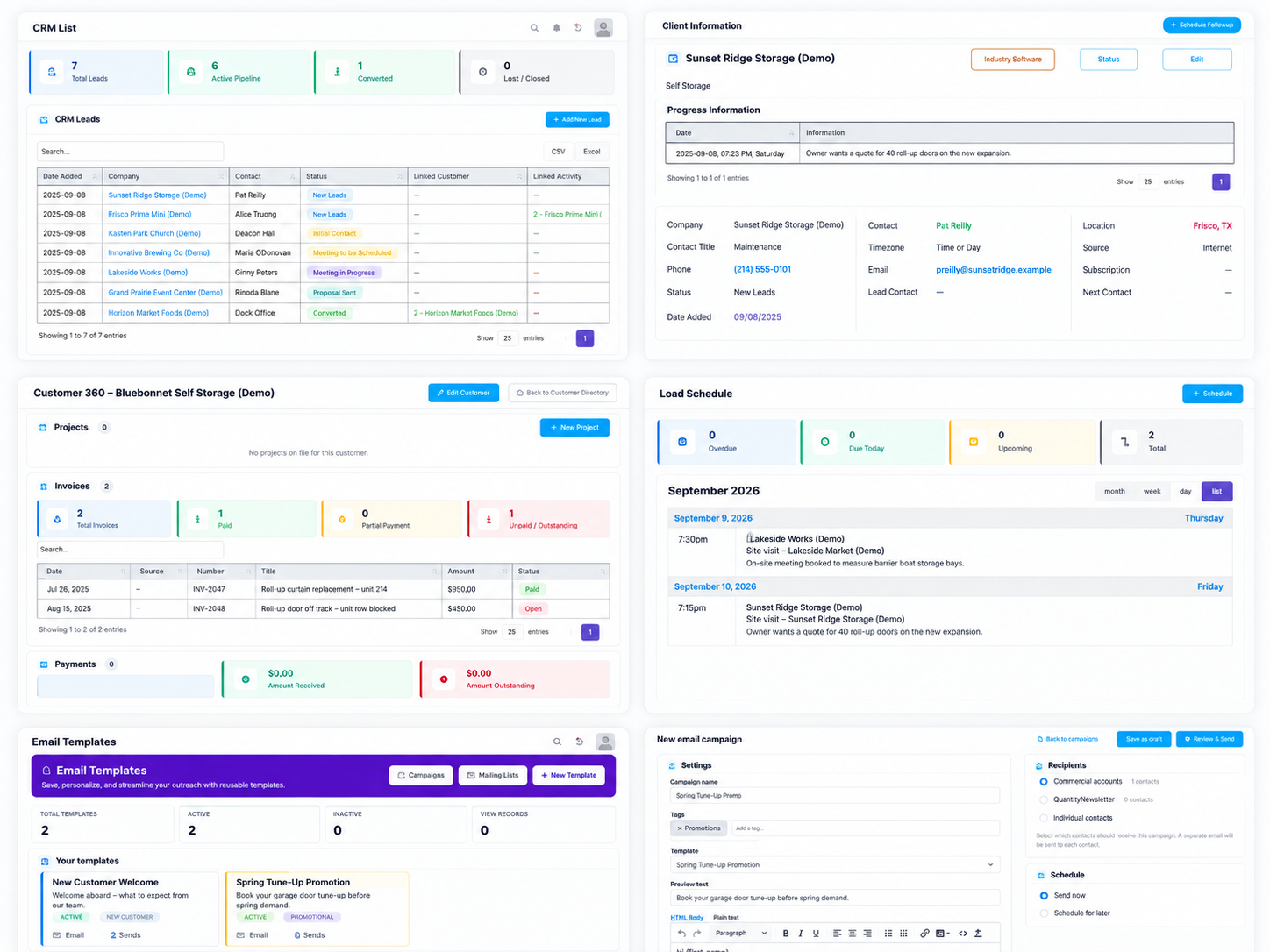
A customer relationship may include inquiries, meetings, estimates, project delivery, and future service activity. CRM Pipeline keeps lead status, progress updates, and follow-up activity attached to the same sales record, making the next action easier to understand. Linked Customer opens the established account, while Linked Activity connects directly to associated Estimates, Projects, and Work Orders.
Customer 360 brings contacts, files, estimates, projects, invoices, payments, work orders, and Service Locations into one customer view. Sales can use that history to continue the commercial relationship, while service teams can review prior activity before planning the next visit. Customer context therefore continues even when responsibility moves to another team.
Move opportunities forward: Manage stage, progress, and follow-up through CRM Pipeline
Open the established customer record: Linked Customer connects directly to the account
Review connected work: Linked Activity opens Estimates, Projects, and Work Orders
Preserve the full account history: Customer 360 combines commercial, service, and financial records
Identify follow-up needs: Client Overview groups opportunities by pipeline stage
Coordinate customer activities: Events & Appointments manages meetings and site visits
Reuse customer communications: Email Campaigns, Mailing Lists, and Templates support outreach
Proposals & Estimating
Build Consistent Estimates from Standard Costs and Measured Quantities
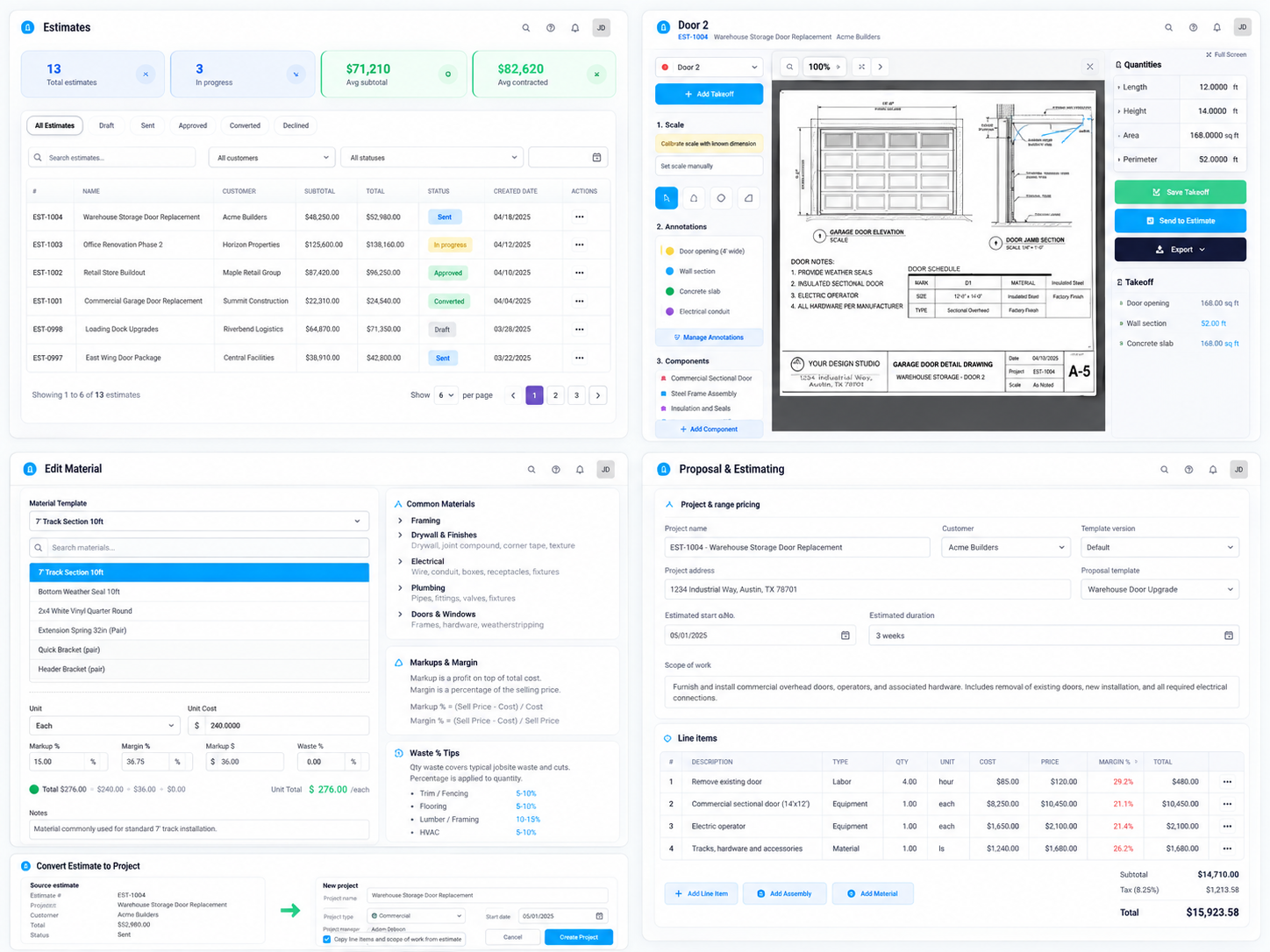
Specialty-contracting estimates often combine material, labor, equipment, subcontractor, and indirect cost. Recreating those inputs for every opportunity adds administrative work and makes consistency harder to maintain. Materials Library, Labor Classes, Equipment Rates, Flat Rate Book, and Soft Costs create reusable foundations for pricing.
Assemblies organize related material, labor, and equipment into repeatable work units, while the selected Unit controls whether Digital Takeoff uses Count, Length, or Area. Once the drawing scale is established, measured quantities can be sent directly into the linked Estimate with the associated Assembly content. Approved scope can then continue into a Project or Work Order instead of being rebuilt for execution.
Reuse standard costs: Draw from Material, Labor, Equipment, Flat Rate, and Soft Cost libraries
Structure scope clearly: Use Sections, Line Items, and Cost Codes
Create repeatable work packages: Assemblies combine related delivery resources
Standardize measurement: Manage Units controls Each, Linear Feet, Square Feet, and related units
Measure directly from plans: Digital Takeoff supports count, length, and area measurement
Connect takeoff to pricing: Save and Send to Estimate transfers measured quantities
Review margin and markup: Margin Analysis and Bulk Markup support pricing review
Continue approved scope into delivery: Convert the Estimate into a Project or Work Order
Project Management
Review Progress and Cost While the Project Is Still Active
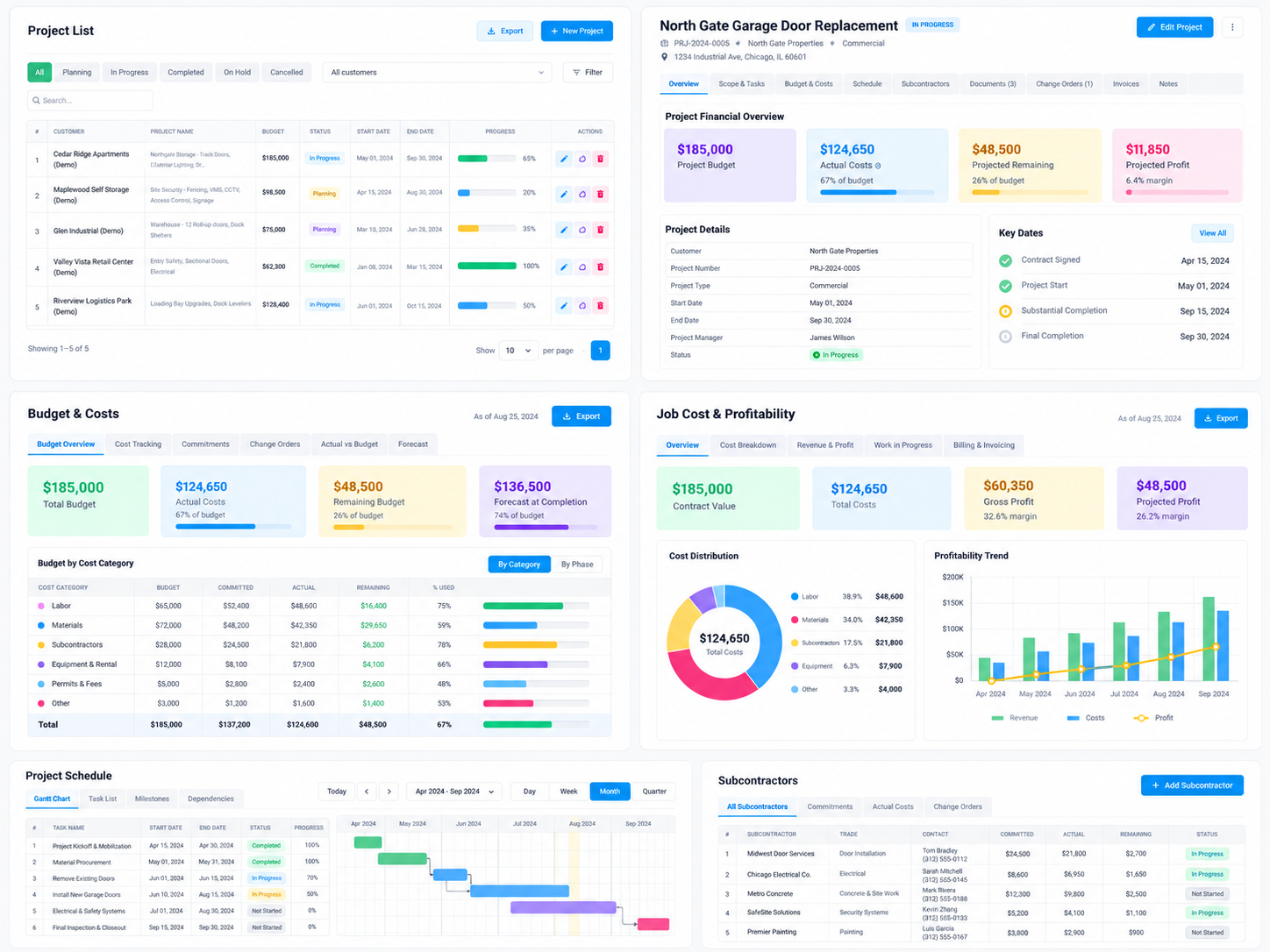
Once work enters execution, project status alone is not enough. Managers also need to understand the current phase, actual spend, remaining budget, and whether performance is moving away from plan. Project Phases divide execution into trackable stages, while Project Budget brings Material, Labor, Equipment, Subcontractor, and Overhead into one cost structure.
Actual Costs and Job Cost provide deeper visibility into spending, and Budget vs Actual highlights where cost movement requires attention. When scope or contract value changes, Change Orders retain the change, financial impact, and approval status. Project Timeline, WIP Reporting, and Subcontractor Contracts extend the same control into scheduling, financial progress, and outside commitments.
Organize execution by phase
Review the complete cost structure
Capture actual project spending
Investigate Job Cost
Identify budget variance
Adjust schedules visually
Formalize scope and value changes
Review work-in-progress financials
Manage subcontract commitments
Field Services
Keep Scheduling and Field Execution in Sync
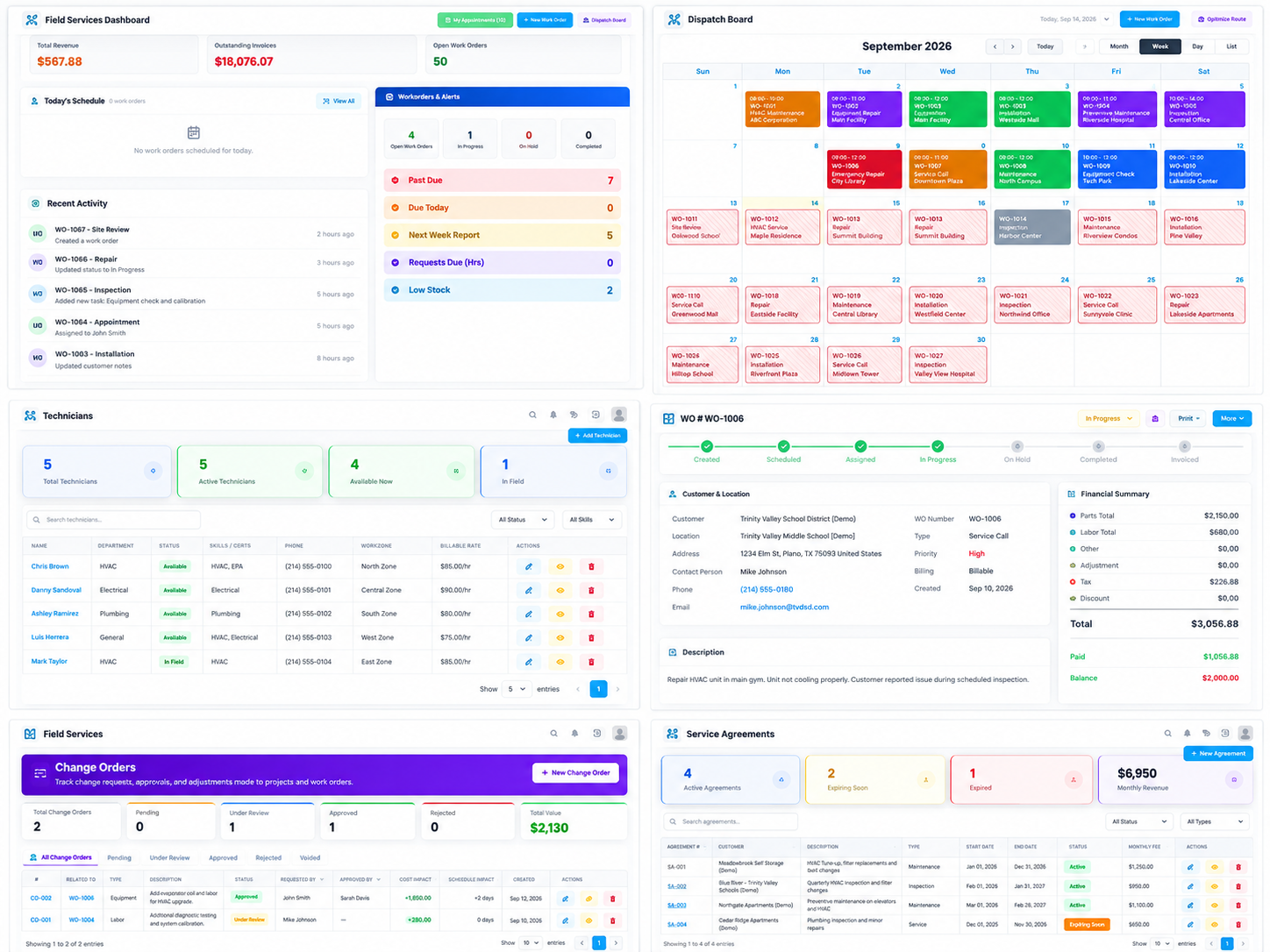
Field schedules change as customer availability, technician capacity, vehicles, and site conditions change. Dispatch Board brings scheduled and unscheduled work into the same operating workspace, while Quick Assign allows visit time, lead technician, crew members, and vehicles to be updated quickly.
Work Orders can be moved directly to another date, and multi-day jobs can shift either one selected day or all later scheduled days together. Once work is underway, Daily Field Reports, Forms, Customer Equipment, and Service Agreements continue to capture execution history and recurring service needs. Scheduling and actual field activity therefore remain part of the same workflow.
Review field schedules in one place
Quickly assign technicians, crew, and vehicles
Reschedule work directly on the calendar
Shift connected multi-day work
Place unscheduled work onto available dates
Keep complete Work Order context
Capture daily field activity
Standardize inspection and service forms
Preserve customer-equipment history
Manage recurring service programs
Inventory & Materials
Prepare Materials Before Shortages Affect Delivery
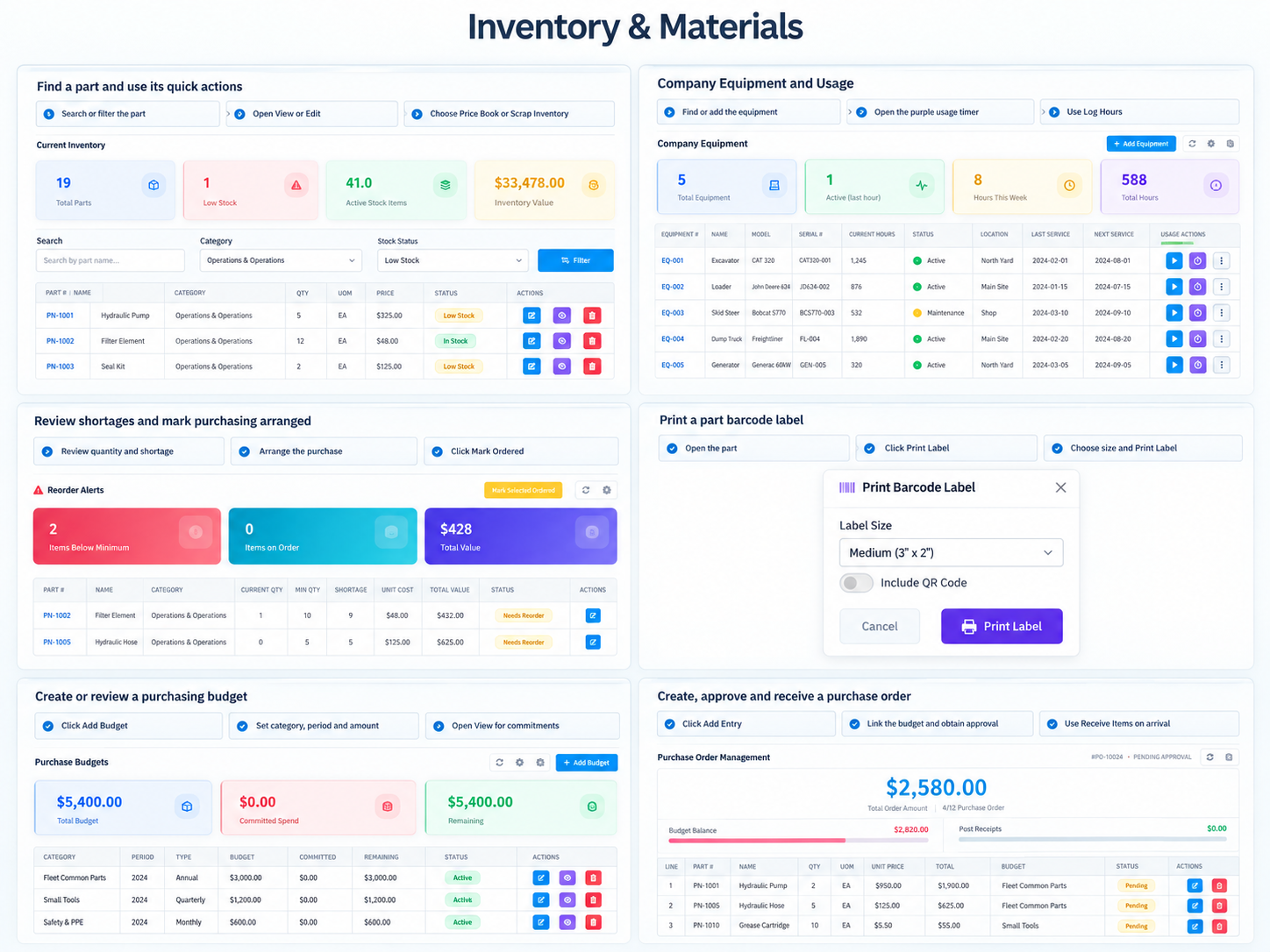
Inventory visibility becomes more useful when it leads directly to purchasing decisions. Current Inventory shows available quantities, while Minimum Stock creates a replenishment threshold for frequently used material. Reorder Alerts then identify shortage quantities, suggested reorder amounts, and estimated cost.
Purchase Budgets place replenishment inside a spending framework, while Purchase Orders continue the process through approval and receiving. Company Equipment Usage also connects equipment, projects, phases, work orders, operators, and hours. Material and equipment readiness therefore become part of active delivery rather than separate administrative records.
Maintain current inventory visibility
Establish replenishment thresholds
Identify shortages early
Control purchasing against budget
Manage purchase orders through receiving
Maintain part pricing, labels, and scrap activity
Connect company-equipment use to jobs
Fleet Management
Keep Vehicles and Mobile Resources Ready for the Field
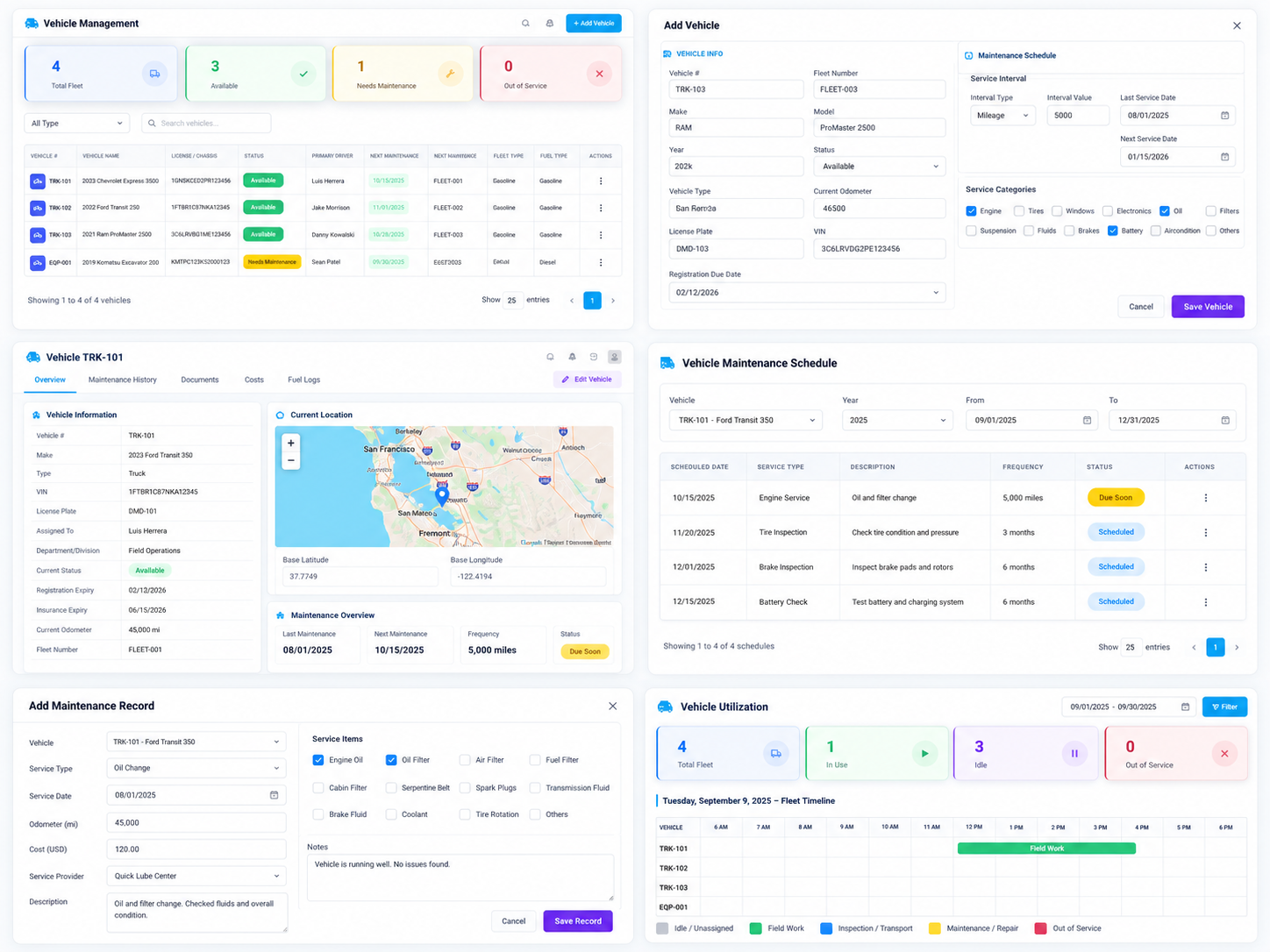
Service vehicles affect both technician mobility and the tools and parts available at the jobsite. Vehicle Management brings status, odometer, registration, primary operator, maintenance history, and fuel activity into one vehicle record.
Maintenance Schedule provides visibility into upcoming service, while Vehicle Utilization shows which Work Orders a vehicle is supporting. Truck Inventory tracks the parts and tools carried by each vehicle and supports job-based loading, replenishment, transfers, and warehouse returns. Vehicle readiness and mobile inventory can therefore be managed as part of field operations.
Maintain complete vehicle records
Preserve maintenance history
Plan scheduled maintenance
Connect vehicle use to Work Orders
Track mobile parts and tools
Load inventory from a Work Order
Transfer stock between vehicles
Return unused material to the warehouse
Time & Labor
Turn Recorded Hours into Payroll and Job Cost
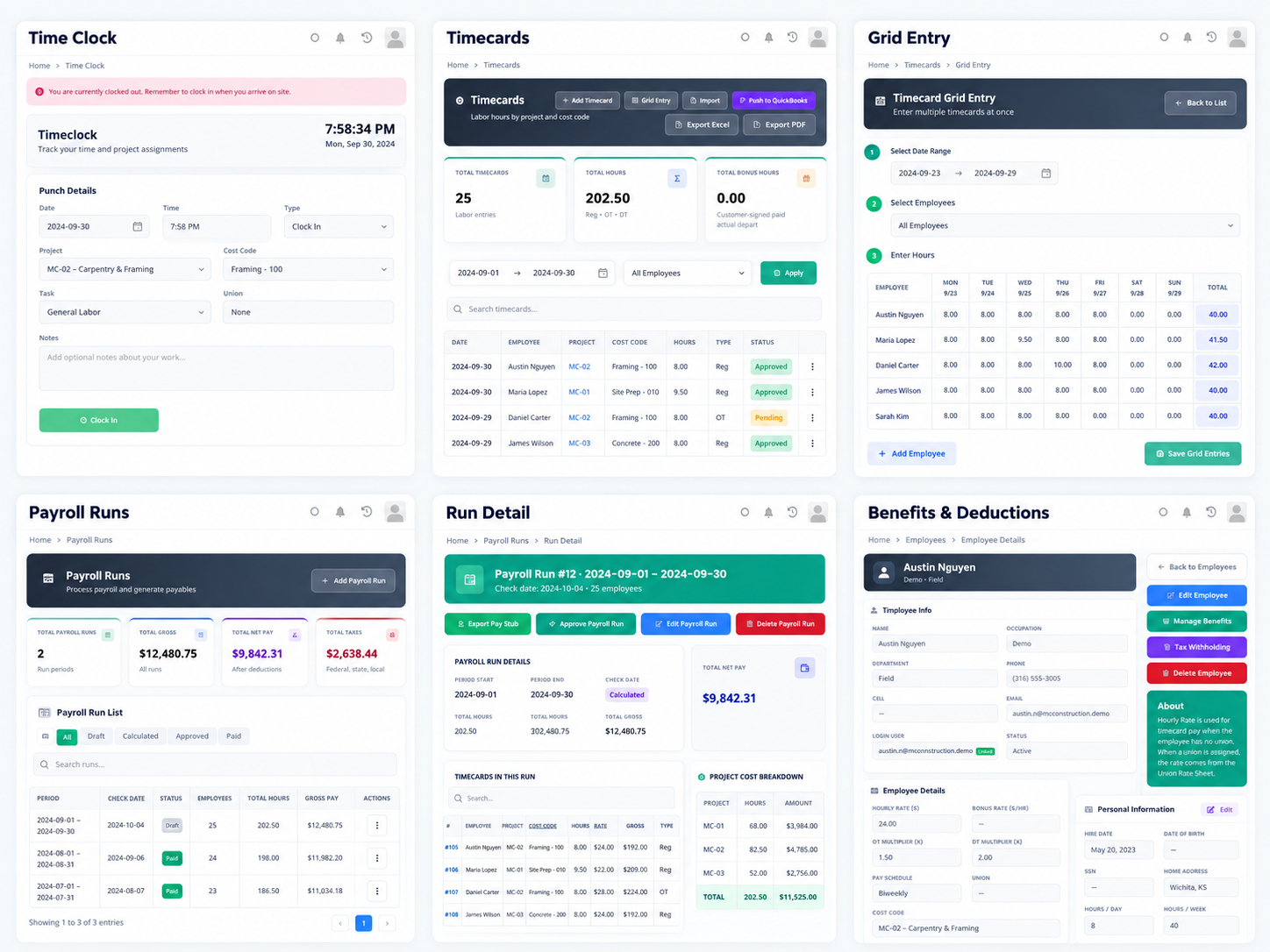
Labor records become more useful when the hours remain connected to the work that generated them. Time Clock can capture project, phase, division, punch type, and work location together with employee time, while Timecards provides administrative review of Regular, OT, DT, Bonus Hours, and cost information.
For larger volumes, Timecard Grid supports multiple employees and dates with synchronization and edited-cell visibility. Approved labor then moves into Payroll Runs with salaried employees, and final payroll activity can continue into AP, Job Cost, and GL. Labor can therefore be followed from time entry through its downstream financial impact.
Record time against actual work
Review and correct employee hours
Preserve project and phase cost ownership
Enter time in bulk
Synchronize existing time records
Build the payroll period
Recalculate after labor changes
Continue approved payroll into accounting and Job Cost
HR
Keep Workforce Credentials and Safety Records Current
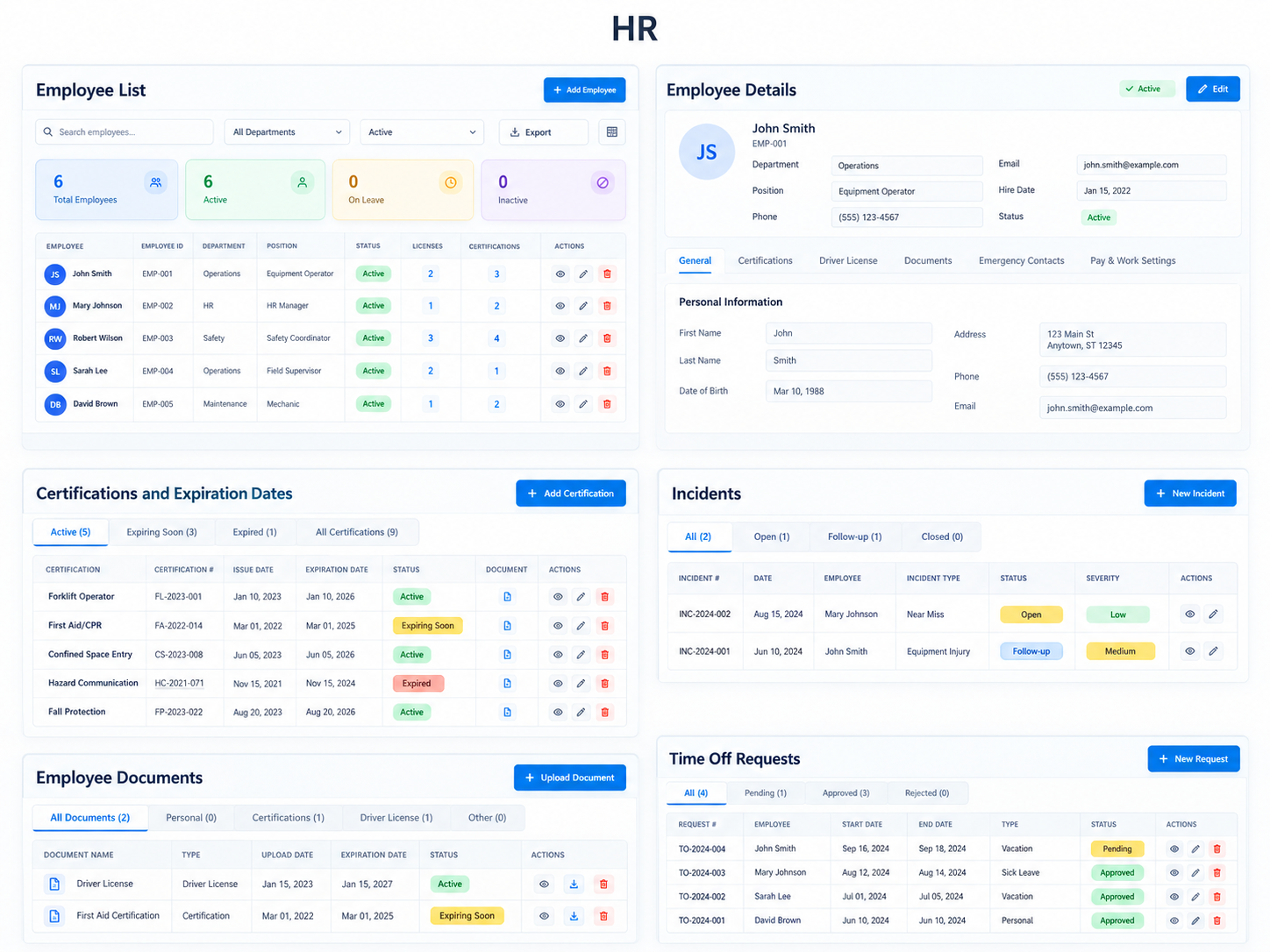
A field workforce requires more than basic employee contact and payroll information. Employee Details centralizes pay and work settings, benefits, certifications, driver licenses, incidents, emergency contacts, and supporting documents.
Certification and license records retain issue dates, expiration dates, status, and documentation, with upcoming expirations visible through HR Dashboard and HR Calendar. Workplace injuries, vehicle accidents, and other events can be maintained through Incident records with compliance details, corrective actions, and supporting files. HR information and compliance follow-up therefore remain connected to the employee record.
Maintain complete employee profiles
Manage pay and work settings
Assign employee benefits
Track certifications and expirations
Maintain driver-license records
Document workplace and vehicle incidents
Maintain emergency contacts
Store employee documents
Monitor upcoming credential expirations
Manage employee time off
Accounting & Finance
Carry Completed Work into Billing and Financial Review
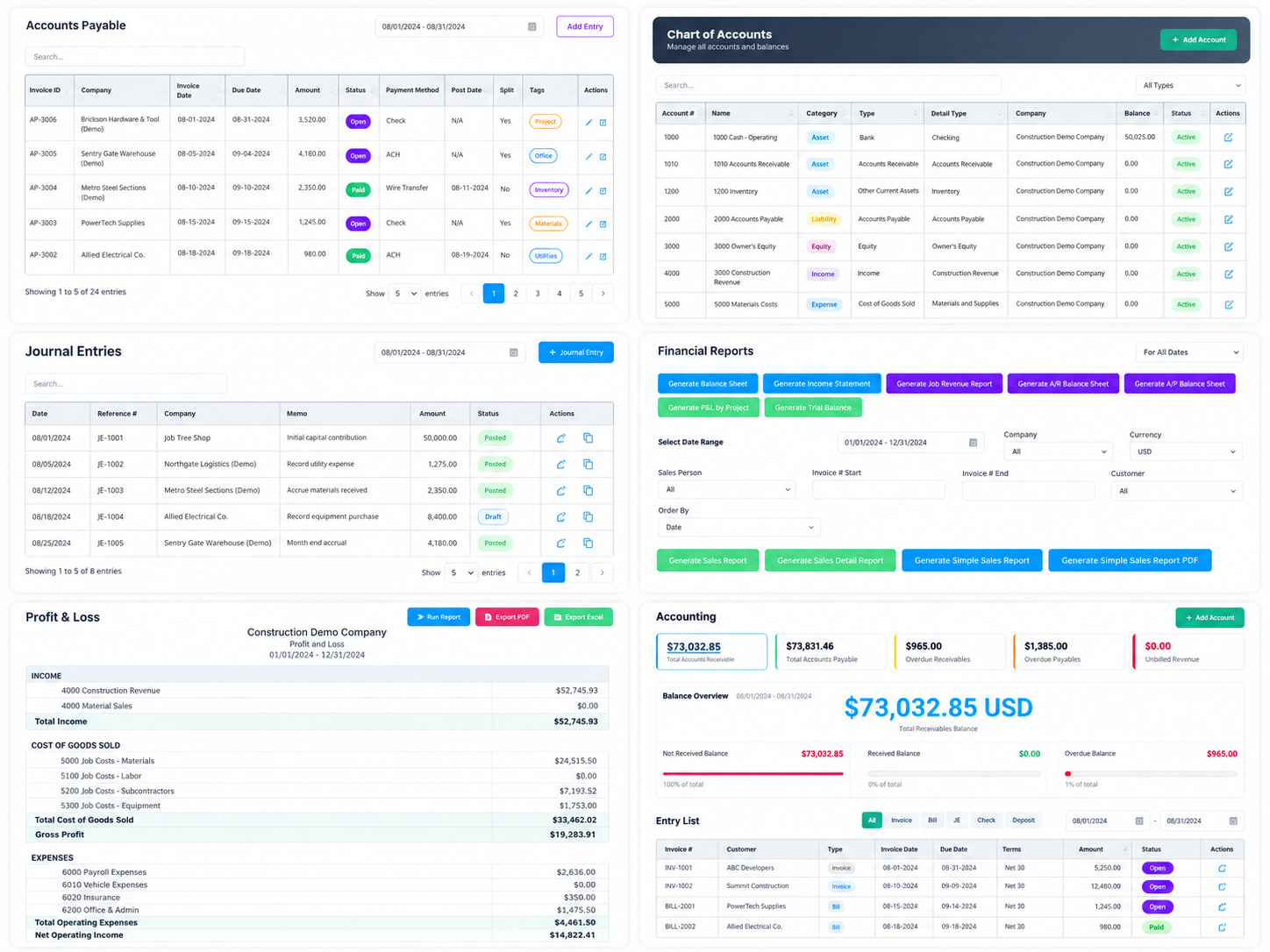
Work completion still needs to become billing, payment, and financial information. Accounts Receivable handles invoices, outstanding balances, aging, customer payments, and overpayments, while Accounts Payable manages vendor bills, payment status, supporting files, and check generation.
Chart of Accounts and Account Reports provide account-level financial structure and activity, while General Ledger allows balances to be traced to individual transactions. Invoicing Dashboard summarizes billed, outstanding, collected, and still-unbilled work, while Profit & Loss and other Financial Reports organize activity into revenue, cost, expense, and net-income reporting.
Follow customer receivables
Record payment activity
Manage overpayments
Manage vendor obligations
Generate supplier payments
Maintain the GL structure
Review account-level transactions
Trace ledger activity
Review operating performance
Monitor billing status
Implementation and Adoption
The workflow follows the way different roles already contribute to the work rather than expecting every employee to operate every module. Sales continues to manage customers and opportunities, estimating owns scope and pricing, project management controls execution and cost, dispatch and field teams manage delivery, and finance handles billing and accounting.
The difference is that these responsibilities now operate on connected records. Each team can maintain the information it owns while giving the next stage the context needed to continue. The handoff becomes part of the operating workflow rather than depending entirely on email, calls, or manual explanation.
Operational Outcomes
The improvement comes from connecting multiple parts of the operation rather than relying on one isolated feature. Customer records, estimates, projects, work orders, inventory, labor, and financial activity together create a more complete record of the work while it is still active.
Key operational outcomes include:
Customer and sales history can remain connected to downstream delivery
Approved estimating scope can continue into Projects and Work Orders
Budget and actual cost can be reviewed earlier during execution
Multi-day field scheduling and resource assignment become easier to follow
Inventory, purchasing, fleet, and labor remain closer to the work they support
Employee compliance information is easier to monitor centrally
Finance can follow operational activity into billing, payment, and reporting
Broader Business Impact
The larger shift is from reconstructing the job after completion to reviewing it while execution is still underway. Different teams continue to own different responsibilities, but Customer, Estimate, Project, and Work Order records provide a shared operating context. Field changes can become formal records, resource activity can become cost information, and completed work can continue into billing and financial review.
For specialty contractors managing both project work and field service, this connection is especially important. Customer requests, site conditions, material needs, and labor plans can still change, but the team has a clearer way to see where the change occurred and which role needs to respond next.
From Separate Records to a Continuous Operating Workflow
A connected system does not remove the complexity of project and field work. It makes that complexity easier to trace. From Customer History, Estimating, and Digital Takeoff through Projects, Dispatch, Work Orders, Inventory, Timecards, and Accounting, each stage can continue using information created earlier in the process.
The team can follow how a customer requirement became an estimate, how the estimate became field execution, how resources supported the work, and how completed activity became cost, invoice, payment, and financial results. That continuity is the central value of the workflow.