Sales Order Management (SOM) is the heartbeat of any commercial enterprise. It is the critical bridge that connects customer demand with supply chain fulfillment, turning a simple handshake into a tangible financial reality.
In today's hyper competitive industrial landscape, speed and accuracy are no longer optional, they are the baseline for survival. From the moment a quote is generated to the final confirmation of delivery, every second counts. An efficient Sales Order Management system does more than just record transactions; it orchestrates the entire production and fulfillment cycle, ensuring that customer expectations are not just met, but exceeded.
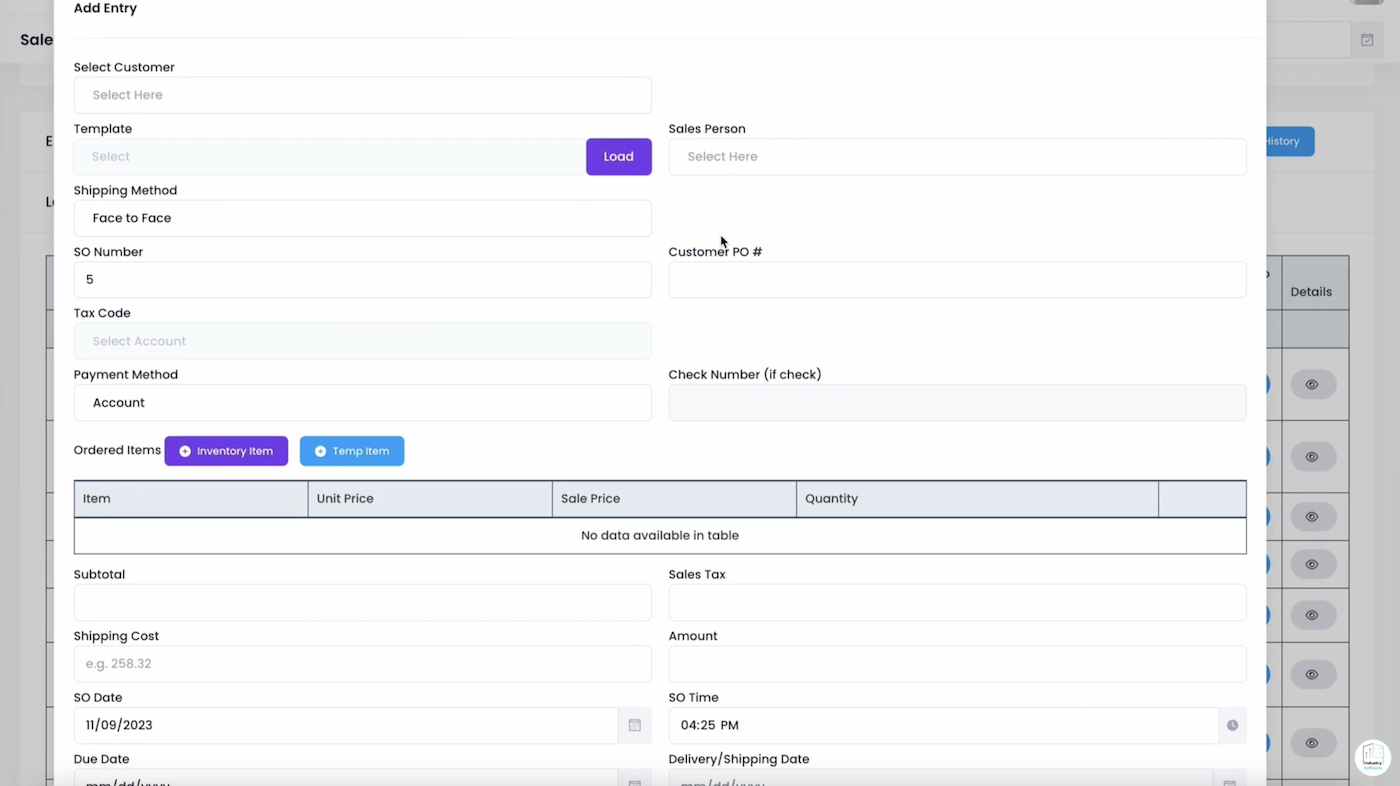 Figure 1: The Unified Sales Order Dashboard provides a 360 degree view of the revenue pipeline, combining high level balance summaries with granular order tracking.
Section I: The Revenue Command Center
Visibility is the foundation of effective sales operations. As shown in Figure 1, the Sales Order Management Dashboard serves as the central nervous system for the sales and finance teams.
With a total sales balance of $445,785.25, the system provides an immediate pulse check on the company's top-line performance. The "Unpaid Balance" of $444,573.90 (representing nearly 100% of the current pipeline) highlights the volume of work currently in the fulfillment or collection phase.
By categorizing orders into Quotes, Sales Orders, Producing, Packing, and Shipped, managers can identify bottlenecks in real time. Are orders getting stuck in the "Producing" phase? Is there a delay in "Packing"? This granular visibility allows for proactive resource allocation, ensuring that the company's delivery promises are kept.
Section II: The Anatomy of a Flawless Order
Errors in order entry are the leading cause of fulfillment delays and customer dissatisfaction. Our Intelligent SO Entry Modal is engineered to eliminate these friction points by enforcing data integrity from the very first click.
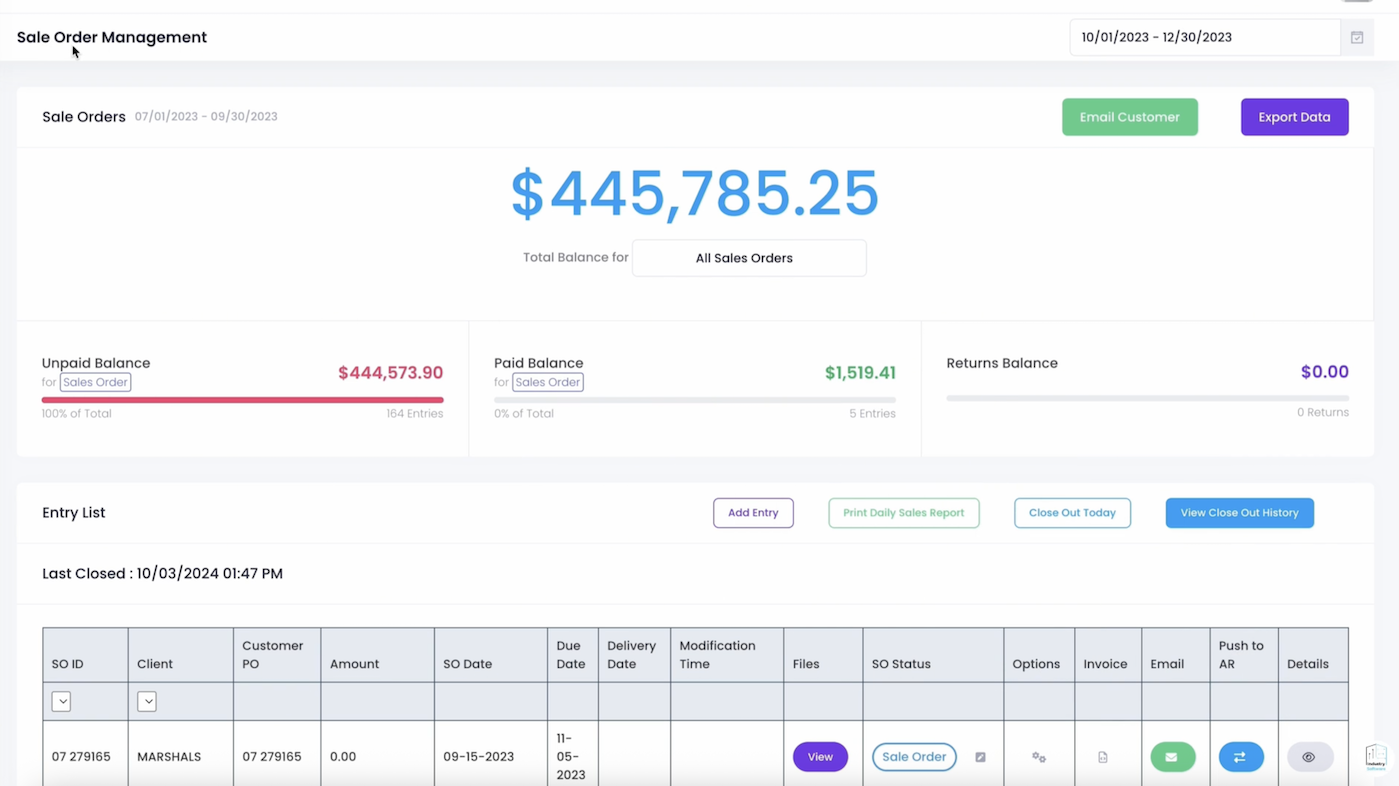 Figure 2: The Add Entry interface captures every essential detail, from customer-specific templates and sales person assignment to precise tax codes and delivery dates.
The Add Entry workflow (Figure 2) is designed to be both comprehensive and intuitive. Key operational features include:
-
Template Driven Efficiency
Use the "Template" feature to instantly load recurring orders for frequent customers, reducing entry time by up to 80% and eliminating manual typos.
-
Shipping & Payment Harmony
Select from multiple Shipping Methods (e.g., Face to Face) and Payment Methods (e.g., Account) to ensure the logistics and finance teams are perfectly aligned.
-
Dual-Item Entry
Combine Inventory Items (standard stock) with Temp Items (custom or one off goods) in a single order, providing the flexibility needed for custom industrial projects.
Financial Integrity in Every Order
Every sales order is automatically linked to the Sales Tax and Tax Code architecture, ensuring that every transaction is compliant with local and regional regulations. The system calculates the Subtotal, Sales Tax, and Shipping Cost in real time, providing the customer with an accurate final Amount before the order is even saved.
Section III: Lifecycle Tracking and Status Automation
In a modern ERP, a sales order is a living document. It changes status as it moves through the organization. Our system tracks this evolution with surgical precision.
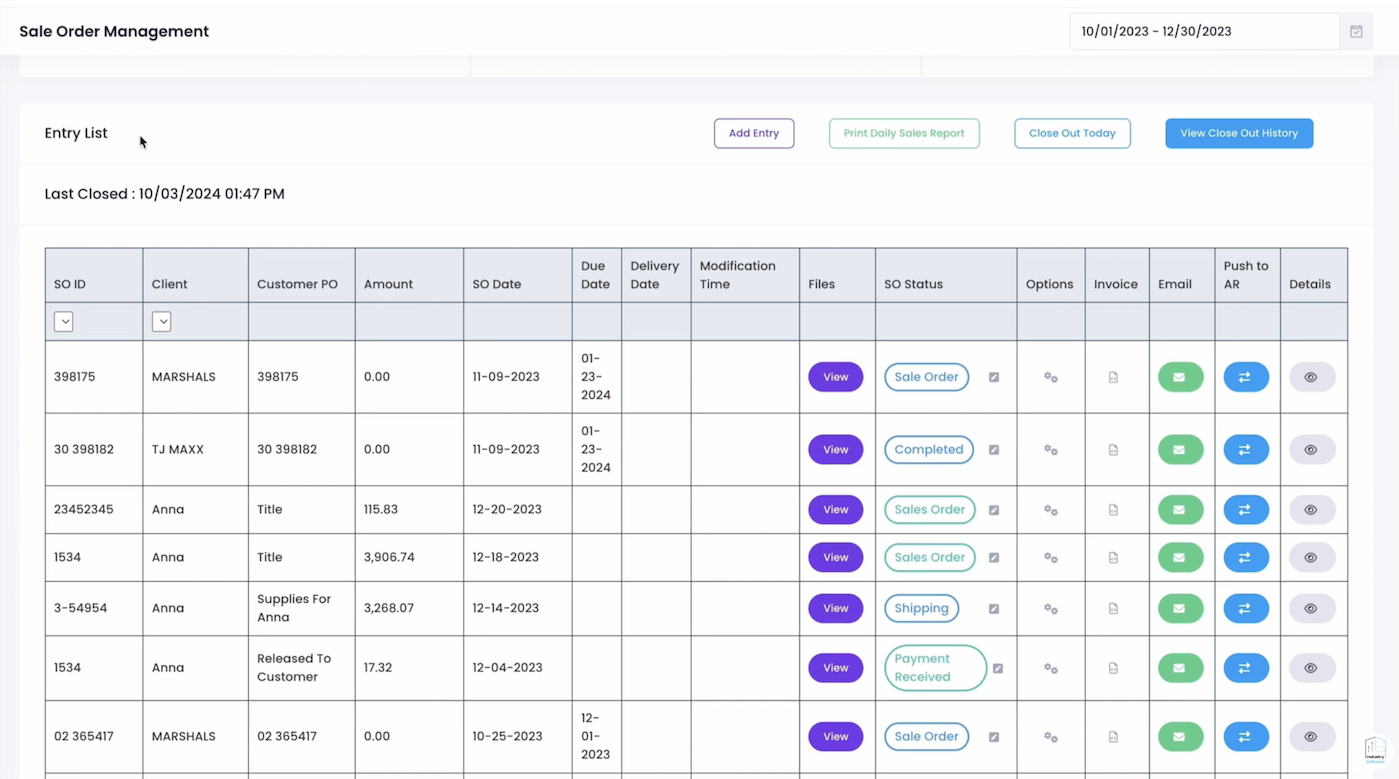 Figure 3: The dynamic status dropdown allows teams to move an order from Quote to Shipped, triggering automated updates across the warehouse and finance departments.
As seen in Figure 3, the SO Status dropdown is the primary tool for production control. When an order moves from "Sales Order" to "Producing," the manufacturing team is instantly notified. When it shifts to "Shipped," the system can automatically trigger the generation of a final invoice and push the data to the Accounts Receivable (AR) ledger.
This automation eliminates the "Information Silos" that plague traditional businesses. The sales person knows exactly where the order is, the customer knows when to expect delivery, and the finance team knows when to expect payment, all without a single internal phone call.
Section IV: Enhancing Customer Communication
Modern customers expect proactive communication. Our platform includes an integrated Email Customer Modal that allows sales teams to send updates, invoices, and shipping confirmations directly from the order screen.
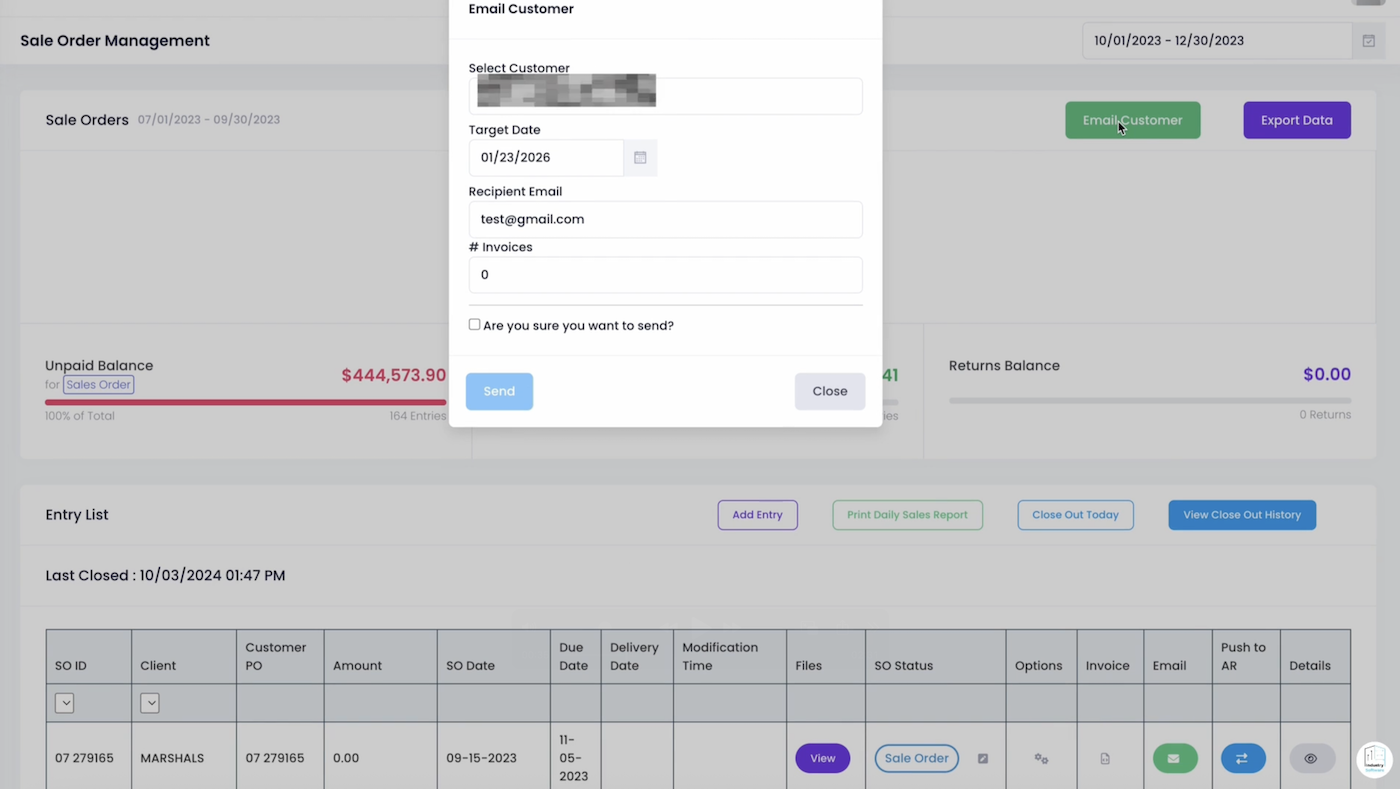 Figure 4: The Email Customer interface ensures that your clients are always in the loop, fostering trust and reducing inquiry volume.
By linking directly to the customer's verified email address (Figure 4), the system ensures that critical documents, like the Target Date confirmation or final Invoices, are delivered securely and recorded in the order's communication history. This creates a perfect audit trail of all customer interactions, invaluable for resolving future disputes.
Section V: Operational Excellence in the Entry List
The Entry List is where the daily work of order fulfillment happens. It provides a real time view of every active commercial relationship, enriched with metadata that supports rapid decision making.
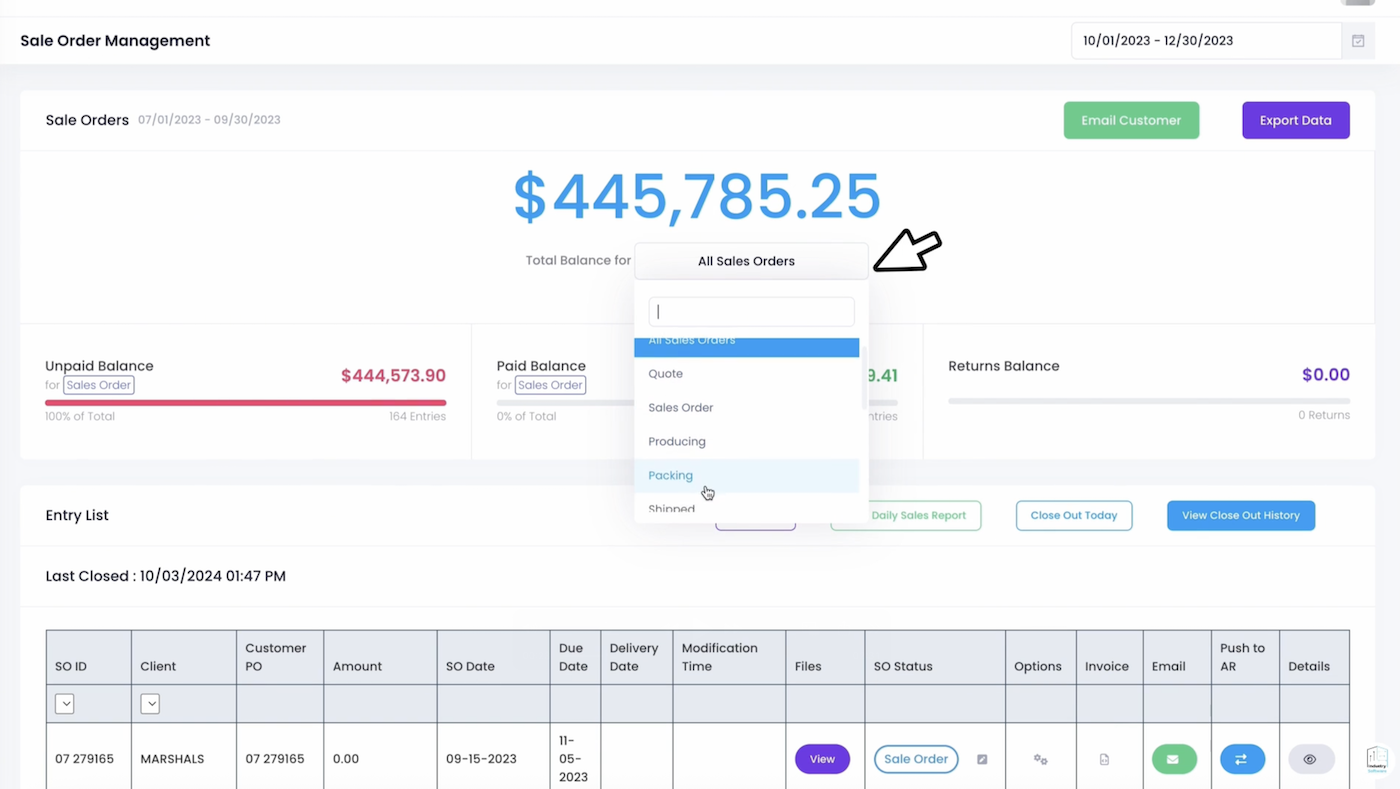 Figure 5: The unified ledger supports multi level filtering, instant report printing, and one click "Push to AR" functionality.
In Figure 5, we see a diverse range of client activities, from "Marshals" to "Anna." Each entry features critical tracking points:
- Push to AR: With a single click, a completed sales order is converted into an Accounts Receivable entry, accelerating the cash conversion cycle.
- Daily Sales Report: Generate a comprehensive summary of the day's revenue activities for executive review.
- Close Out History: Maintain a secure log of all daily close out activities, ensuring fiscal discipline and accountability.
Section VI: Strategic Insights and Revenue Forecasting
Sales Order Management is not just about the past; it is about predicting the future. By analyzing the "Quotes" vs "Sales Orders" ratio, executives can gain early insights into market demand and sales team performance.
The system's ability to filter by Date Range (e.g., October 1st to December 30th) allows for seasonal trend analysis. Is there a spike in orders before the fiscal year end? How does the "Returns Balance" correlate with specific product lines or shipping methods? This data driven approach transforms the sales department from a reactive order taker into a proactive revenue generation machine.
Conclusion: Scaling with Confidence
As your business grows, the complexity of managing hundreds of sales orders across multiple channels can become overwhelming. By adopting a modern, integrated approach to Sales Order Management, from intelligent entry modals to automated status tracking, you build a foundation for scalable growth.
Mastering the sales order lifecycle is about more than just technology; it is about creating a culture of excellence where every customer order is treated with the precision, care, and transparency it deserves.